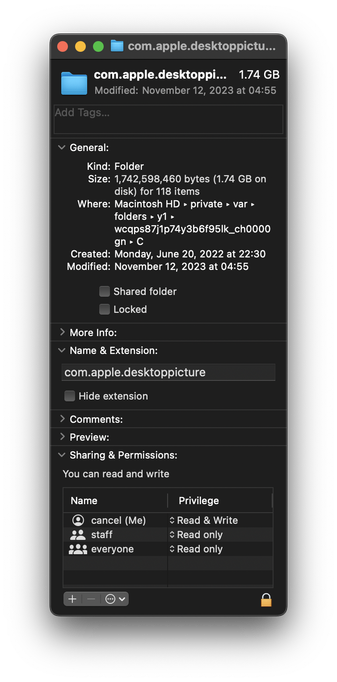
At this point, becoming suspicious that Apple intentionally puts things into macOS to fill up your disk over time and make you want to upgrade.

This machine lost 800mb over the last two days, even though I didn't create anything or update any software.

I went looking for stuff that might have been generated. Here's one. A directory of…copies of the desktop background images (which already ship with the OS in another directory.)

macOS creates new copies at random times. Forever. What.
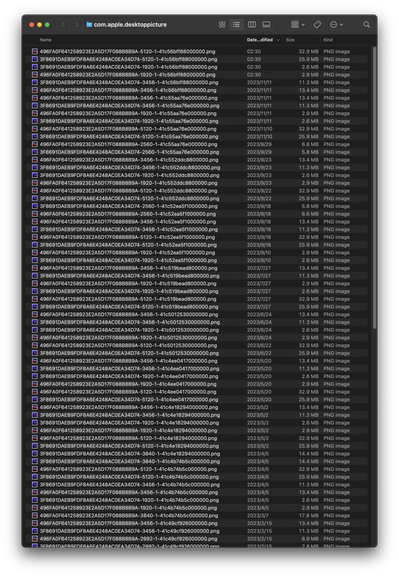
These are 5K images btw. 30mb PNG files. Hundreds of copies.
@cancel Are they from one of the new “live” backgrounds? It may be using that as an image cache for the still frame that shows up on your desktop after the computer unlocks (it’s very unhelpful if you are trying to manage disk space though, bloody hell)
@drisc No. These are just static images.
@cancel Judging by the file names it looks like they are being generated at different desktop sizes, 1920, 2560, 5120. Have you been docking/undocking your computer at those times?
@drisc no. also that doesn't make sense, because I don't have displays with those resolutions. also even if I did, it wouldn't make sense, because it wouldn't need to keep generating bit-identical copies of the same files.

@cancel Yeah it is a bit silly, it was the only other thing I could think of. The files are taking up roughly the room you’d expect for the listed resolution in the file name.

Sidebar: I disabled the live wallpapers on my Mac after realising that it was keeping the entire video loaded in RAM at all times *just in case* I stepped away and it went into screensaver mode.

@drisc this OS is held together with elmer's glue
@cancel Where's this? I checked in Library and Library/ApplicationSupport (both the user and global directories) and I couldn't find it. Sorry if the full path is in the original image, it's definitely not in the alt.
@miki it will have a random path on your machine. mine is at /private/var/folders/y1/wcqps87j1p74y3b6f95lk_ch0000gn/C/com.apple.desktoppicture
@cancel @miki That looks a temporary directory that will get removed at boot time
@sanityinc @miki Read the time stamps my dude
@cancel @miki Whoah, okay, I'm in for this mystery now!
@cancel @miki I've a similar folder, less out-of-control though. The hash-named parent of these dirs (total ~0.5GB) was created Aug 22, so it has survived many reboots and several OS updates.
@cancel @miki The 'com.apple.desktoppicture' folder for me has only a couple of images, unlike yours.

@cancel @miki For me, the parent path corresponds to this:

getconf DARWIN_USER_TEMP_DIR
=> /var/folders/hc/w17tmcyn47j16fs8h4rb3_6w0000gn/T/

(see "man confstr", also "getconf DARWIN_USER_CACHE_DIR")

So it's a system-level cache dir that persists indefinitely, but I believe can be removed when safe-booted. What you're seeing looks like careless use of that dir by Apple devs, but I'd apply Hanlon's razor in this case.

@sanityinc @miki Yeah but there are multiple of these kinds of things happening in the OS, not just this one. I don’t think this is something they plotted to do, but they have no incentive to fix it or avoid it, either. They’re incentivized to just ignore it and let it keep happening.
@cancel @miki Yes, perverse incentives indeed.
@cancel If you use Xcode you’ve probably accumulated a complete iOS simulator for every point release of iOS. Only deleteable from the command line. No way to say “I don’t do iOS dev”.
@jkaniarz I installed Xcode once and then never updated it. How do I check if I have duplicated copies of iOS simulators?

@cancel They shouldn’t be duplicated, there’s just a lot of point releases. Look in ~/Library/Developer and delete the old ones.

Also check out OmniDiskSweeper for finding unusually large folders.

@jkaniarz what am I looking for? here's my ~/Library/Developer

@cancel ~/Library/Developer/Xcode/macOS DeviceSupport/?

I don't have any iOS stuff in there so I don't know the iOS path but take a look around.

I also have a gig of near duplicate "devices" (each including the same example photo library) in ~/Library/Developer/CoreSimulator/Devices/*

I also just noticed that XCode 15 puts simulators in a new (unknown to me) location now. So anything in the Developer folder is probably out of date. Thankfully you can now delete simulators from the Xcode gui.

@cancel I ... need to look this up, wtaf
@cancel I found the folder but no dups and actually no desktop pictures either. Maybe because I use my own images and not Sonoma's.
@draNgNon @cancel checked my macbook and found only 2 .png files with different image size
@mikevv @draNgNon One of my friends on IRC had 1.1gb worth of png files
@cancel what on earth lol... my experience with apple stuff is fairly minimal, but this seems about as user-hostile as the rest. only barely related, but i got my first iphone a little while ago and i don't think i've ever hated a computer more. nothing makes any sense. there is no cohesion, there is no control, things are buried in things which are buried in things, gestures are nonsense, and don't even get me started on actually getting photos/videos off the thing and then having to manually convert all their goober HEIC shit.

i am bewildered by people that will say droid is "worse", maybe an out of the box configuration, sure, but you can just change most things. here i'm stuck with somebody that thinks they know what's best for me constantly offering wrong suggestions and finishing my sentences with unrelated thoughts.

@msx obviously just get a mac so you can airdrop the files to yourself and deal with HEIC natively

at least iphones will go more than 26 months before security updates stop and your phone becomes a liability

@msx you know, the first sentence was sarcasm but maybe if you thought i was an apple fanboy it would sound like i was serious. and uh, yeah i meant it to be sarcasm. because i'm reading it now and there is a chance i might have been taken non-sarcastically, because it wasn't that funny.
@cancel @Martin Vogel just a dumb question: a single png-file with 32 MB? What resolution is this?
cancel (@[email protected])

5.47K Posts, 56 Following, 1.51K Followers · ┌┐┌┐·┌┐┌┐ └┘└┘·└┘└┘ ᴬᴹ

Merveilles
@cancel 🤦‍♂️🤷‍♂️
cancel (@[email protected])

5.47K Posts, 56 Following, 1.51K Followers · ┌┐┌┐·┌┐┌┐ └┘└┘·└┘└┘ ᴬᴹ

Merveilles
@cancel Oh, neat, I have 1 GB in mine! Good find! But also, terrible find!

@cancel so on top of having intemtionally unupgradeable hardware and unrepairable flash by virtue of soldering down the SSD as a part that'll inevitably wear over use they literally commit themselves to accelerate the #ReducedLifecycle by virtue of introducing added wear & tear...

Someone should tell #LouisRossman about it...
https://www.youtube.com/watch?v=0qbrLiGY4Cg
https://www.youtube.com/watch?v=RYG4VMqatEY
https://www.youtube.com/watch?v=MANlo9fV9yI

@kkarhan yes, it is generally a pain that Apple solders down the SSD, but Mac laptop lifespan has been consistently longer for me (over the last 17 years) than my PC laptops even considering that I put the Macs through a lot more.

@standev still, your hardware would likely last even longer if RAM & SSD weren't soldered on, CPUs were socketed and batteries weren't glued-in...

Granted, noone uses #Apple hardware because they like it [except @fuchsiii because she's in love with her #fanless #MacBookAir] but most people want #macOS and it's #exclusives!

@kkarhan @fuchsiii I gave up on my 2012 MacBook Air in 2020 due to a confluence of factors (SSD was too small, not enough RAM, 32-bit hardware in an increasingly 64-bit software world) but battery swelling was the reason I had to recycle it.

It outlasted two PC laptops during the time I had it, but I think it would have been more expensive to upgrade SSD+RAM+replace battery than it was to buy a used 2017-era MBP.

@kkarhan @fuchsiii I do wish it were more plausible to upgrade RAM/SSD to allow for mid-cycle upgrades, but my use case for Mac laptops (lightweight, durable platform for word processing/spreadsheets, internet browsing, and media consumption along with the odd game or lightweight VM host) is very forgiving.

I’ve settled on buying a used Mac laptop of some stripe every few years rather than buying new and either reselling or running them into the ground like I did with my 2006 and 2012 Macs.

@standev @fuchsiii I think that #buyUsed / #refurbished and #UseLonger is inerently better than buying new.
@kkarhan @fuchsiii it certainly is for where I am in life—I don’t need top-end hardware for anything I do these days, so paying a premium and burning a bunch of resources to chase the state of the art doesn’t make a lot of sense to me.

@standev I think that's the most rational choice:

Getting equipment as a tool aka. a means to access or create content and work as well as play with.

After all, #HardwarePorn is all nice and cool but maxing out everything doesn't necessitate in a good price/performance ratio - espechally with light productivity where the ability of the user is way more limiting than the hardware...

@standev

Yeah and it almost lasted double the expected lifecycle maximum [5 years]...

But aside from being 32bit-only, it's battery ecoming a #DangerPillow and the limitations based off the CPU [i.e. RAM and SSD upgrades were limited and/or not cost-effective] it was likely still a good machine and removing the battery likely made it still a useable linux machine to browse the web with...

Personally I just want to advocate for #repairable and #ugradeable laptops because that is possible!

@kkarhan I agree that it would be a noble goal, but there are not a lot of companies pushing toward it in any meaningful way. Framework is the only one I’m familiar with, and I’ve heard mixed reviews of their component quality.

@standev TBH, @frameworkcomputer do a pretty decent job considering the compareatively low funding and good price for their hardware.

I wish I had the €€€€€ to get the #NUCbook off the ground even if that'll be a very CHONKY BOI but even if we assume we only want #Apple-esque #SoC's even that could've been designed upgradeable like the @Raspberry_Pi #CM3+ & #CM4 have shown...

@kkarhan @standev @fuchsiii I use Apple Hardware because I like it. That makes two 😅.

Its a package. Hardware + OS + services.

@cancel is this cache by any chance

/var/folders/…/C/ makes me think it is

@traumaphoenix look at the time stamps

@cancel oh yeah that’s weird, maybe the automated cache cleaner broke?

only other thing i could think of is you have some process that’s reading all these files and preventing the automated cleaner from thinking they’re unused

@traumaphoenix 4 other people have reported to me they also have >1gb of stuff in there
@cancel all of mine is fairly recent, and I haven't run any kind of macOS cleaning utility in recent memory, but I do have duplicates (maybe system updates change the hash algorithm used, shrug)
@traumaphoenix That’s a lot of wasted space

@cancel it's about 300 megs in a cache folder- you *can* just delete everything here will no ill effects, the system will just recreate them

i'm more interested to know why yours isn't cleaning up after itself

@traumaphoenix It does not tell users to clean this up. Nobody knows to delete files in here. It’s not discoverable. You didn’t know about it until you saw my toot. It just grows forever for reasons nobody knows. It doesn’t seem like it ever cleans up.

@cancel every single program keeps caches, they are files that are generated to make subsequent use of that program faster

in this case, to make loading of your desktop wallpaper faster so it doesn't have to resize it to your monitor every time

Apple doesn't teach people how to clean it up because it sits in the background and manages itself (or at least, it's supposed to)

if you really want to step into that process and do it yourself, I recommend CleanMyMac X

@traumaphoenix Thank you for telling me what caches are. Most of these file duplicates aren’t the size of my display. Even if they were, there don’t need to be repeated copies of the same files. You say “if you really want to step into this” like it’s not really a problem and I shouldn’t care about 1.5gb of wasted space for no reason. You were saying Apple takes care of this but are now recommending third party software.

https://kolektiva.social/@mixael/111478509505382170 here’s a fifth one now

Mixæl Laufer (@[email protected])

@[email protected] Just had this exact same experience.

kolektiva.social

@cancel honestly, <5 GB, IMO, is not worth losing sleep over

I'm only giving you the option for if you do. but if you use it to delete your caches, you'll notice half of them are back within 24 hours.

@cancel Just had this exact same experience.