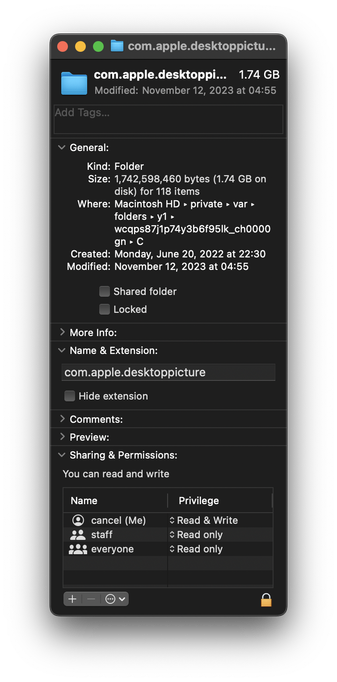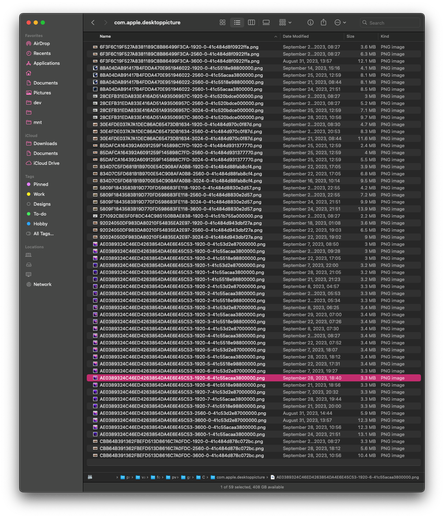
At this point, becoming suspicious that Apple intentionally puts things into macOS to fill up your disk over time and make you want to upgrade.

This machine lost 800mb over the last two days, even though I didn't create anything or update any software.

I went looking for stuff that might have been generated. Here's one. A directory of…copies of the desktop background images (which already ship with the OS in another directory.)

macOS creates new copies at random times. Forever. What.
@cancel is this cache by any chance

/var/folders/…/C/ makes me think it is

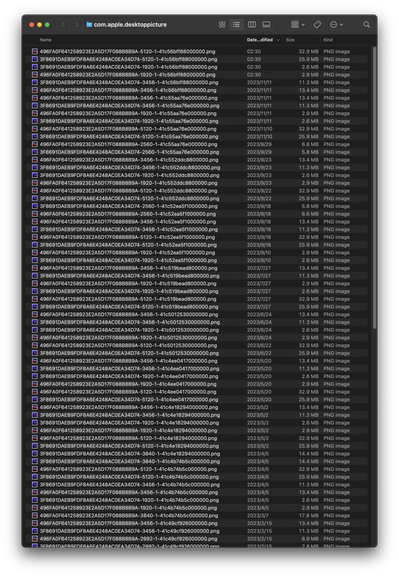
@traumaphoenix look at the time stamps

@cancel oh yeah that’s weird, maybe the automated cache cleaner broke?

only other thing i could think of is you have some process that’s reading all these files and preventing the automated cleaner from thinking they’re unused

@traumaphoenix 4 other people have reported to me they also have >1gb of stuff in there
@cancel all of mine is fairly recent, and I haven't run any kind of macOS cleaning utility in recent memory, but I do have duplicates (maybe system updates change the hash algorithm used, shrug)
@traumaphoenix That’s a lot of wasted space

@cancel it's about 300 megs in a cache folder- you *can* just delete everything here will no ill effects, the system will just recreate them

i'm more interested to know why yours isn't cleaning up after itself

@traumaphoenix It does not tell users to clean this up. Nobody knows to delete files in here. It’s not discoverable. You didn’t know about it until you saw my toot. It just grows forever for reasons nobody knows. It doesn’t seem like it ever cleans up.

@cancel every single program keeps caches, they are files that are generated to make subsequent use of that program faster

in this case, to make loading of your desktop wallpaper faster so it doesn't have to resize it to your monitor every time

Apple doesn't teach people how to clean it up because it sits in the background and manages itself (or at least, it's supposed to)

if you really want to step into that process and do it yourself, I recommend CleanMyMac X

@traumaphoenix Thank you for telling me what caches are. Most of these file duplicates aren’t the size of my display. Even if they were, there don’t need to be repeated copies of the same files. You say “if you really want to step into this” like it’s not really a problem and I shouldn’t care about 1.5gb of wasted space for no reason. You were saying Apple takes care of this but are now recommending third party software.

https://kolektiva.social/@mixael/111478509505382170 here’s a fifth one now

Mixæl Laufer (@[email protected])

@[email protected] Just had this exact same experience.

kolektiva.social

@cancel honestly, <5 GB, IMO, is not worth losing sleep over

I'm only giving you the option for if you do. but if you use it to delete your caches, you'll notice half of them are back within 24 hours.