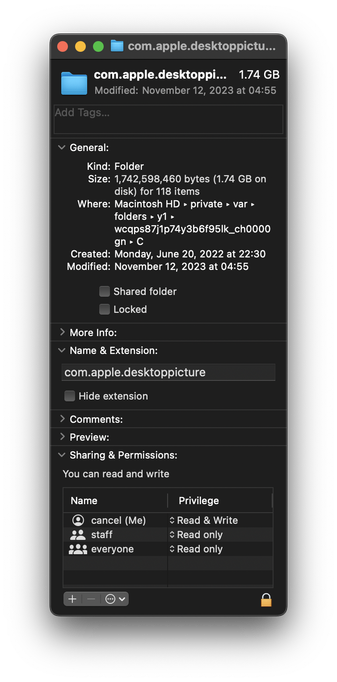
At this point, becoming suspicious that Apple intentionally puts things into macOS to fill up your disk over time and make you want to upgrade.

This machine lost 800mb over the last two days, even though I didn't create anything or update any software.

I went looking for stuff that might have been generated. Here's one. A directory of…copies of the desktop background images (which already ship with the OS in another directory.)

macOS creates new copies at random times. Forever. What.
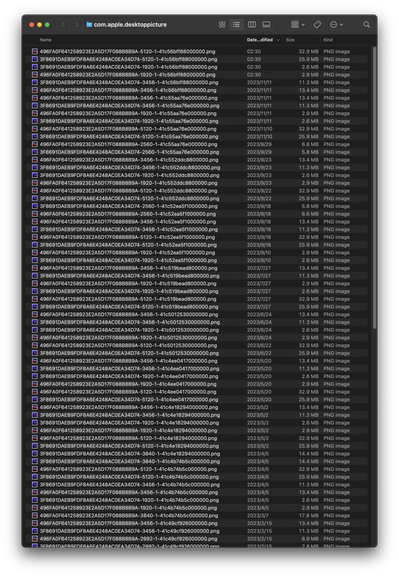
@cancel Are they from one of the new “live” backgrounds? It may be using that as an image cache for the still frame that shows up on your desktop after the computer unlocks (it’s very unhelpful if you are trying to manage disk space though, bloody hell)
@drisc No. These are just static images.
@cancel Judging by the file names it looks like they are being generated at different desktop sizes, 1920, 2560, 5120. Have you been docking/undocking your computer at those times?
@drisc no. also that doesn't make sense, because I don't have displays with those resolutions. also even if I did, it wouldn't make sense, because it wouldn't need to keep generating bit-identical copies of the same files.

@cancel Yeah it is a bit silly, it was the only other thing I could think of. The files are taking up roughly the room you’d expect for the listed resolution in the file name.

Sidebar: I disabled the live wallpapers on my Mac after realising that it was keeping the entire video loaded in RAM at all times *just in case* I stepped away and it went into screensaver mode.

@drisc this OS is held together with elmer's glue