
I just whined about this elsewhere, but this makes a good post, so:
1. a very good feature of default Win32 message boxes is that they implement Ctrl-C to copy the error message and window title into the clipboard (formatted and everything)
2. way too few people know this, and accordingly, custom message boxes basically never implement this
3. if you work on custom UI libraries that have some message box facility, you should!
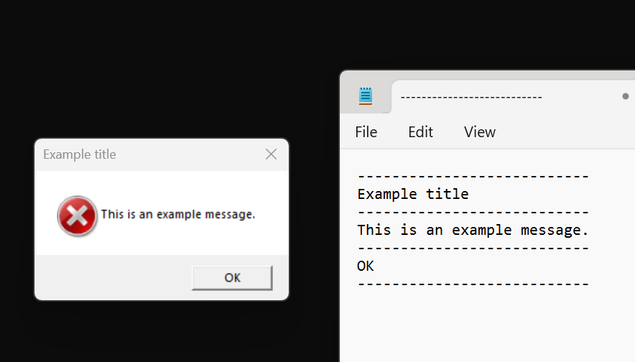
@rygorous so many times in a support role have I asked people to use this, and so many times do they ignore our request and screen grab the message box (or entire screen), paste that into a Word document, then email the Word document
@ajft @rygorous luxury! people these days film the screen with their phone, and send a video
@aras @ajft @rygorous More like they say, "yeah we got an error last week, I heard from my employee who said his coworker saw some kind of pop-up but they closed it because it was in the way, but can you tell us why it doesn't work? We have a demo for the CEO in 10 minutes"
@aburka @aras @ajft @rygorous ultimately the game changer for this is logging, although once we had to set up a separate, (barely) encrypted log for user-specified commands, as we had users that broke stuff and tried to hide their fault adjusting "regular" logs.
@aburka @aras @ajft @rygorous that's why I insisted on making assert/error popups not ignoreable in our inhouse tools, even if that way any triggered assert disrupts the artist workflow. Unfortunately that's the only way to get breakage actually fixed instead of ignored.
@aburka @aras @ajft @rygorous "A lack of planning on your side does not constitute an emergency on mine."
@aras @ajft @rygorous given that people just send us photos of errors via WhatsApp, I've seriously proposed to add a QR code with the relevant info in our main application error dialog (but TBF it's generally used on machines that may not have connectivity, so it's somehow understandable).

@cvtsi2sd The machines don't need connectivity. It's possible to encode an error message into a barcode entirely offline.

[email protected] @ajft @rygorous

@riley @cvtsi2sd @ajft @rygorous I think they'd need to be pre-compiled though, since my first thought is; you want a program that hit an error/exception to not handle that, but instead generate an QR code while displaying an error message?

Is it possible? Probably - unless the error/exception it hit was an OutOfMemoryException, because then you won't have the memory to do that.

@AT1ST @riley @ajft @rygorous if the program state is so fucked up it cannot manage to generate a QR code, probably it can't even display the error dialog; it's a thing that does happen from time to time, but it's a very small minority of errors (and that's why the error handler tries to handle the problem doing cleanup actions in order of increasing "risk of further crash" and decreasing importance). The cleanest thing would be to handle at least the reporting part from a fresh process, though.

@cvtsi2sd There's no reason why generating a QR code for an error code should require allocating new memory. If you want to really push it, it can even be done without using new stack frames (although, if you can call the system API that displays an error message, you can't be entirely out of stack space just yet).

@AT1ST @ajft @rygorous

@riley @ajft @rygorous I think there's a misunderstanding, I was saying is that it's understandable that they send me WhatsApp photos of the screen instead of nice screenshots, because those machines generally don't have connectivity, so taking a picture with the phone is much faster for our technicians. QR code generation would be entirely in-app, it makes no sense to use a network service for that.

@ajft @rygorous yeah, because it’s not obvious at all that this is a feature.

You’re lucky you didn’t get the screenshot as a fax. (I speak from experience.)

@ajft @rygorous I always prefer the Word document over a picture of the screen taken with a phone.
@rygorous Or...and I know I'm preaching UX maximalism in an era when feature-shrouding design is the dominant ethos...devs could include a "COPY" button, which could help with point #2. 🤔

@ironmaus @rygorous

Sounds like a good idea... but given that now I've started getting code snippets from personal developers as screenshots of their editor... I really don't understand how people think.

@javierg @ironmaus @rygorous I got that too, pasted screenshots of code and error dialogs in Slack instead of code or text. I think it may be because it is easier to use a snipping tool than to cut and paste exact text, it they are just used to doing that.

@javierg @ironmaus @rygorous Windows-Shift-S is way quicker than copy-paste, format-as-code, select correct language for highlighting...

Unless the person needs to actually EDIT and return the code, screenshots are way quicker and easier to get correctly formatted and color-coded snippets to them.

@ironmaus @rygorous i don't see why you can't just make the text in your message boxes selectable at the very least

@rygorous people doing custom controls/UIs get even way more basic things wrong. Your modal message box, does it accept Esc/Enter keys? How about space? Tab?

A drop-down list, can I start typing and it scrolls to these entries? PageUp/Down? Arrow keys?

*Soo* much custom UI shit is made to only work with mouse and touch. Ugh.

@aras @rygorous and that’s before you get to accessibility.
@aras @rygorous Custom? Windows "modern" UI is unusable without a mouse – if you're doing a clean install of Windows 11, you can't pass OOBE without a mouse (one of the screens where you just have to click Next does not respond to keyboard, which is a problem with laptops, since the trackpad doesn't work during OOBE sometimes; not to mention the language selection dialogs, which only respond to keys and not typing, so selecting anything but the default language is a chore even with a mouse).
@jernej__s @rygorous that falls under custom :) Microsoft has gobs of standard and tested and working UI controls among the 7 or so UI frameworks they use. But no, some blob somewhere decided that they will do their own for the OOBE screen :(
@aras @rygorous The "modern" UI I mentioned is what they're using in the UWP programs such as Settings, and it has these problems.

@aras @rygorous talking about Widgets, rather than win32. Proper auto-complete is a large volume of inputs to handle. and timings

I spend alot of time putting things like that onto the requirements e.g. Search boxes should accept paste properly, be it <cntl-C> or <long tap> Android mini-menu

This improves reusability.

@rygorous going the step further and adding a “web search for this error” button 👌
@rygorous I want all my time back that i spent typing over error codes...

@rygorous I am in fact pleasantly surprised how many games that have copyable (yes I can verbify anything!) error codes in their (custom) message boxes. You kinda assume they aren't.

Too few, but still more than expected.

@rygorous

When was this added? I've never seen this documented prior.

@ncommander @rygorous pretty sure it's been like this for at least a decade
@halcy @ncommander @rygorous At least since XP days; grep'd my IRC logs and the first time I saw it mentioned was 2005 :)
@ncommander @rygorous it goes at least as far back as Windows XP, what would be interesting to know whether it came from the Windows NT side, or the "Windows for Muggles" side.
@floooh @ncommander @rygorous I just tested – Ctrl+C in message boxes was introduced with Windows 2000 – it doesn't work in NT4, nor 98/ME.
@ncommander @rygorous It's been there at least since Windows 2000, and possibly earlier.
@rygorous Thanks. I'll have to try this.
@rygorous imagine if the text was selectable so that people could actually have a way to.find out that you can copy it
@rygorous never knew this was a thing
@rygorous they should just add a visible button too, tho

@rygorous Classic UX design failure. The Ctrl-C feature is not discoverable. There should be an explicit button for it, next to [ Ok ].

(I'll make a note to do this one thing correctly when I get around to the Big Pile Of Stuff To Someday To item of porting Turbo Vision to modern terminals, with Blackjack and Unicode.)

@rygorous how did I not know this!? Heck

@rygorous @KirillOsenkov why was this cool feature built in an impossible-to-discover way? What's the point if most people never even know about it? Same with:

Clipboard history (windows-v)

Paste plain text (ctrl-shift-v)

Copy path in explorer (shift rclick)

@rygorous i'm guessing the reason nobody uses the default win32 error messages is because they look absolutely archaic. why does the "OK" button look the same as it did in windows 95? devs don't typically want their software to look like it's from nearly 30 years ago... if only microsoft didn't completely botch the transition from win32 to UWP
@rygorous They should have added a second button. "Copy to clipboard". So everybody knows this feature.

@rygorous TIL, thanks! Of course hidden interaction possibilities is a dark pattern to begin with.

But my guess is Win32 was the wild west of computing (don't make me count how yound win32 actually is 😅)

@rygorous

honestly, every major OS has a really rich and powerful copy/paste system, but because every major OS's copy/paste system works slightly differently outside of the most trivial case (putting a small amount of plain text on the clipboard), cross-platform UI libraries don't generally expose more than that. it sucks.

like, x11 copy/paste is basically a general-purpose inter-process message-passing system

@rygorous It kind of feels like a failure of UI design, though, that there's absolutely no indication that it's possible to do that.
@rygorous how was i supposed to know that
@rygorous Whoa - this is fascinating to hear.
@rygorous but the error text in the message box is typically not itself selectable/copyable which is frustrating since that’s one of the things people do with onscreen text. It’s great that it’s possible to control-C the box and get everything but that’s really not obvious.

@rygorous thanks for posting this! Never knew this was possible and a one source of frustration with using Windows was copying error messages (or lack of support for that matter).

It'd be even better if all these boxes allow text selection (and then copy). That'd often be more useful than a fully formatted text, but hey it's something.

@rygorous I have been using windows since Windows 95 and never knew you could do this. wow.