
I just whined about this elsewhere, but this makes a good post, so:
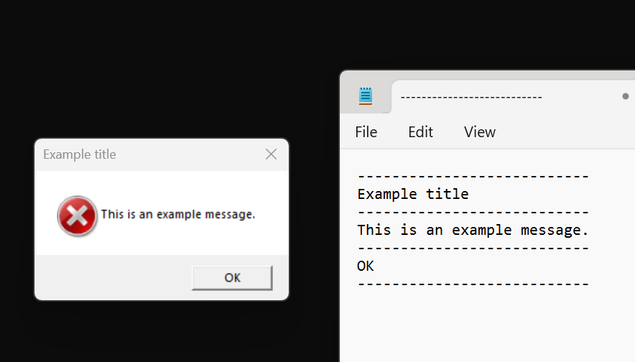
1. a very good feature of default Win32 message boxes is that they implement Ctrl-C to copy the error message and window title into the clipboard (formatted and everything)
2. way too few people know this, and accordingly, custom message boxes basically never implement this
3. if you work on custom UI libraries that have some message box facility, you should!
@rygorous so many times in a support role have I asked people to use this, and so many times do they ignore our request and screen grab the message box (or entire screen), paste that into a Word document, then email the Word document
@ajft @rygorous luxury! people these days film the screen with their phone, and send a video
@aras @ajft @rygorous More like they say, "yeah we got an error last week, I heard from my employee who said his coworker saw some kind of pop-up but they closed it because it was in the way, but can you tell us why it doesn't work? We have a demo for the CEO in 10 minutes"
@aburka @aras @ajft @rygorous ultimately the game changer for this is logging, although once we had to set up a separate, (barely) encrypted log for user-specified commands, as we had users that broke stuff and tried to hide their fault adjusting "regular" logs.
@aburka @aras @ajft @rygorous that's why I insisted on making assert/error popups not ignoreable in our inhouse tools, even if that way any triggered assert disrupts the artist workflow. Unfortunately that's the only way to get breakage actually fixed instead of ignored.
@aburka @aras @ajft @rygorous "A lack of planning on your side does not constitute an emergency on mine."
@aras @ajft @rygorous given that people just send us photos of errors via WhatsApp, I've seriously proposed to add a QR code with the relevant info in our main application error dialog (but TBF it's generally used on machines that may not have connectivity, so it's somehow understandable).

@cvtsi2sd The machines don't need connectivity. It's possible to encode an error message into a barcode entirely offline.

[email protected] @ajft @rygorous

@riley @cvtsi2sd @ajft @rygorous I think they'd need to be pre-compiled though, since my first thought is; you want a program that hit an error/exception to not handle that, but instead generate an QR code while displaying an error message?

Is it possible? Probably - unless the error/exception it hit was an OutOfMemoryException, because then you won't have the memory to do that.

@AT1ST @riley @ajft @rygorous if the program state is so fucked up it cannot manage to generate a QR code, probably it can't even display the error dialog; it's a thing that does happen from time to time, but it's a very small minority of errors (and that's why the error handler tries to handle the problem doing cleanup actions in order of increasing "risk of further crash" and decreasing importance). The cleanest thing would be to handle at least the reporting part from a fresh process, though.

@cvtsi2sd There's no reason why generating a QR code for an error code should require allocating new memory. If you want to really push it, it can even be done without using new stack frames (although, if you can call the system API that displays an error message, you can't be entirely out of stack space just yet).

@AT1ST @ajft @rygorous

@riley @ajft @rygorous I think there's a misunderstanding, I was saying is that it's understandable that they send me WhatsApp photos of the screen instead of nice screenshots, because those machines generally don't have connectivity, so taking a picture with the phone is much faster for our technicians. QR code generation would be entirely in-app, it makes no sense to use a network service for that.

@ajft @rygorous yeah, because it’s not obvious at all that this is a feature.

You’re lucky you didn’t get the screenshot as a fax. (I speak from experience.)

@ajft @rygorous I always prefer the Word document over a picture of the screen taken with a phone.