 Paul Haddad
If I want to run a dead simple VPN from a Mac into my house network what should I look at? Router is pfSense, can run any VM needed, don't have a static IP, do have DDNS setup.
Ended up going with Tailscale. Was pretty easy. Kind of out of character for me, I'd normally just roll something much more convoluted.
 Imperator Nevadicus
@paul Getting old makes you choose the easy choice
 Raineer
  🦆
🦆@paul good call. In this case, it’s so simple that it’s hard to justify the effort to stand up Wireguard proper
 freeformz 🏳️🌈
@paul Tailscale is 💯 the right choice.
 Eric Lindvall
 Arch
Arch 
@paul Heck yeah, more Tailscale users :p
 Melissa
@paul I used to run my own WireGuard setup, but I eventually realized that Tailscale would save me a LOT of maintenance time. Love their service!
 Bluewall
@paul Tailscale is so good, it's like magic.
 Frank Endrullat 🌻
@paul Tailscale is pretty nifty. In Germany we have the routers from AVM that now also do WireGuard. Trying to setup IPSEC didn't work for me somehow but WireGuard was a breeze. And amazingly fast.
 Dustin Rue
@paul WireGuard gets my vote
 owlboy
@paul Tailscale?
 Timo Hetzel
@paul nothing but praise for Tailscale if that works for your setup
 Joanna J.
@paul Tailscale is super easy to setup.
 Mike Lapidakis
@paul I’m a big fan of @tailscale
 David Nelson
@mike @paul @tailscale Same, I have Tailscale running on pfSense at home and at my mom’s house, both as subnet routers. Essentially created a site-to-site VPN which is really handy for things like remote backups and family tech support needs.
 Michael
@paul Not self-hosted, but TailScale works really well. Otherwise WireGuard is super easy to set up.
 Matt Witmer
@paul Tailscale
 Mike Fraser
@paul Run an openvpn server on the pfsense box.
 ℳikey 🏳️🌈 - Moved
@paul pfSense can host OpenVPN built in.. that's what I use.
 Ware Adams
@paul Tailscale is great, and you can run it on your pfSense box itself
 Jesse Vincent
@paul Tailscale would get a 10/10 from me on the NPS survey.
 Raygan Kelly
@paul Tailscale is dead simple, very fast, and has all the features I need. It’s basically wireguard without any of the fussy setup.
 Wajdi
Wajdi@paul Wireguard all the way. Blazingly fast.
 Austin
@paul TailScale for sure, it is magic
 Leon
Leon@powerllama @paul Tailscale rules the school. It’s as good as networking can be.
 Nathan
@paul Tailscale is super easy to set up and use
 Sam Burkhard
@paul everyone is saying Tailscale, but the self-host version is Headscale, and is compatible with the Tailscale clients

 LucaTNT
@samburkhard @paul last time I looked it was kind of hard (or not possible at all?) to point the iOS app to headacale. Has that changed recently?
@LucaTNT you have to change the coordination server in iOS settings to your headscale server
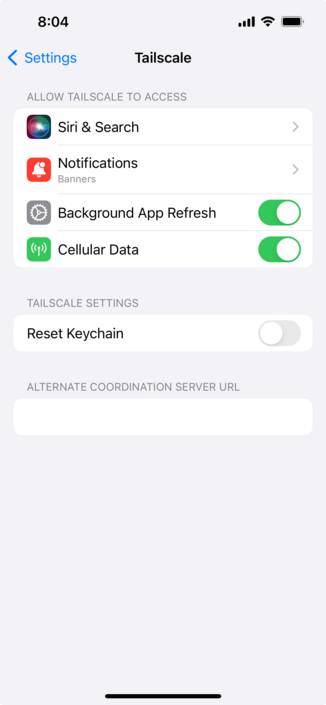
@samburkhard WHAT? Is it that easy?! Thank you Sam!
@LucaTNT yeah it's kind of hidden away. I think I found out by lurking in the subreddit r/Tailscale
 trisweb
@paul Tailscale is the one that gets continually recommended on r/homelab
 John P.

 Chris Pinola
@paul I’d get Tailscale running on the pfSense router in “subnet router” mode to serve as a gateway to your LAN https://tailscale.com/kb/1019/subnets/

 Phil Gastwirth
@paul
Tailscale!
Tailscale!
 Robby Barnes
@paul +1 for Tailscale
 Casey Liss
@paul A little nuanced, but I'd recommend either Wireguard (which has the advantage of supporting auto-connection on foreign Wifi) or Tailscale (which is comparatively far easier to set up)
Happy to discuss more if you have interest.
 Jackson
As of 1.48, released 3 days ago, TailScale supports VPN on Demand.
My apologies. I leave my exit node enabled all the time and never toggle it off so my quick test I did just now leaves it enabled.
But if you have it disabled then, no, there is no way to tell it to re-enable a specific node.
 Adam
Adam@Jackson thanks for the info! Just updated mine.

 Caleb
Caleb@caseyliss @paul I just set Wireguard up at home with the GL.iNet Beryl you recently recommended for travel and their Brume 2 for the home client/server.
It was super simple. I’m shocked to hear Tailscale is simpler?
 Mike Taffet
@caseyliss @paul very happy with wg-easy running in Docker on my home network for Wireguard stuffs. Works like a charm.
 Slade Watkins
@paul I personally use TailScale. No complaints, has always just worked. And it feels like a crime saying this, but I've never paid them anything... base free plan just works. https://tailscale.com/
 sashk 🇺🇦
@paul pfsense supports openvpn, ipsec and wireguard - https://docs.netgate.com/pfsense/en/latest/vpn/index.html
I've used ipsec and openvpn: ipsec has builtin vpn client in macOS, two others require clients. openvpn for macos is https://www.sparklabs.com/viscosity/ (paid) and wireguard is in the app store. not sure if ipsec will work with floating IP; but openvpn and wireguard works fine with these.
@paul if you want setup a separate VPN VM, try looking into https://github.com/trailofbits/algo, will setup users, etc for you using wireguard.

@sashk @paul If you want an OpenVPN GUI, the official connect app works and is free: https://openvpn.net/client/
@paul I just setup Wireguard and it was super simple and so much faster than an VPN I’ve used before.
Probably should say “snappier” since I have no metrics to back it up 😅
 Jordan
@paul Tailscale is incredible
 mcmjolnir
 gilrip
@paul I’ve been loving PiVPN with WireGuard
 Zero101
@paul pfSense can do OpenVPN and WireGuard natively. OpenVPN is easier to setup, but Wireguard is faster.
 Elliott
@paul Tailscale is really great.
 Nick Foster
@paul I use OpenVPN and it’s always worked great for me. Free plan allows 3 concurrent devices, so the Mac at home and up to two remote clients connected at a time
 Best Wishes, TheJesusFish
@paul to piggyback on @caseyliss, pi-vpn with wireguard was a dead simple setup
 Richard Felix
@paul Tailscale.
 Matt
Matt@paul another vote for tailscale
 aaron
aaron@paul I have used this script in the past. It uses the native macOS vpn client. https://github.com/hwdsl2/setup-ipsec-vpn

GitHub - hwdsl2/setup-ipsec-vpn: Scripts to build your own IPsec VPN server, with IPsec/L2TP, Cisco IPsec and IKEv2
Scripts to build your own IPsec VPN server, with IPsec/L2TP, Cisco IPsec and IKEv2 - GitHub - hwdsl2/setup-ipsec-vpn: Scripts to build your own IPsec VPN server, with IPsec/L2TP, Cisco IPsec and IKEv2
 Rizwan
@paul wiregurd, v2ray, snell
All works fine