No I don’t want to give you location access.
No I don’t want to sign in.
No I don’t think this would be better in Chrome.

How about instead of “don’t be evil” we go for “don’t be obnoxious”?

Also Apple please add a block all future requests for location from this site option.

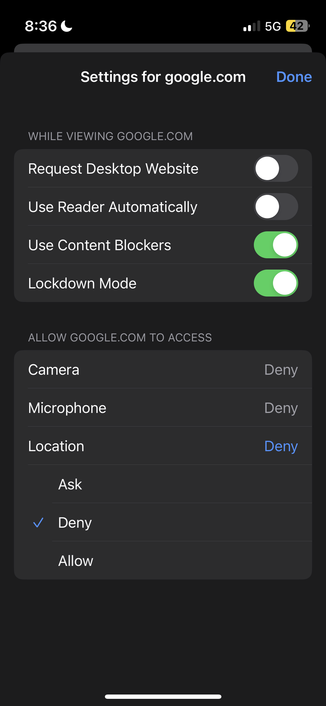
Holy crap it’s actually an option. Not in iOS settings where I looked but in “website settings” when visiting the domain. Still just give me a never option in the alert and make my life a bit easier.
@paul thank you. This got worse recently and it’s been buggin the shit out of me too.
@paul Thank you for pointing this out. Would also love an option to prevent asking to open in an app.
@paul where is this exactly? Safari?

@noondlyt

It took me a while to find this:

In Safari, when the URL bar is visible, tap on the "aA" bit to the left of the URL, and that brings up another menu, where "Website Settings" lives.

@paul curious why you'd use Lockdown Mode for Google properties. It severely slows down JS-heavy sites (since it disables JIT).

Lockdown Mode is more about Security than Privacy (the only exception maybe being WASM).

There's no one I'd trust more with Security than Google.

@paul sadly (for me) Google has migrated Google Maps to google.com (no longer on a subdomain) so I can't block location without also affecting Google Maps (on the odd occasion that I use it)
@dhritzkiv @paul OsmAnd uses Open Street Maps, which I have not used. I'll test it today and post about it.
@paul the “Fuck that” option in the permissions alert.
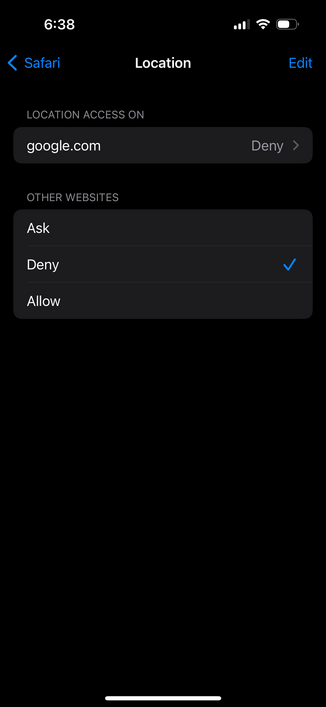
@paul In the iOS settings - Privacy - Location, there’s also a setting for “Safari sites” which you can set to “Never”.
@paul Thank you for sharing this! I’ve looked several times and couldn’t find these options.

@paul

Android:

Site settings -> Location -> Disable
----------------------> Notifications -> Disable

Never be asked or bothered by either again for any site, and you can whitelist sites you want.

@paul I like the “Use Reader Automatically” option. May be using that now on some places!
@paul I have these both set, and I just got a request for location access on a Google search result page. So this is definitely broken in the current beta. /cc @pschiller