
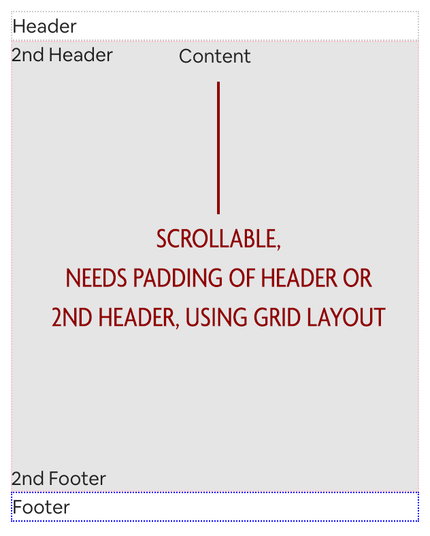
Challenging #css question for folks. I have a grid with a header and content, the content is scrollable. I need to add padding that's equal to the height of the header to the content. I need it on the first render as well. I feel like I saw some #CSSGrid hackery that allowed something like this, but curious if #frontend folks might have any ideas.
@callie why does it need padding equal to the header? Is the header absolutely positioned or placed in the same grid cell?

@keithjgrant The content starts in the same row as the 2nd header (it could do it on the first as well). Imagine where the 2nd header there's a non-dismissable error message, you wouldn't want it to start overlapped over the content, but upon scrolling you want it to scroll behind the error message. This is my rows.

[primary-header-bar] auto [secondary-header-bar content-start] auto [content] 1fr [secondary-footer-bar] auto [primary-footer-bar content-end] auto;
```typescriptreact

```

@callie If you put the error message in its own grid row, it should work. Something like this? https://codepen.io/keithjgrant/pen/zYMmXBj?editors=1100

Notice if you delete the contents of the error message, it collapses to height 0 and the main content takes that space.

zYMmXBj

...

CodePen
@keithjgrant The issue here is that I want the contents to scroll behind the error message when I start scrolling.

@callie ah, so it's like semi-tranparent or doesn't fully hide the content behind?

In that case, I'm not sure there's a super clean way to do it, unfortunately. You'll have to either make a safe estimate of the height, or use JS to measure

@keithjgrant @cornflower has a solution using position: sticky that seems to solve the situation nicely! https://mastodon.social/@cornflour/110787454739088749
@callie @cornflower Oh great! I think I misunderstood what you were looking for, sorry!😅
@callie My understanding here is that the header here will stay visible on top of the window as you scroll down?
@cornflour content is overflow-y: auto
@callie oh i'm asking about your wanted behaviour moreso than the code
Like do you want the header to always stay on top of the screen as you scroll down content?
And do you want to find the footer at end of the screen at all time or do you want to see the footer as you scroll to the bottom?
@callie If the goal here is to have either the header or the footer (or both) to always stay in the same position on the screen as you scroll down, the best approach I think is to use `position: sticky` so you don't have to manually padding from the content for the header or footer.
Here is an example of both the header and footer having `position: sticky` https://jsfiddle.net/rouy5wkq/14/
If I misunderstood the requirements please lmk! 😁
Edit fiddle - JSFiddle - Code Playground

Test your JavaScript, CSS, HTML or CoffeeScript online with JSFiddle code editor.

@cornflour Yeah I think this is what I'm looking for, content is offset but can scroll behind the header/footer. Thank you! Going to give this more of a shot but it looks promising!