
Challenging #css question for folks. I have a grid with a header and content, the content is scrollable. I need to add padding that's equal to the height of the header to the content. I need it on the first render as well. I feel like I saw some #CSSGrid hackery that allowed something like this, but curious if #frontend folks might have any ideas.
@callie why does it need padding equal to the header? Is the header absolutely positioned or placed in the same grid cell?

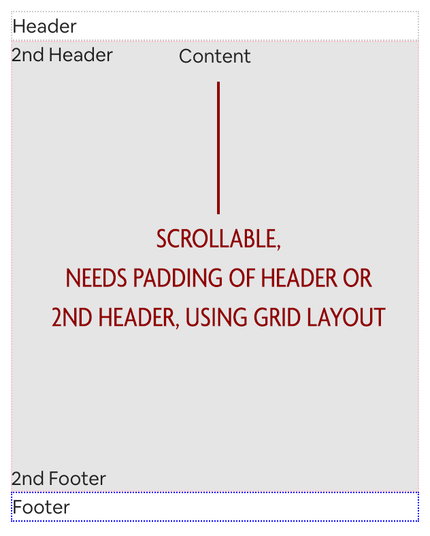
@keithjgrant The content starts in the same row as the 2nd header (it could do it on the first as well). Imagine where the 2nd header there's a non-dismissable error message, you wouldn't want it to start overlapped over the content, but upon scrolling you want it to scroll behind the error message. This is my rows.

[primary-header-bar] auto [secondary-header-bar content-start] auto [content] 1fr [secondary-footer-bar] auto [primary-footer-bar content-end] auto;
```typescriptreact

```

@callie If you put the error message in its own grid row, it should work. Something like this? https://codepen.io/keithjgrant/pen/zYMmXBj?editors=1100

Notice if you delete the contents of the error message, it collapses to height 0 and the main content takes that space.

zYMmXBj

...

CodePen
@keithjgrant The issue here is that I want the contents to scroll behind the error message when I start scrolling.

@callie ah, so it's like semi-tranparent or doesn't fully hide the content behind?

In that case, I'm not sure there's a super clean way to do it, unfortunately. You'll have to either make a safe estimate of the height, or use JS to measure

@keithjgrant @cornflower has a solution using position: sticky that seems to solve the situation nicely! https://mastodon.social/@cornflour/110787454739088749
@callie @cornflower Oh great! I think I misunderstood what you were looking for, sorry!😅