 Julia Evans
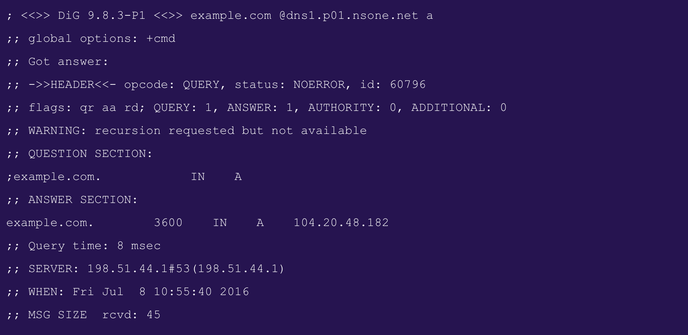
what's a popular command line tool (other than git) that you wish had a clearer / more intuitive UI? I'm thinking of tools like `dig` which has this IMO pretty arcane output format
@thumper
I think it would be against the core privacy principle in atuin.
@ellie did you consider this feature?
I'm wondering if keeping statistics of a SHA of each command could be abused? Assuming that often used commands are most interesting of course.
It might be safe if each user could be asked to approve sharing of specific commands.
I have been wanting to do something like this for ages! But doing so in a safe way is difficult, and I don’t want to even risk the perception that your data is not private
The two options we have that could work
1. Opt in sharing of “atuin stats” output
2. As you say, some kind of opt in SHA fingerprint sharing
There’s a bunch we’re working on atm, with marking a command “public”/“shareable” potentially happening in the future
@b0rk
In a way, you can do this on https://www.commandlinefu.com
In case you didn't know it already, people post their favourite one-liners along with explanations, and vote for/against possible alternatives.
@schmidt_fu @b0rk Oh, that's cool!
In the same vein, I like Cheat (https://github.com/cheat/cheat) - it's *kind of* like seeing how people use commands (because people contribute to the cheat sheets). I use the cheat command way more often than man, that's for sure.

cheat allows you to create and view interactive cheatsheets on the command-line. It was designed to help remind *nix system administrators of options for commands that they use frequently, but not ...
There's tldr, of course. That's in the distant neighbourhood of what you want.
@b0rk oh no Julia, no! 😦 It's garbage!
It's muscle memory and copy pasta... Half of us don't know what we're doing and the other half forgot the reason why this combination of switches "works" 🥲
@jjcelery @b0rk I sometimes want to go through that garbage to improve my helper scripts. Or create stubs to remind me I wrote a script to chamfer the sharp edges off.
Like how I repeatedly cd deep into my ~/src directories then edit the current dir, when I have a `ze` script to present a fzf selector and open in $editor.
The ergonomic-improvement possibilities there are pretty huge, if you could get community buy-in.
What command combinations are so frequently used that they might deserve their own shortcut? What commands to people need to go to the man page before using most often, and how can they be improved?
I bet even just gathering usage stats from something like tldr would be a cli-ergo goldmine.
@b0rk Back in the day, you kindof could - when I was first learning, most users on the systems I were on left everything open so you could learn by exploring others directories. At least on some of the systems I was on, it was accepted and in fact encouraged.
It was another time.
> git rebsas —interactive
> git rebase —intectv
> gitrbsse—interactive
> sudo shutdown
 Alan
Alan Tim Penhey 🇳🇿
 b4ux1t3
  #1️⃣
#1️⃣ #[deprecated] Qyriad
 Andreas Helbech Kleist
 Ellie Huxtable
 Gaëtan Duchaussois
 Florian Schmidt
 Lisa W. E.
 An Agora
 Jeremy Allen
 Mandar Vaze (desipenguin)
 Joe Cooper 🇺🇦 🍉
 Chris [list of emoji]
 JJ Celery
 : j@fabrica:~/src;
 rhizome
 mhoye
mhoye Brice Ruth
 David Blume
 Mike Zamansky
 Ben Lopatin
 Dan Copeland 🇨🇦🇺🇦🇵🇸
 Norman Wilson
 Jeroen Baert
 jimmyhartington
 Jon Steege
 Lou Katz
 Reed Mideke
 joel cretan
 Steve Young
 Florian Voggeneder