🚀 Deep Green has re-launched! ✨

Seven short years after the previous update, version 2 marks a new era of Deep Green. This is a full rewrite on a modern architecture that can be built upon with even more exciting features in the months and years ahead.

Deep Green is now free. Still with no ads, no tracking, no analytics.

I hope you like it. Enjoy, #chess: https://deepgreen.app

Some of the highlights in version 2 are:

- Refreshed UI and graphics updated to latest iOS look and feel
- Third generation Deep Green chess piece design in both 2D and 3D
- High-resolution 3D game rendering based on SceneKit
- Fluid animations and subtle touches during gameplay
- System sharing, copy/paste, import/export of games in PGN format

@deepgreen Immediately duped by this not button!
@bonney Yes, I wanted you to hunt for it in the navigation bar ;-)
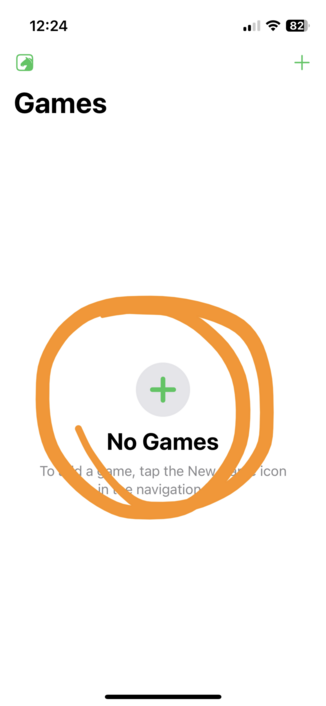
@Alderete @bonney My “inspiration” was Apple’s screens, like this one in Freeform. I just want to make sure people are aware of the + button. Maybe I’ll simply remove the green, making it look disabled…
@deepgreen @bonney It’s the plus icon that fooled me. If you changed it to a chess piece, or a board, it would do the trick. Changing the color of the plus, probably not.

@deepgreen Congrats on the release! Was so happy to see this update pop up on my app list!

Unfortunately when I started it up the last game I played (pre update) was there and I was still losing.

It could be user error but probably a bug, right?!

@deepgreen congrats on the relaunch!!
I have to admit I LOVED the old icon and theme of the app, and I can’t say this about the new version 🫣 is there any plan to provide an option for the old icon and the classic-green theme in the app?
@aviel I don’t have any concrete plans, to be honest. But I definitely do want to improve on the current appearance.
@deepgreen Thank you! Looking forward to it :)

@deepgreen First of all, congratulations and thank you for the new release. Been a paid user since your first launch way back and it’s the first app I install on any new iOS device.

Secondly, could we please have the earlier version’s theme and pieces - at least as an option if not as default? Those pieces were one of the primary reasons I love Deep Green to pieces! Thanks in advance!

Hi @owlsays, thanks for your support.

As you may have heard, I was suddenly under tremendous time pressure to get v2 out. I’m not content with the current look either. It will definitely improve.

And as you may also have noticed, it’s no longer just pixels. Deep Green is now modelled in 3D, even in the 2D perspective. The pieces have been designed over a period of two years. At this point, it’s basically a matter of reworking lighting and material.

That’s an ongoing process. Hang on…

@deepgreen Thanks a lot. Appreciate your candid response. Look forward to the upcoming changes.

Also, thank you for creating something beautiful for iOS.

@deepgreen @bondo is that some SceneKit I see? Preparing yourself for a new platform, perhaps? 😇
@deepgreen Aaaaaaaahhhhhhhh!
@markb Must be on its way …
@bondo It actually updated through the AppStore update mechanism. Playing now… it looks amazing Joachim. My only question is how are we supposed to support your work?
@markb Nice of you to ask, thank you. I should have thought of that. I may add an option later. (And I've planned Pro features going forward.)
@bondo I look forward to clicking the “buy” button soon
@markb Will be called “Get” ;-)
@bondo I hope one of the pro features will be sounds, I miss my old Deep Green sounds already, well maybe not the checkmate sound… this new steampunk guy plays some mean chess
@markb Sounds will make it back in for the Steampunk engine. The Pro pack will include Stockfish which will have a different sound. Thanks for the feedback!
@bondo Great news, I will be watching for that “Get” button!
@markb Ah, maybe I misunderstood. When you said “buy”, I thought you meany on the App Store now, because DG wasn't available for you. But maybe you meant in the app when Pro's available? In that case you're right.
@bondo Yes that’s what I meant… Just make sure you pick a really good checkmate sound for the stockfish sounds because I’m going to be hearing that one a lot! 😂

@deepgreen I took Steampunk's queen, the game seems stuck. Opponent doesn't play, neither can I. (Don't judge, I don't play chess well 😄)

[Event "?"]
[Site "?"]
[Date "2023.04.24"]
[Round "?"]
[White "You"]
[Black "Steampunk"]
[Result "*"]
[WhiteType "human"]
[BlackType "program"]
[Time "10:28:47"]
[BlackEngineConfiguration "Engine: Steampunk, Version: 4.0, Depth: 3, Concentration: 100"]

1. e4 Nf6 2. f3 Nc6 3. d3 d6 4. c4 Bd7 5. g4 Nd4 6. b4 c5 7. bxc5 Qa5+ 8.
Nc3 Qxc3+ 9. Bd2 Qxa1 10. Qxa1 *

@arroz Yes, you hit a bug where the pawn promotion puts the king in check, will be fixed in next release. Thanks for reporting!
@arroz And you found the copy function! :-)
@deepgreen I have no idea what I'm doing, I haven't played chess in ages. 😄 Pawn promotion happens when the pawn gets to the last row, right? Can that happen on my current board?

@arroz You're right, it requires the pawn to reach the opponent rank. It can't take place on your current board. I just saw your last move and assumed the queen was the result of a promotion. Try to copy paste this into a new game (from Wikipedia):

1. d4 d5 2. c4 e5 3. dxe5 d4 4. e3? Bb4+ 5. Bd2 dxe3! 6. Bxb4?? exf2+! 7. Ke2 fxg1=N+!

@arroz Oh, not promotion (but same underlying error, I think). I'll make sure to fix in any case. Looks like you lay better than me ;-)
@deepgreen Thank you, and loving the update — but did expect the "+" above the “No Games” label to allow me to add a game. It feels like it should :)
@snkhan I can’t say I disagree. The idea was to make users familiar with the plus button in the navigation bar.

@deepgreen I think I broke it. Sorry I’m not very good at chess. Nice app! [Event "?"]
[Site "?"]
[Date "2023.04.24"]
[Round "?"]
[White "You"]
[Black "Steampunk"]
[Result "*"]
[WhiteType "human"]
[BlackType "program"]
[Time "19:26:30"]
[BlackEngineConfiguration "Engine: Steampunk, Version: 4.0, Depth: 2, Concentration: 75"]

1. d4 Nc6 2. e3 Nf6 3. Bc4 d5 4. b3 dxc4 5. bxc4 Bf5 6. Qf3 Be4 7. Qxf6 exf6
8. Nc3 Bxg2 9. Nf3 Bxh1 10. Ne4 *
Now, I cannot move.

@keithws Thanks for reporting, Keith, will be fixed in the next release.
@keithws Fixed in the update that came out yesterday.
@deepgreen Confirmed fix! My existing game even became playable! Nice work. Thank you!
@keithws I'm glad to hear, thanks for the patience!
@deepgreen Congratulations on the launch! 🔥 Great to see Deep Green cogs are turning once again and all your hard work finally come to life on the App Store. I have to admit I miss the felt and wood feel though. I look forward to follow the development. 💪
@selsoe I know some users are disappointed, but the current look is not final. It’s what I had time and skills to do. It will improve over time. I can *finally* take it step by step.
@deepgreen I’m a bit sad the `+` button does not do anything on an iPhone 8 / 16.4.1 (well it responds to the touch and then the UI is frozen). Anything I could do ? Or an update with a fix ?
@oliviermartin The + button in the navigation bar? That’s supposed to work, and on all devices. I’ll try on a simulator, since I don’t have that model. Only thing I can suggest if the problem persists is to delete the app and reinstall (you’ll lose your games, though, but it sounds like you can’t create them anyway).
@deepgreen Re-install doesn’t help unfortunately, maybe you can reproduce on a simulator. I unlogged from Game Center just in case but no.

@oliviermartin I don’t use Game Center so that shouldn’t make a difference. I’ll try on the simulator first, and I think we have an iPhone 8 at the office (my day job) that I can try tomorrow.

Another long shot in the meantime: copy just a single word to the clipboard and try again (the system checks the clipboard which could, but probably doesn’t, cause an error).

@deepgreen Same, but thanks for the suggestion anyway :)
@oliviermartin Hi, Oliver, I have not had success finding an iPhone 8. But haven’t given up on it; let me know if the situation changes. What version of iOS are you running?
@deepgreen Thanks, I’m sure you’ll find out :)
Still the same, I’m running on iOS 16.4.1

@deepgreen Not sure if it’s relevant but here is the trace when tapping the button, it halts at the last line :

https://gist.github.com/omartin/80b95c0d7a5dca1459275d0fdb88a231

Deep Green trace

Deep Green trace. GitHub Gist: instantly share code, notes, and snippets.

Gist
@oliviermartin That could be helpful, yes. I checked earlier to see if there were any crash reports in App Store Connect, but there wasn't any. I have downloaded your file, so you can delete it if you want. I’ll investigate…
@oliviermartin @deepgreen I have the same issue, tried the same recommended solutions without luck. iPhone 11/16.4.1
@dmatarazzo @oliviermartin Thanks for voicing this. I’m sorry. This is puzzling. I’ll be looking into it over the next few days. Olivier’s log has given me a clue at least…
@deepgreen @oliviermartin No problem, thanks for looking into it!
@deepgreen the app crashes when you play with the engine

@plumpead There is a bug which shows itself under certain circumstances. It will be fixed for the next release.

If you want to be sure, you can copy or share the game by holding down on the game preview (in the list) and select Copy or Share and send it over to me. Thanks.