 mcc
mccI just this second drew the line in my head from "Microsoft is one of the companies who is convinced ChatGPT is a good thing and is telling its shareholders it's going to try to shove this brand of 'AI' into everything it can" and "Microsoft owns my phone keyboard, since they bought SwiftKey" and, uh… shit, maybe I should audition AnySoftKeyboard sooner rather than later
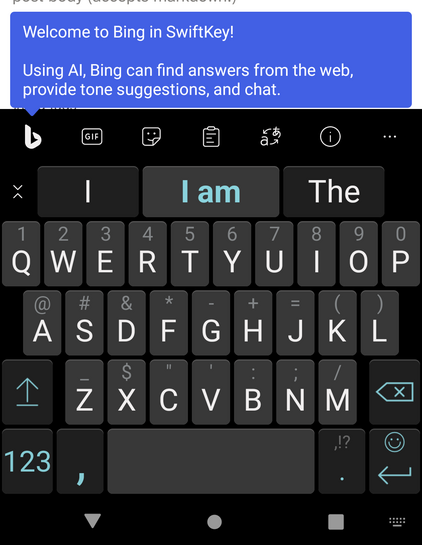
At almost the exact same time they rolled out this update, Microsoft deleted the public support forums. The public uservoice/feedback/feature request thing. They appear to have just removed it completely from the support site and old links to it 404. What an interesting coincidence.
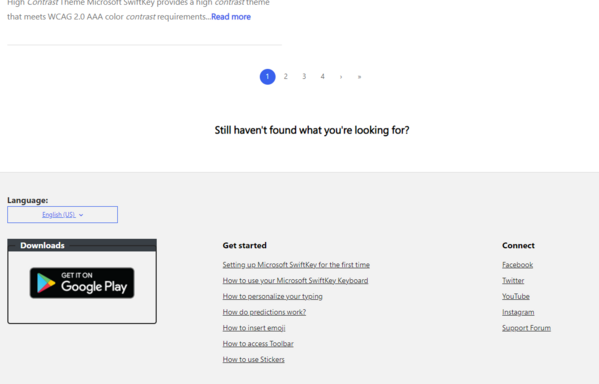
Yeah LOL look at this. They removed the public forums in such an incredible hurry that if you just log into the SwiftKey website, there's still a link to the nonexistent forums at the bottom. They must have done this in an *incredible* hurry. I actually was thinking along the lines of "interesting coincidence" but now I actually believe it is not a coincidence and they really did do this just to prevent people discussing welding Bing and "AI" into the FUCKING KEYBOARD
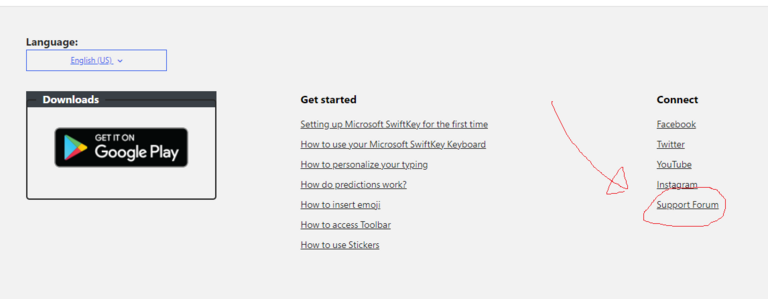
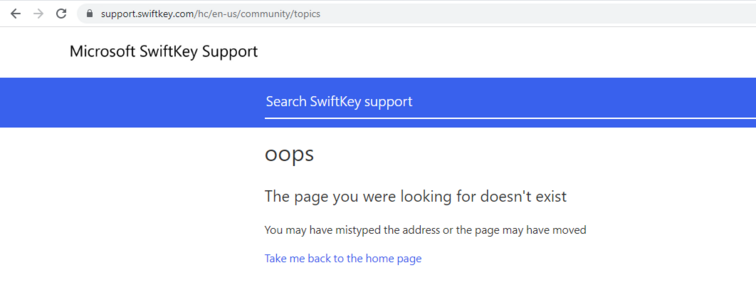
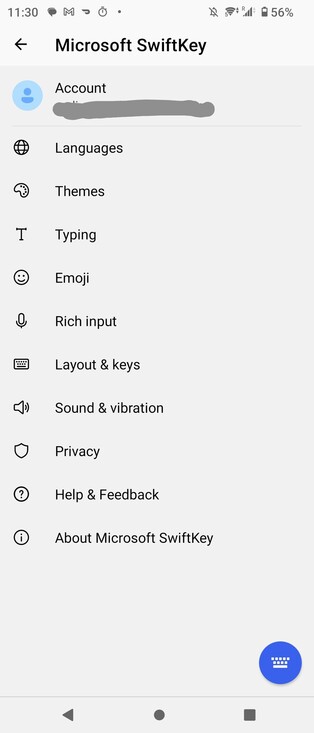
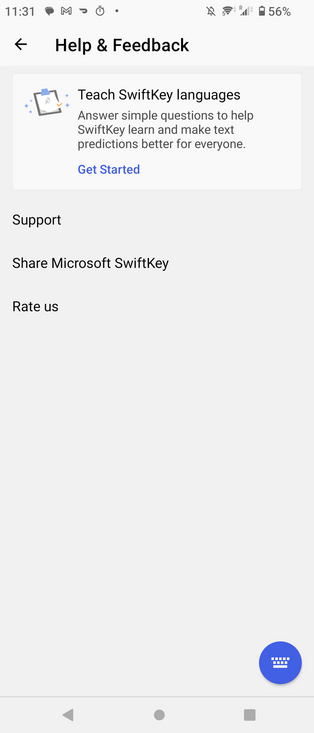
Yeah check this out. The app itself has a "Help and Feedback" section. But there's no way to provide feedback. There's only the "Support" button which links to a static site of prewritten pages. They made the decision to remove the public feedback site, apparently to prevent feedback around "Bing" "AI" integration, they didn't even have the time to tell the people making the actual app to change the button names.
I'm not as certain about this part, but there's a weird detail on the static-support-pages site if you search for something (such as "disable Bing"). Below the search results it simply says "Still haven't found what you're looking for?". EOM. I *think* there used to be something under there like a contact or support link. The line might refer to the links underneath but it doesn't really visually make sense. Now the left-behind line looks so forlorn.
Still haven't found what you're looking for?
This one hurts, it really hurts. I think this hurts worse than Musk buying/poisoning/killing Twitter. I've mentioned this before but a keyboard feels like an extension of your body, and I've been using SwiftKey exclusively for over a decade. I wrote most of this thread in GBoard and it was actually pretty rough to adjust to.
It's bad enough corporations can buy things you like and kill them. This seriously feels like a corporation buying a part of me and taking it away.
It really is true. In the long run, open source software is the only thing that exists. ( https://mastodon.social/@mcc/109683380376727036 ) It doesn't even matter if open source software is good. Eventually you'll have to use it it because there are simply not any alternatives.
Got several people recommending to me "FlorisBoard". Do I understand correctly you cannot install this through Google Play? It's fdroid/sideload only?

 Curioso 🍉 🇺🇦 (jgg)
Patience. Getting used to a new keyboard takes time. You may end up preferring the new one quirks.
I would recommend you my keyboard, but since I hate the very idea of my keyboard having any kind of autocomplete, I don't think you would like it.
 T0╳F01Æ
Songs for the Elderly - Foil Arms and Hog
 ator robot
@mcc this is hilariously tragic. as a past user of SwiftKey (sadly after the Microsoft acquisition) i am genuinely sorry.
IMPORTANT: try Yandex Keyboard. i haven't seen people suggesting this anywhere, but it is literally the only keyboard i can tolerate, and it's available through Google Play.
think of it as SwiftKey if it had been improved over the years (getting regular genuinely good updates) instead of being bought out by Microsoft.
@mcc by the way, this was not an impulsive decision. i searched through very many keyboards and gave up multiple times before finding Yandex. Google Play search is just useless at finding good apps of a certain type.
curious robot :v_enby: :v_bi: (@[email protected])
:ms_speaker_loud_volume: This is a public service announcement: MS SwiftKey is dead. Bing AI has been integrated, and Microsoft's trail of destruction is finally complete. *Search for Yandex Keyboard on Google Play.* It is the only keyboard I can recommend for Android, having searched, experimented, and given up multiple times. Many settings, high quality features, great look and themable, it is SwiftKey if instead of being bought out it was improved with regular responsible updates. #keyboard #ai #android https://mastodon.social/@mcc/110209152979696652
 luna the doggie

@mcc
I'm using AnySoftKeyboard, but getting a comfy setup with it took a lot of configuration effort and some getting used to my custom, somewhat unusual gestures.
I'm using AnySoftKeyboard, but getting a comfy setup with it took a lot of configuration effort and some getting used to my custom, somewhat unusual gestures.
 Jeroen van der Ham-de Vos
@mcc you can actually disable the bing button. In the SwiftKey settings there is a button to disable the "Bing Hub". Turning it off automatically enables the menu button which is a weirdly unhelpful feature.
@1sand0s This is a new feature. At the time I made the above posts there was no Bing configurability. I guess people complained.
The simple way to remove the bing button is:
- Bring up the toolbar
- Scroll to the right of the toolbar, there's a gear or a … or something
- Drag the bing button out of the toolbar into the tray below it
@mcc thanks, seems like it took them a week to make that change (and a further week for me to discover it)
@1sand0s But, here is the thing. By putting a search engine inside the keyboard, Microsoft crossed a line. By allowing a complex third party program like SwiftKey in my keyboard process space, I am assuming there will be no future security vulns, or feature changes, or TOS changes that are a threat to me. Having a whole chatbot system in the keyboard (or worse, code to load a web-based chatbot system) makes me wonder, what if that code activated by accident? Or was forced to activate by a vuln?
@1sand0s Microsoft dropped a search engine button in our keyboards. I didn't like the "TODO" app they crowbared into SwiftKey, but that doesn't connecting to the network. Connecting to the network on purpose is a significant change. What if they make a significant change, of this sort, to the TOS when I'm not paying attention, and remote Bing AI becomes part of the keyboard model (which I was already increasingly worried was being backed up by MS)?
@1sand0s Basically, even if I can turn Bing off, I can no longer trust SwiftKey! If they're adding Bing now I can't know what they will add in future. I have switched to GBoard, which is frankly not good, and I am watching FlorisBoard to see how their autocorrect turns out once it's shipping.
@mcc you are completely right. It was great to see new support for SwiftKey after a long period of silence, but this is going in completely the opposite direction indeed.
Turning off full access is possible, but then the keyboard is next to useless
Turning off full access is possible, but then the keyboard is next to useless
@1sand0s I guess maybe I could protect myself from nearly anything if I "log out" my swiftkey, but I think then I might not be able to install themes anymore. I'm not sure. Anyway, I'd *prefer* FlorisBoard if I can make it work. As you say, SwiftKey has been too dormant for too long in terms of productive feature work.
 Natanael ⚠️
@mcc yeah there's a bunch of apps there which don't want to publish via google play, either because of policy violation (some system wide ad blockers) or because of various other Google policies, or because they simply don't want to pay the publishing fee
@Natanael_L there's a publishing fee now?
 Michael Nischt
@mcc you can install it through the Google Play Store but you need to join the test group and visit the testing page first. It's just a few clicks linked here:

 ⁂ Fish Id Wardrobe
@micha @mcc trying this now and I'm impressed. First time I‘ve ever got glide to work for me (fat fingers)!
Cleảly thẻe ảe still issues 🤪
But you shouldn't listen to me because my usual keyboard looks like this:
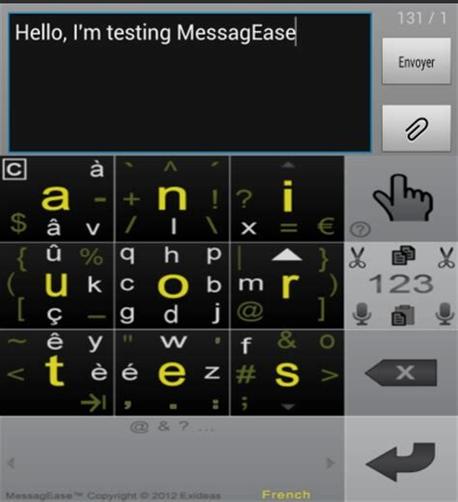
@fishidwardrobe @micha I don't think I want to *use* this… but I *respect* it
@mcc @fishidwardrobe haha, I didn't know of it before but was intrigued to give it a try as well. I guess the screenshot saved me the effort.
I fear convenience always wins over privacy. 🙈
I fear convenience always wins over privacy. 🙈
 xrvs
xrvs@fishidwardrobe @micha @mcc no, i was talking about the text you typed in your post that has diacritics instead of the letter r
@fishidwardrobe @micha @mcc yes, that is the name of the vietnamese input method it is trying to mimick (which does need improvement in fact). for english you should use appender instead
@micha Thanks so much, I didn't understand the github page at first.
It looks like the predictive text in Florisboard is still forthcoming. So I guess I'll stay in the beta and give it a serious try when the predictive text lands.
@mcc thank you too. I was just following along and discovering things on the go. =)
 PunnO)))
@mcc You'll be disappointed. I've tried all the FOSS android keyboards, and none of them is consistently enough better than the AOSP one to daily drive.
@ieure is aosp same as gboard ?
@mcc Not the same, but gboard might be based on it (like how Chrome is based on Chromium). AOSP keyboard is very basic, think iOS 6 style.
FOSS keyboards with swipe typing are pretty new (within the last ~1-2 years), and your options are FlorisBoard or AnySoftKeyboard. FlorisBoard is (IMO) the better of the two, but both are inferior to the features of gboard. I refuse to use gboard because I don't trust Google with my keystrokes.
@mcc FlorisBoard doesn't have word suggestions, so if it misdetects your swipe, you have to delete the word and try again. AnySoftKeyboard has suggestions, but feels a lot more sluggish and seems less accurate with swipe typing overall. Maybe some day these will be good enough, but I don't think they are today. I just gave up swipe typing when I started ripping corporate snitching software out of my life. :/
 Dźwiedziu
@mcc
Or OpenBoard
Or OpenBoard
 ✧✦Catherine✦✧
@mcc florisboard's pretty good
@whitequark A few people recommended this and I downloaded it, but there doesn't appear to be a predictive text model at all right now…?
@mcc oh yeah. i don't run gapps so my bar is "aosp's default keyboard" which is really bad
 Simon Brooke
@mcc "It's frustrating because open source end-user software is of persistently lower quality than commercial"
Uhhmmmmm.... *WHAT*?
Have you ever tried using commercial software?
@simon_brooke
Some people have the blessing of not used outsourced, in-house, underfinanced enterprise software, or enterprise grade ITIL ticketing solutions.
Or even software designed perfectly, but designed to fork over your wallet.
 Dag Ågren ↙︎↙︎↙︎
@mcc Speaking of things in that thread, I have been using heptapod.host for a while now for mercurial hosting, and it has an actual user interface that doesn't try to bite your face off, but it does still cost money.
@WAHa_06x36 Maybe it was never reasonable to expect free source code hosting. I don't know.
@mcc Maybe. I don't know either. I just decided that I am now at a point in my life where I am rich enough to just pay to make my problems go away.
 T045T
T045T@mcc forlorn, or passive-aggressive. „You still hanging around? Why?”
 bob
bob@mcc this is why I use the basic aosp keyboard
 Charlotte 猫 Awoo Fide
@mcc the future sucks
 Scott Hain
@mcc it's all over the newer windows flights as well. I've been leaving all the feedback to at least let us opt out in some form but I'm not holding my breath. Registry hacks for windows it is!
 Jernej Simončič �
@elejia @mcc I'm hoping Windows Pro N or Pro Education will leave it out like they do with the rest of the crap (hint: if you had Pro activated on a computer, Pro N will activate without a key; you need to install Media Feature Pack afterwards, otherwise a bunch of features don't work, but the auto-installing crapps will not reappear).
 Norma/nta
@jernej__s @elejia @mcc ive been mentioning pro for workstations/enterprise as relatively immune to promotional targeting but i do wonder when some stuff will accidentally make it there too
@jernej__s @elejia @mcc huh, is Pro N missing these intentionally or as a side effect of 'no media foundation makes them not work'?
also, does the media feature pack actually migrate whenever there's a feature update these days? this used to be a hassle
also, does the media feature pack actually migrate whenever there's a feature update these days? this used to be a hassle
@nta @elejia @mcc No idea why Pro N is missing those – the Store works.
Media Feature Pack is kept over feature upgrades as long as you're upgrading from a version where MFP is installed from Optional Features (though I've had MFP missing after upgrading 10 to 11 a few times, although in those cases manual install also failed and I had to run DISM.exe /Online /Cleanup-image /Restorehealth first).
One problem with Pro N is that even if you install Media Feature Pack, a few things still don't work (eg. Augmented Reality).
I recently came upon a tablet with Windows Pro Education license, which seems to be the same as Pro, except there's no auto-installing crap like in Pro N (but media support is present). Still need to test if Pro Edu will activate without a key if Pro was activated on the same machine.
 pivotman319 🦊

@nta @elejia @jernej__s @mcc these days, the Media Foundation Pack is being delivered via Windows Update as an FoD internally named Microsoft-Windows-Media-Features-Package
<assembly xmlns="urn:schemas-microsoft-com:asm.v3" manifestVersion="1.0" description="Installs media apps and enables Windows Media technologies." displayName="Media Feature Pack" copyright="Copyright (c) Microsoft Corporation. All Rights Reserved" supportInformation="http://support.microsoft.com/?kbid=777777">
  <assemblyIdentity name="Microsoft-Windows-Media-Features-Package" version="10.0.25398.1" processorArchitecture="amd64" language="neutral" buildType="release" publicKeyToken="31bf3856ad364e35" />
 Jesse Morris
@mcc Maybe it’s because maintaining public forums anywhere where most people have easy access to spewing ai drivel directly into the forum seems like a lot of extra work