 Marco Arment
My favorite thing about my crooked, wobbly LG UltraFine monitor, besides all of the backlight bleeding around the edges, is how I keep randomly losing the ability to control its brightness
 Jaime Creixems
@marcoarment Hey, at least your backlight bleeding is white.... mine turned pink about a year ago. It's only leaking red
@webjac Oh god it's actually bleeding
@marcoarment xD that's right, haven't thought about it that way.
 FreediverX
@marcoarment
My not-so-ultrafine LG 32” monitor didn't even pretend to have that feature, so I had to resort to a third party app called MonitorControl. Wobbling was minimized by mounting on an Ergotron arm.
On a related note, the recent episode discussing EDR was very enlightening, as I had wondered why my “HDR" display didn't make my photos look very HDR.
 randomhappening
@freediverx @marcoarment this is the way. Definitely keeps my UltraFine in check.
 Aaron Miller
@marcoarment mine is slowly turning grays into pinks
 Andrew Kasian
@marcoarment I see an Apple Studio display in your future. 🔮
 Peter Saathoff-Harshfield
@marcoarment I always use mine at 100% brightness. Usually, but not always, when I plug in, it’s at 75%, pressing brightness up does nothing, but pressing brightness down immediately sets it to 100%.
 Matt
Matt@pesh @marcoarment Yeah I get this too! Never happened on my old intel MacBook so I think this is something to do with DisplayPort drivers on M1/2 Macs specifically.
 David Crooks 🏳️🌈
@marcoarment God bless you, Marco, just buy a better monitor, we all know you’re good for it.
 Szymon Bęczkowski
@marcoarment That always happens when there is an adjective in the product name. I have some hardware in the lab that is controlled with EasyExpert software 😬
 Gabriel R.
@marcoarment I had one for less than a year, still works ok. Never got LG’s menu bar app to work though.
I’m looking forward to Samsung’s ViewFinity 5K and Dell’s UltraSharp 6K announced at C3, my new alerts are all set https://www.theverge.com/23542274/samsung-dell-5k-6k-monitors-apple-macbook-macos-ces-2023

 francbelge
@marcoarment literal bleeding edge haha
 Nick Collins
@marcoarment FWIW I’ve had a similar issue lately with the Studio Display, both brightness and volume controls stop working until I disconnect my MBP or failing that, power cycle the display.
 Craig
Craig@marcoarment My favorite thing was selling it and replacing it with a Studio Display. The only redeeming quality was that it mostly matched my iMac Pro's screen. Total garbage!
 Zaͩnͦsͤt̀́rͤa̅̆̈
@marcoarment I’m so glad my 5k iMac is still in good condition. Not sure what to do otherwise…
 Federico Reinfeld
@marcoarment but feels like Apple did brake something with the latest Ventura update, I’m having trouble adjusting brightness on my 27” iMac as well.
 Richard Kalling
@marcoarment I use “MonitorControl" to be able to quickly adjust its brightness from the menu bar. I often see it dimmer, and wiggle the bar down & up to get it to come back…
 Sean
Sean@marcoarment I use this free app with my Dell display. Works great.

 David Ferguson
@marcoarment Very annoying. I created a keyboard shortcut in @jessegrosjean's BetterTouchTool to dim the display one and then brighten up to max. It seems to regain brightness control after that.
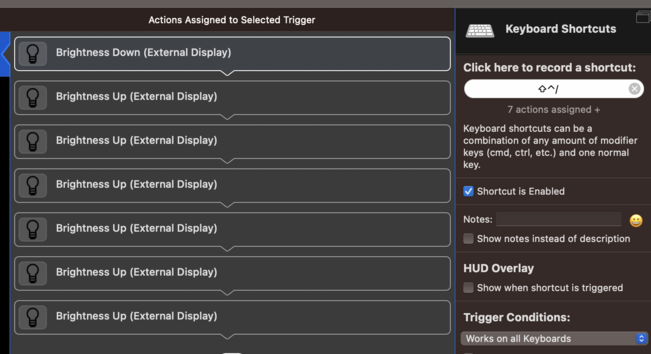
What I hate most about the Dell monitor, which I am otherwise completely satistied in btw!, is the fact that it does not remember the brightness state when waking from sleep.
In a dark room, put computer to sleep, and then wake it up: get blinded by the light being at 100%.
@ooans Yup. LG too.
 Greg DeMichillie
@marcoarment Roughly 2/3 of the time my M1 MacBook Pro wakes from sleep, the LG comes back at 60-70% brightness until I move the cursor to that screen and toggle the brightness up and down. No problem on Studio Display.
 donkey
@marcoarment I used to use one with my iPad Pro. Couldn’t adjust the brightness at all back then…
 Jeff Wilson
@marcoarment I’m going to be looking for a new monitor soon as I move away from a PC and toward the desktop-laptop life, but with the Samsung and Dell options not out yet and there Studio Display not quite doing it for me price-wise relative to the features of offers, I’m feeling pretty stuck.
 Joseph Gaeddert
@marcoarment now when you say “favorite”…
 kapowaz
@marcoarment god yours too?
 Dylan Ginsburg
@marcoarment Mine crashes when I plug in any usb-c keyboard. After a few minutes the webcam and other usb ports stop working until I unplug the power.