 Simon Willison
So now that I've got an M2 MacBook Pro with an absurd number of CPU and GPU cores... aside from keeping hundreds of VS Code and Firefox tabs open at the same time, what are some things I can run on it that will make the most of all of that compute capability?
Back in the 2000s I remember running 3DMark to enjoy the pretty demos every time I upgraded my PC's graphics card... has anyone built an equivalent for the M1/M2 2020s?
 sayrer
@simon they aren't that great vs a Threadripper and an Nvidia 4090 or something, but they are small and quiet. But maybe try Minecraft? It is really good on an Nvidia 2080ti, and that is a bit old.
 sxpert
@simon start a streaming channel with OBS ?
 Carl M. Johnson
@simon Stable Diffusion?
 Chris
Chris@simon I believe there’s a 3DMark for macOS on ARM64.
@chr1stian Yeah I saw some references to that, and the 3DMark website even mentions macOS on https://benchmarks.ul.com/news/new-3dmark-wild-life-extreme-benchmark-for-windows-macos-ios-and-android - but when you get to the App Store page it appears to only be available for iOS https://apps.apple.com/us/app/3dmark-wild-life-benchmark/id1512372293 - I guess running in that new iOS emulation mode?

@simon I haven’t used it on macOS but it looks like from the app store side it’s one of these „universal“ apps for iOS + macOS. You can probably install it with the Mac AppStore app.
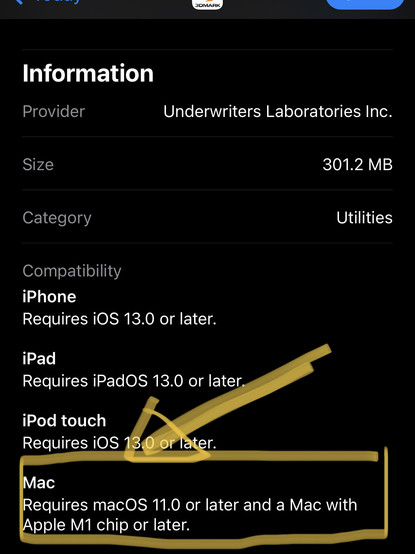
@chr1stian I tried it - it shows up as an iPad app in a big window. Have to admit it wasn't nearly as visually exciting as I was hoping for!
@simon oh I see :-(
 Andres Jalinton
@simon
I moved from a Phenom to a Ryzen, it's absurd the amount of power, I have it running "World Community Grid" while I browse the web, without noticing it's running.
I moved from a Phenom to a Ryzen, it's absurd the amount of power, I have it running "World Community Grid" while I browse the web, without noticing it's running.
 Ben Falk
@simon stable diffusion I guess? Compiling python?
 Jonathan Clem
@simon Keylogger to Stable Diffusion to wallpaper pipeline.
In other words, a very expensive mood ring.
 Dan Sugalski
@simon fire up Chrome and…
Actually that might be enough right there.
 Sam Morreel
@simon Create a Blender short on it🤣
 Miguel de Icaza ᯅ🍉
@simon diffusion bee?
 Patrick Berry
@simon nvm install all
 Jan
Jan 
@simon Compiling Rust 🙂  🎡
🎡
🎡 Queen of Anxiety
@simon Modded Minecraft.
😉
@simon I recently saw a "let us build a chatgpt" YouTube video. Track that down go through it, the train on both Sherlock Holmes and Shakespeare from Project Gutenberg?
 Peter Kaminski
@simon run #StableDiffusion with #DrawThings https://drawthings.ai/
(Installs as an app and manages models itself, no tricky setup or anything.)
Draw Things doesn't slow down my M1 Max MacBook Pro, but it _does_ get the fan going after generating a few images sequentially, especially with "High Resolution Fix" (two-pass) turned on.
 Willie Abrams
@peterkaminski @simon mochi diffusion or guernika, both of which use CoreML, are other options in this vein
 noel hidalgo
@simon try running Windows 11 VM via Parallels. it is a real hoot.
 Glyph
Glyph Aaron Lord

@simon Rider with a solution that has 100 projects.
 Shawn Simister
@simon Stable Diffusion?
 Tom Carden
@simon the Lego Star Wars games on Apple Arcade might not be bleeding edge, but I've enjoyed them and they do quite well on a newish Mac.
 Codepope
@simon Final Cut Pro, Diffusion Bee (https://github.com/divamgupta/diffusionbee-stable-diffusion-ui), Microsoft Word :D

GitHub - divamgupta/diffusionbee-stable-diffusion-ui: Diffusion Bee is the easiest way to run Stable Diffusion locally on your M1 Mac. Comes with a one-click installer. No dependencies or technical knowledge needed.
Diffusion Bee is the easiest way to run Stable Diffusion locally on your M1 Mac. Comes with a one-click installer. No dependencies or technical knowledge needed. - divamgupta/diffusionbee-stable-di...
 Neil Lee
@simon It’s kind of a shame things like SETI@home no longer exist. I have no idea of the magnitude, but the amount of surplus CPU power these days must be massive.
 John Harris
 seb hanlon 😷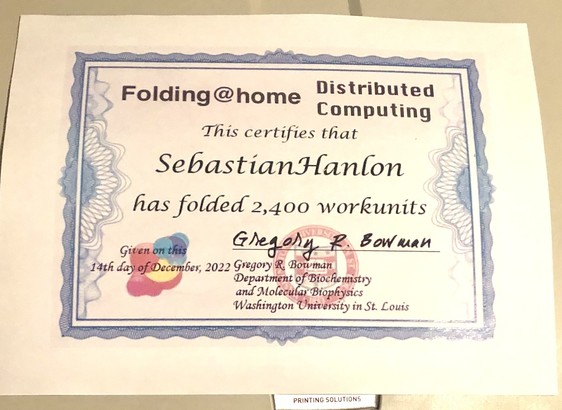
 Elizabeth Viera
@simon the slow/unoptimized version of an Advent of Code answer 😂
 Frank Wiles
@simon Docker desktop, with Kubernetes enabled, some Django containers, Celery, Prometheus, Grafana, Postgres, Loki, AND all those browser tabs 😂
 Alex White
@simon Chrome with tens of tabs open?
/joking
 Michael Glenn
@simon check out https://www.rewind.ai
Only runs on M series Macs.

 Craig Saila
 Joe Fabisevich
 : j@fabrica:~/src;
@simon electric sheep fractal screensaver?
 Kevin Teljeur ❄️
@simon There is quite a lot of amazing fun to be had with Inigo Quilez style raymarching and distance fields!
 Jon
Jon
 Scanner
GitHub - divamgupta/diffusionbee-stable-diffusion-ui: Diffusion Bee is the easiest way to run Stable Diffusion locally on your M1 Mac. Comes with a one-click installer. No dependencies or technical knowledge needed.
Diffusion Bee is the easiest way to run Stable Diffusion locally on your M1 Mac. Comes with a one-click installer. No dependencies or technical knowledge needed. - divamgupta/diffusionbee-stable-di...
@simon I’m really enjoying zipping around in Photos and Maps on a big screen with gestures. So instantaneous
 Steve Tibbett
 Mr.Nuclear Monster
 Thomas 🇪🇺
@simon
You could try some Blender rendering or 4k video editing. Even gaming is a thing it seems.
Best part for me is the low power consumption while doing all this <3
 Garth Kidd
@simon Minecraft. Smooth lighting, crank up the render distance… I’m still a little gobsmacked by how well my M2 Air does.
 rick
rick Daryl Manning
@simon docker. 😊
 Chris Longshanks
@simon produce a banger in Ableton Live 11.
 Jeff Atwood
@simon load The Verge website
 Jono Ferguson
@codinghorror @simon that will use it, will it really make the most of it?