Yuck, I just got the Apple TV update that puts ATV+ continent at the top of the TV app, demoting my actual watchlist below that.

And it auto plays video…with sound…again, yuck.

As far as I can tell, there is no obvious way to turn this off, the best I can do is not open the TV app at all and scroll my queue from the home screen, which is a serious regression IMO 🤮
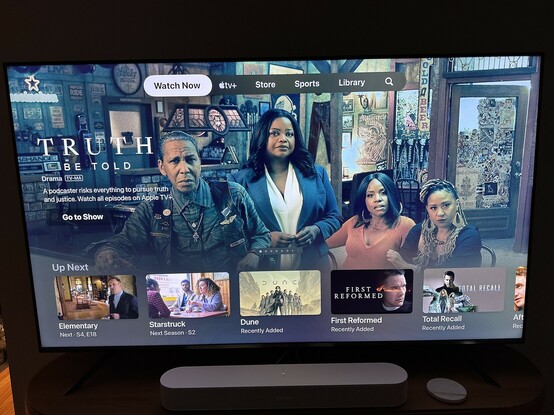

Update: my wife has now seen the change and is angrier than me about it. “Literally who wants this?” was her review.
@birchtree last night it was promoting “Bad Sisters” which is a great show. I know because I’ve already watched it :-)

@haglund Haha well that’s very dumb 😂

And agreed, Bad Sisters was tons of fun!

@[email protected] thanks for the tip! I am pleasantly surprised they’ve include a setting to revert to the watchlist.
@brett I spoke too soon and had to edit the post! Apparently that setting does not remove this. I can’t find how to do it 🤦🏻‍♂️
@[email protected] @[email protected] @[email protected] @[email protected] @[email protected] @[email protected] @[email protected] @[email protected] @[email protected] @[email protected] @[email protected] @[email protected] @[email protected] @[email protected] @[email protected] I keep getting angrier about this. Feel like this is a cruel rug pull after the last few years of training me (and then me training other members of the household) to prefer the tv interface from the app grid. I have liked almost everything I’ve watched on Apple TV but that doesn’t mean I want it pushed so hard. Ugh.
@birchtree You have a bunch of options in the Apple TV settings > Apps > TV (sound off especially)

@mickael Auto-play can be turned off, but demoting my watchlist to below ads for their own shows appears impossible to disable 😞

Woof, terrible update.

@birchtree I agree with you, it’s quite a shitty move.
@birchtree settings → accessibility → motion → auto-play videos → OFF

@bensk That helps with the auth-play part, thanks!

Shame they’ve demoted what I actually want from the app in favor of pushing their own stuff 😞

@birchtree Services!
@bonney I mean I already pay for the service, I can’t even imagine how shitty this is for someone who doesn’t 😵
@birchtree have to pay for these shows somehow!

@birchtree One way to avoid this is to go to Settings > Apps > TV and change the Top Shelf setting to Up Next. Then you can access your Up Next queue on the home screen without opening the TV app at all as long as the TV app is on the top row of apps.

(I also went to Settings > Remotes & Devices and changed the TV Button setting to Home Screen so it takes me home rather than into the TV app.)

@devondundee That technically works, although I much preferred doing this inside the TV app before.

Stupid regression that makes them feel like Netflix, and not in a good way IMO.

@birchtree Yeah, it’s a shame. Definitely a regression in the user experience.

@birchtree FYI I changed a few settings to turn this off in the Settings app under Settings > Apps > TV.

There are settings for Up Next Display, Top Shelf, and Autoplay Video Sound, at least.

@lucas None of these change this view as far as I can tell. Maybe I'm missing something, but I've toggle all the settings on this page and nothing gets it to go away. At best I just turns off the auto-playing trailers for each one.

@birchtree damn that's a shame. I might just not have received this new "feature" yet.

Changing the Top Shelf setting should at least show you your Up Next queue from the Apple TV Home Screen though, right? That way you can play content without even entering the TV app first.

@lucas Yeah, that still works so long as you have the correct “top shelf” setting configured. Not as convenient, but at least that hasn’t changed (yet 😬).
@birchtree it’s truly terrible. One thing you can turn off is the sound on the auto playing trailers but that’s it. I want old Up Next back.
@birchtree It amazes me how bad the AppleTV interface is. If I am watching a series, why doesn’t it have a continue watching section at the top vs forcing me to search for it.
@birchtree I was horrified to discover this too. I am very much put off using it going forwards.
@birchtree settings, apps, tv, top shelf - up next seems to solve it for me.
@Abazigal That’s what I hoped it was as well, but top shelf apparently is the row of icons that display on the Home Screen, not inside the TV app itself. Very frustrating.
@birchtree Should have seen it in the beta — the Apple TV+ content was a row just like Up Next but above it, and pushed your content to below the fold!
@chrisgrande Apple TV is the only Apple device I don’t run on a beta 😂