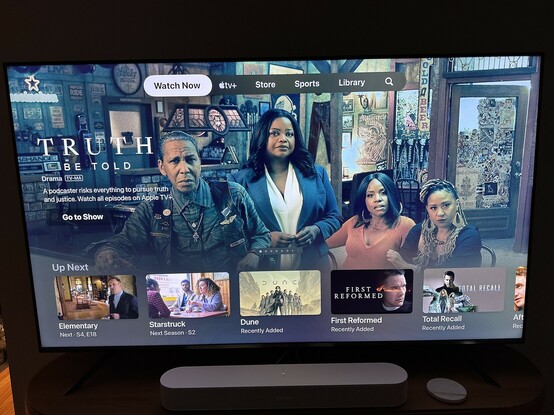
Yuck, I just got the Apple TV update that puts ATV+ continent at the top of the TV app, demoting my actual watchlist below that.

And it auto plays video…with sound…again, yuck.

As far as I can tell, there is no obvious way to turn this off, the best I can do is not open the TV app at all and scroll my queue from the home screen, which is a serious regression IMO 🤮
@birchtree FYI I changed a few settings to turn this off in the Settings app under Settings > Apps > TV.

There are settings for Up Next Display, Top Shelf, and Autoplay Video Sound, at least.

@lucas None of these change this view as far as I can tell. Maybe I'm missing something, but I've toggle all the settings on this page and nothing gets it to go away. At best I just turns off the auto-playing trailers for each one.

@birchtree damn that's a shame. I might just not have received this new "feature" yet.

Changing the Top Shelf setting should at least show you your Up Next queue from the Apple TV Home Screen though, right? That way you can play content without even entering the TV app first.

@lucas Yeah, that still works so long as you have the correct “top shelf” setting configured. Not as convenient, but at least that hasn’t changed (yet 😬).