 Taylor Lorenz
Question for Mastodon experts, is there a way to get some sort of notification feed for mutuals only? I love my general notifs but it’s hard to keep up and I often miss replies from good friends. I’d love a way to skim just those in addition to the general notifs
 singingshark
I mean notifications for replies only btw, not for friends’ main Mastodon posts 😅. Friends reply to me and their replies get lost in the notification feed. So looking for a solution where I can sort replies into “general” and “mutuals only” if that makes sense
 Nancy M Ruff
 Cameron MacLeod
@taylorlorenz Ahh, yes makes sense. Sorry for unintentional notification traffic that doesn't help. Good advanced view feature suggestion @Gargron : multiple notification columns, with a filter for mutuals.
 Giacomo Indiveri
  🧠
🧠@taylorlorenz
I created multiple "lists" so that I can keep track of posts from friends, colleagues, without worrying that their posts get lost in the main "Home" feed
I created multiple "lists" so that I can keep track of posts from friends, colleagues, without worrying that their posts get lost in the main "Home" feed
 Mark Douglas
@taylorlorenz
Ah... Ok... Not sure about just notifications. I'll look into it. Sounds like a great idea.
Ah... Ok... Not sure about just notifications. I'll look into it. Sounds like a great idea.
 E Warren Fan
@taylorlorenz you gonna have to sort through the riff raff like me 😄
 CartyBoston
@taylorlorenz you are 3 hours from reading the wikipedia article for JSON-LD and declaring that you are writing your own instance.
@CartyBoston @taylorlorenz Remember to also read the W3C specs!
 K Priest
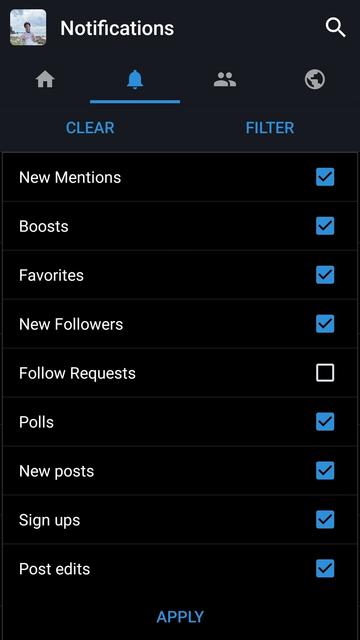
@taylorlorenz depends on the masto app you're using, and it might not be exactly what you're looking for, but Tusky allows me to filter notifications by type.
 @pennyivy
@taylorlorenz People could use #general for outsider comments.
 Joris Meys
@taylorlorenz Is the tab "Mentions" in the Notifications what you're looking for? That's on the website btw, I don't know whether there's an app that allows the same filtering.

 Beeks
Beeks@taylorlorenz say what you will about Twitter algorithms, but back when I used it I never once clicked "see additional replies" and afterwards thought it was a good idea. Of course now all those people have blue checks and are pushed to the top of the replies....
 Albert Hubble
@Beeks @taylorlorenz Reality is, Mastodon never tried to be a clone. And therefore it is more of a social network, while twitter is more a single way sender especially for journalists. Question is, will mastodon try to pleace those kind of users or not. You can't follow 1000 other accounts without an algo unless you do lists for everything.
 Chris L
@Albert_Hubble @Beeks @taylorlorenz as someone that follows 1700 people and bots on Twitter and only used chronological timeline, you can if you don’t care about seeing everything but only care about seeing interesting things. And trust that important stuff will be repeated enough. But yeah, Twitter seems like the people with a ton of followers have more tools than we. Maybe some high volume person will sponsor a client hat solves those use cases ?
@jayalane @Beeks @taylorlorenz I mean, i used to make lists on twitter too, but many don't. Somehow "algorythm" became a bad word in most cases but it really makes Twitter useable if you don't make lists yourself. Also i watched the first 10 minutes of this video and that made me think a little. https://odysee.com/@EposVox:6/the-net-is-healing-beginners-guide-to:d

THE NET IS HEALING - Beginners Guide to Mastodon & Fediverse
 Landsil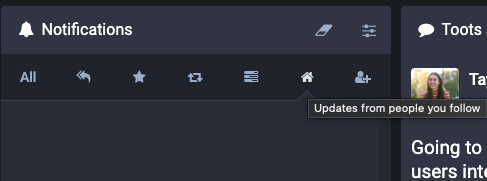
 (っ◔◡◔)っstephen
@taylorlorenz you should to get on @ivory beta, as it has built in filters just for this.
 Adam
Adam@taylorlorenz if you’re interested in an app-specific solution, it appears the @ivory beta has a filtering feature that might suit your needs https://tapbots.social/@mark/109546784111517607
Mark Jardine (@[email protected])
Attached: 2 images We’ve had timeline filters in Tweetbot for awhile now, but moving these tools to the titlebar has made them so much more accessible. In the first image, I filtered my mentions list to only show mentions from people I follow because I was looking for a post. In the second, I wanted to reply to one of my older tweets, but it was far down the list because of a bunch of replies and boosts. So I created a custom filter removing replies and boosts.
@taylorlorenz
In the webpage you can do this in the Preferences-->Notifications page by blocking notifications from people you don't follow
In the webpage you can do this in the Preferences-->Notifications page by blocking notifications from people you don't follow
@taylorlorenz
In the app you can do this in the preferences and this nifty drop-down menu next to notifications
Hope these help

@taylorlorenz
Keep in mind these settings are not kept between the webpage and the app, changing one doesn't affect the other
Keep in mind these settings are not kept between the webpage and the app, changing one doesn't affect the other
 DarthWombat
@taylorlorenz That makes perfect sense, and sounds highly useful. It also helps align with user expectations: a stranger may not expect a response, a mutual may be puzzled/disappointed if one isn't forthcoming.
 Brother Holmes
@taylorlorenz Riley Testut has been beta testing the Ivory app from Tapbots & it looks like it has EXACTLY what you’re looking for. 😀
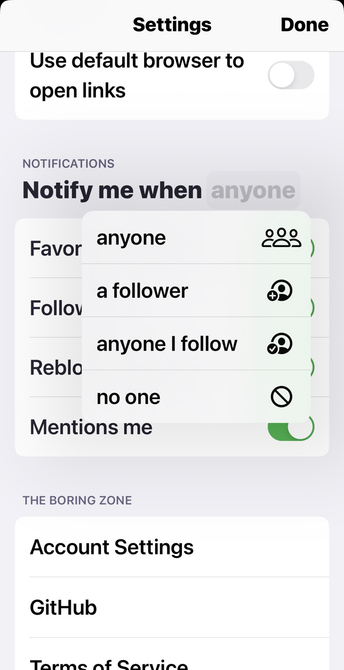
@taylorlorenz if you click on the word “anyone” in notifications you will get a list to pick from
 Joe Chapman (he/him)
@taylorlorenz if you’re OK with a “filter” and not notification, you might find what you want in the new @ivory alpha. This is a filter for “replies” from “people you follow” that include your username.
 R. P. Dillon
@taylorlorenz I guess I'd kind of recommend using multiple identities. In the same way you have an email address for work and a separate address for your actual life, and maybe even another email address that you give to all the websites that constantly ask you to signup, I think a similar pattern for the fediverse can be helpful.