People with multiple Apple Watches for testing or sleep or whatever:

How do you reliably prevent the “other” one (at a given time) from sounding your daily wake-up alarm from your iPhone?

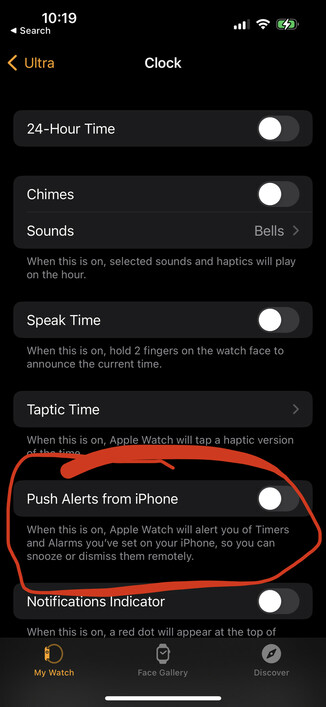
This “Push Alerts from iPhone” setting in Watch -> Clock is off for both watches, but sometimes, the “other” watch sounds the alarm anyway.
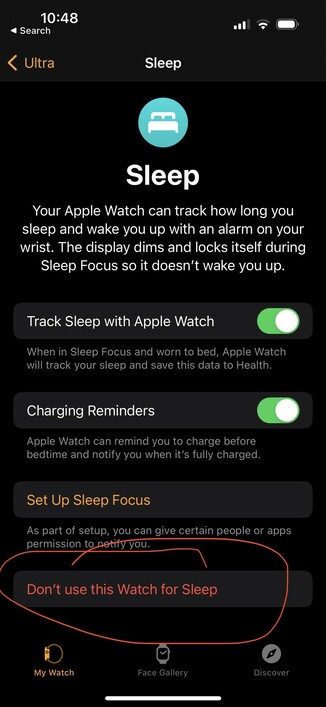
This looks like the answer!

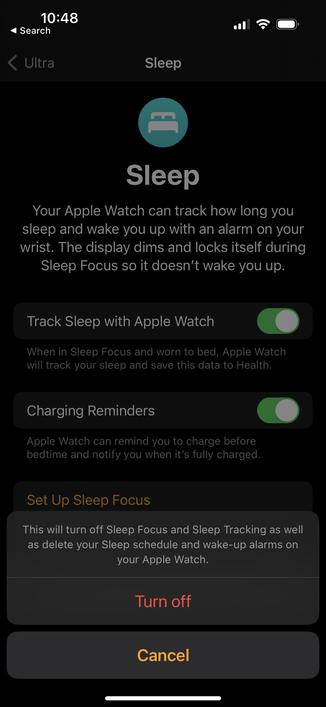
Watch -> Sleep -> Don’t use this Watch for Sleep

Thanks, @captainslim !

https://infosec.exchange/@captainslim/109512751562435199

Chris Johnson (@[email protected])

Attached: 1 image @[email protected] I have two watches, one of which I wear to sleep. I select Don’t use this Watch for Sleep in Sleep settings in the Watch app on the non-sleep one.

Infosec Exchange
(Also, I don’t want to get into a whole thing, but this is a common situation — asking a question, and wanting to share the answer with commentary and thanks — in which I really miss quote-tweeting.)
@marcoarment I understand the justification for not allowing quote toots but I think it’s doing more bad than good

@caseyliss @marcoarment I jumped off the Twitter train so long ago that this whole conversation just feels alien to me. It’s like I jumped into the middle of season 3 of a show:)

I’m wondering if people are missing a habit or a feature. I honestly can’t tell.

@breadbin @caseyliss @marcoarment My perspective is this is like a knife. Billions of people use knives for good every day. A relatively insignificant number use them for evil. We don't ban knives, instead we ban specific uses of them. I think if someone uses the feature to bully or harass, they shouldn't be allowed on mastadon at all (or at least not on any instance that fedarates with the one I'm on).