 Lickability
Every week, one of our iOS devs shares a special tip in the engineering meeting. Here’s this week’s tip from @[email protected]:
Treat your Xcode search results as a to-do list and delete (⌫) results when you no longer need them. #iOSDevTips
Every week, one of our iOS devs shares a special tip in the engineering meeting. Here’s this week’s tip from @[email protected]:
Treat your Xcode search results as a to-do list and delete (⌫) results when you no longer need them. #iOSDevTips
Another tip from @[email protected]:
If you work on one project every day, you’re probably tired of cd-ing to that directory. Save keystrokes by adding "cd /project/directory/here" to your .bash_profile or .zshenv. Now, every new Terminal window and tab will start there! #iOSdevtips
This week’s tip is from @[email protected]:
It’s that time of the year again when your application certificates have expired. Did you know you can renew and export your new certificates directly from Xcode’s preferences? #iOSdevtips
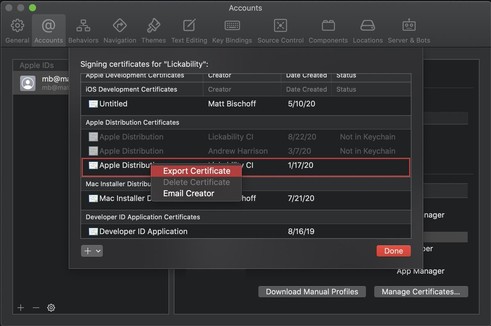
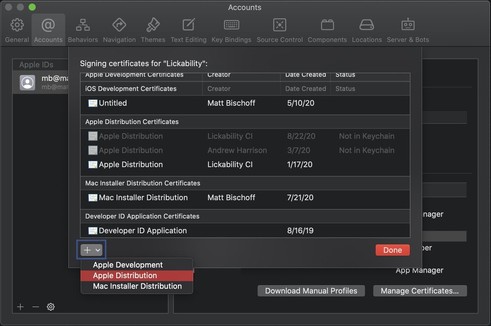
Today’s tip is from @[email protected]:
Use the 🔎 icon in Xcode’s Search Navigator to search for patterns like <Any>. Then, you copy and paste those patterns into the Replace field to do large, complex find and replace operations.
A good example might be making all your classes final. 💫
A testing tip from @[email protected]:
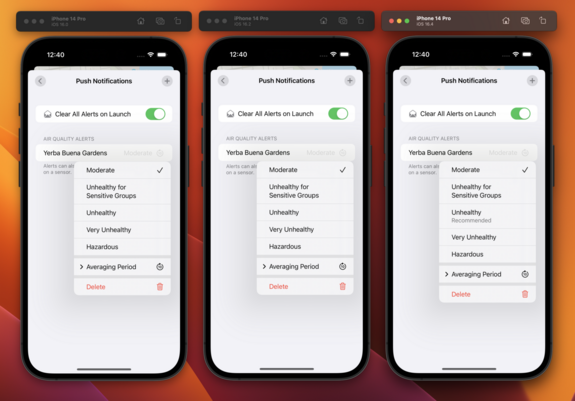
If you use @[email protected]’s SnapshotTesting library, you can see the images and diffs for failing tests right from within Xcode’s Log Navigator. They use a recent Xcode feature called Test Attachments, and it’s so handy. ✨
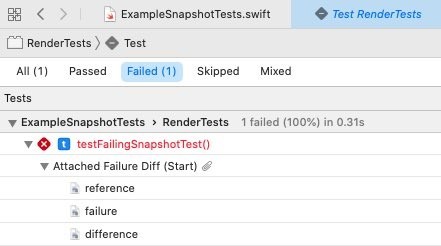
Today’s tip is from @[email protected] about localization:
🌍 Ever forget to localize a string? Use Xcode’s Refactor → Wrap in NSLocalized String command to make localizing your UI copy a snap.
Right click on any string, run the command, add the comment, and you’re done. #iOSDevTips https://t.co/LroOb0fDsW

“Today’s tip is from @mb about localization: 🌍 Ever forget to localize a string? Use Xcode’s Refactor → Wrap in NSLocalized String command to make localizing your UI copy a snap. Right click on any string, run the command, add the comment, and you’re done. #iOSDevTips https://t.co/LroOb0fDsW”
⤵️ Ever forget which SwiftUI property wrapper you’re supposed to use in a given situation? Happens to the best of us. This week’s #iOSDevTips is from @[email protected], who made this handy interactive decision tree to help you remember.
https://www.hackingwithswift.com/articles/227/which-swiftui-property-wrapper
🧠 Today’s #iOSDevTips installment comes from @[email protected]. It’s a philosophy on naming they bring up in code review a lot:
If you can’t figure out a good, simple name for your type, it may be poorly factored code. Try splitting up the object into small pieces that are easier to name. 🪄
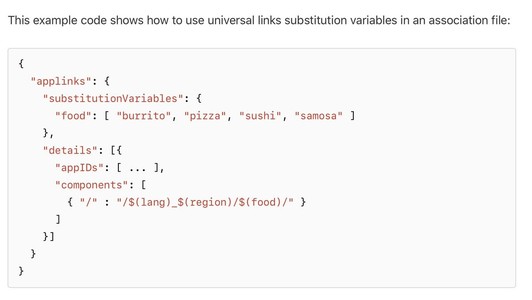
🔗 Today’s #iOSDevTips on Universal Links comes from @[email protected]:
Is your app site association file growing too large? We were able to massively simplify one for a client by using the updated format and new substitution variables introduced in iOS 13.5.
🆕 https://developer.apple.com/documentation/bundleresources/applinks/substitutionvariables
We’re back with more #iOSDevTips 💥
@[email protected] heard about this site via @[email protected] and wanted to share the love—lets you convert your JSON into Codable models for Swift:
quicktype generates types and helper code for reading JSON in C#, Swift, JavaScript, Flow, Python, TypeScript, Go, Rust, Objective-C, Kotlin, C++ and more. Customize online with advanced options, or download a command-line tool.
For our #iOSDevTips post this week, @[email protected] spotted this tweet about a really handy keyboard shortcut that’s especially useful in large Xcode projects. ⌨️
Once you learn it, you’ll use it daily.💡 https://twitter.com/jordanmorgan10/status/1368985366586396676
🛠✨ This week’s #iOSDevTips tweet comes from @[email protected], and @[email protected] has started using it regularly when Refactor and Edit All in Scope don’t fit the bill!
https://twitter.com/MuseumShuffle/status/1379584369388625922
Another week, another #iOSDevTips tweet!
We often attach gifs or videos to our pull requests to show reviewers our features in action. With Xcode 12.5, we’re able to save a few steps and record directly from the simulator! 😍
https://twitter.com/txaiwieser/status/1387892348378652672?s=20
🤩 Our tip this week is from @[email protected]!
To sort all the files in an Xcode group by either name or by type, select the group and navigate to Edit → Sort → By Name or By Type. #iOSDevTips
Here's a tip from @[email protected] 📣
Starting in Xcode 11, you can mark assets as “development assets,” and they won't be added to your shipping app—which is great for test data in SwiftUI previews! #iOSDevTips
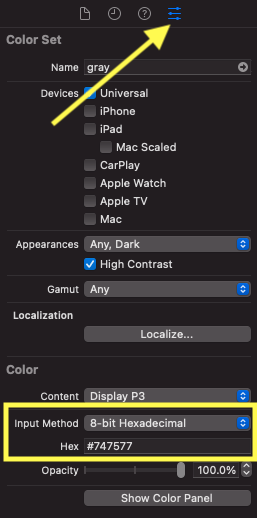
This week's tip is from @[email protected]!
You can specify a hex value when defining colors in asset catalogs by selecting an individual color variant and using the Attributes Inspector. Comes in pretty handy if your design system uses hex values! 🎨 #iOSDevTips
Back with more #iOSDevTips for you! This week's tip comes from @[email protected]:
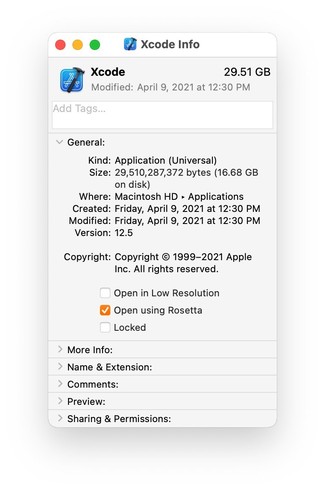
✨ A tip from @[email protected]:
I don’t know who needs to hear this, but if you’re using an M1 Mac and your dependencies don’t support multiple simulator architectures, check “Open using Rosetta” in the Info Panel on Xcode and Simulator, and relaunch! #iOSDevTips
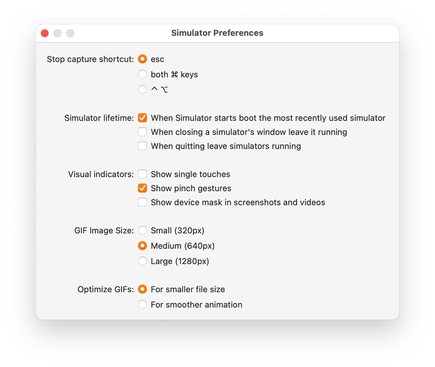
💡 This week's tip comes from @[email protected]:
If you're unsatisfied with Xcode Simulator gifs, you can adjust the quality and animation smoothness in the Simulator Preferences menu below—no more choppy gifs! #iOSDevTips
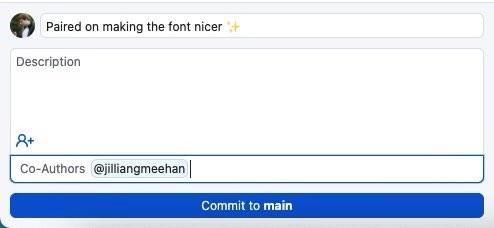
🤝Here’s a tip from @[email protected]: don’t forget to credit your teammates when you’re pair programming using @[email protected]’s co-authors feature. #iOSDevTips
Here’s how to use it: https://docs.github.com/en/github/committing-changes-to-your-project/creating-and-editing-commits/creating-a-commit-with-multiple-authors
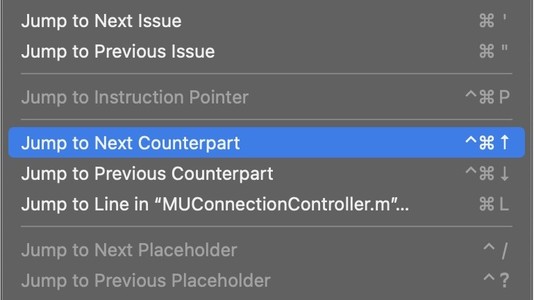
🌟Today’s tip is from our friend @[email protected]! Another super useful keyboard shortcut to remember:
#iOSDevTips https://twitter.com/jordanmorgan10/status/1428081541700325377

“💡Did you know? Xcode Edition 💡 You can zoom out and see all of your open tabs, the same way that you can in Safari, within Xcode. I use this to gain context on all that I've got going on and to quickly choose a file instead of tabbing my way there. The shortcut is "⌘ ⇧ \" https://t.co/DW8AauDlWQ”
@[email protected] 🅰️ In iOS 15, you can limit the min and max sizes of Dynamic Type in any view using the new minimum and maximum contentSizeCategory properties.
This is great for making sure your layout doesn't break at huge sizes (but don't overdo it). #iOSDevTips
https://useyourloaf.com/blog/restricting-dynamic-type-sizes/
“🎨 Cool API Alert 🎨 AXNameFromColor. Snag a human readable string from any CGColor ✨ You can use this for accessibility traits to boost VoiceOver experiences, or even leverage its utility outside of accessibility specific scenarios where you simply need a color's name.”
@[email protected] Ever have your unit tests fail and end up with a console full of logs you don't understand? We've been loving this new feature from Kaleidoscope that helps you get to the bottom of it! 🕵️♂️🔍 #iOSDevTips
https://twitter.com/kaleidoscopeapp/status/1478411978527940613?s=20&t=Rne_1y84L3SBk6Lt84gGGQ
@[email protected] Last year, we found a performance issue in UICollectionViewDiffableDataSource. After reporting the bug & speaking to Apple at WWDC, @[email protected] was excited that it's now fixed in the iOS 15.4 beta!
If you have this issue, try Xcode beta 🎉 #iOSDevTips
👀 Ever wanted to know where and how Apple uses web views in their Mac apps? Use the Web Inspector from Safari → Develop → App Name. #iOSDevTips
https://twitter.com/jimniels/status/1498337278875348994?s=20&t=79LHntuSfogtuJxNJXJAzg
🔎 Have you ever needed to check if one Swift string contains another regardless of case? Use the options parameter on the .range() method & specify .caseInsensitive — thanks to our friend @[email protected] for the tip! #iOSDevTips
📲 Ever needed to find the device ID of a running iOS Simulator? Try this handy Terminal command from @[email protected]:
xcrun simctl list | egrep '(Booted)'
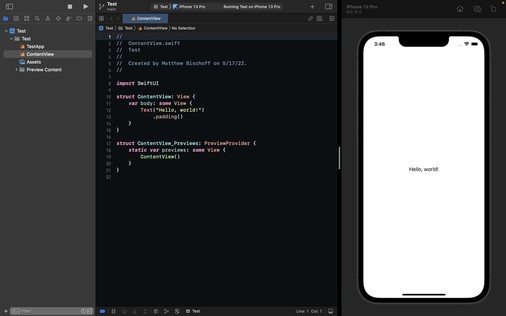
👀 For those times you don’t want to be distracted by Twitter, did you know that you can fullscreen Xcode and the Simulator side-by-side with split screen?
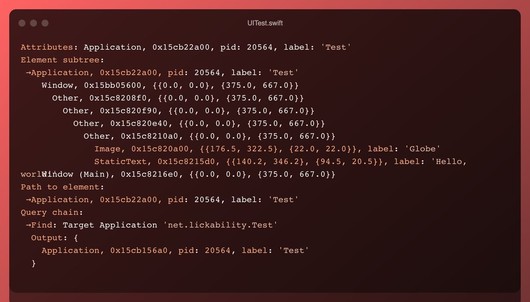
If you’re ever writing UI tests and you want to see a textual representation of the UI tree, run print(XCUIApplication().debugDescription) 🤖
Thanks for the tip @[email protected]! #iOSDevTips
🔎 This is a great #iOSDevTips from @[email protected] ! We’re already using this new feature in iOS 16 to find and fix hangs in our apps.
Our engineers have been waiting for this feature since SwiftUI was introduced! Thanks @[email protected] for the #iOSDevTips 🙏
https://twitter.com/clarko/status/1552383186604216321?s=21&t=0p4GnP-oBWCqgbOK7o30tQ
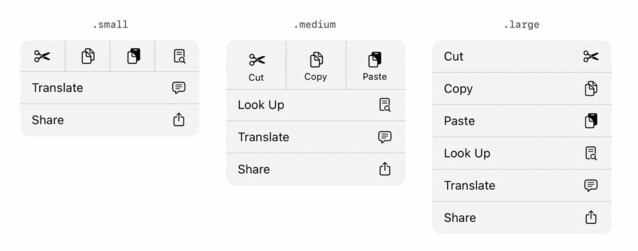
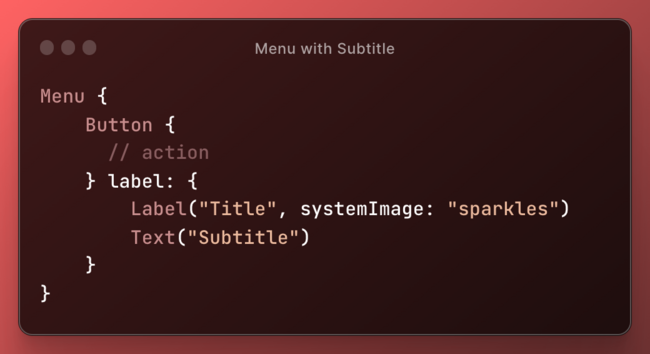
🪧 Our designer was super excited that UIMenu gained size options for elements in iOS 16!
Specify them with the preferredElementSize API:
https://developer.apple.com/documentation/uikit/uimenu/4013313-preferredelementsize?changes=latest_minor
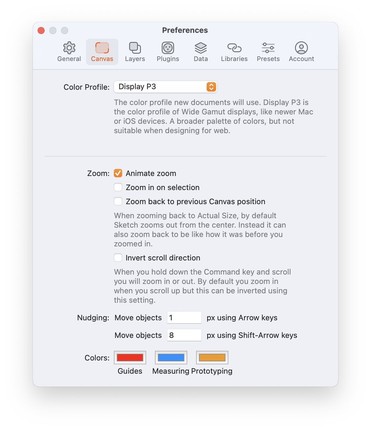
🪫 If the Xcode 14 beta is draining your laptop battery, our friend @[email protected] put together a blog post with a workaround! It's been a lifesaver. #iOSDevTips
https://blog.nihongo-app.com/stop-xcode-14-beta-from-pegging-cpu/
🏎️ This tip from @[email protected] is making our SwiftUI even faster to write in Xcode 14! #iOSDevTips
https://twitter.com/edwardsanchez/status/1570168643962699777
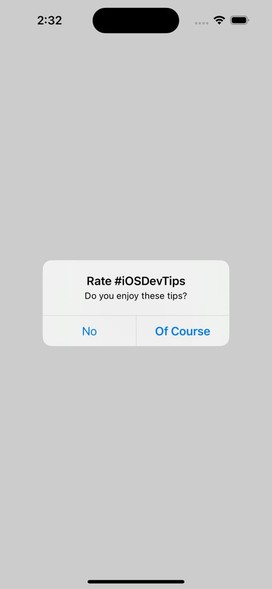
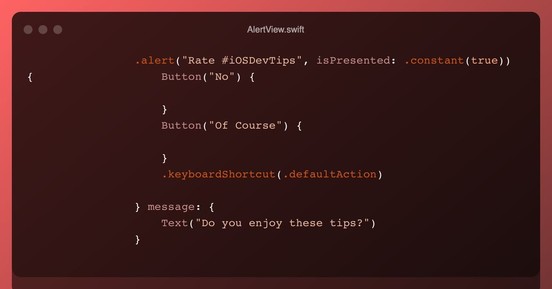
Have you ever tried to bold an alert action in SwiftUI? Here's a tip from @[email protected] to get the styling of a default action—set this modifier on your button:
.keyboardShortcut(.defaultAction)
If you’re frequently submitting builds to App Store Connect, this one weird trick will save you time on every submission! ⏳😅 #iOSDevTips
https://twitter.com/kslazinski/status/1573980451550613504?s=46&t=B9T4IBRs3LLcgzUzDo1VYQ

“👋 Hey, iOS developers. In case someone doesn’t know about this… You can add “App Uses Non-Exempt Encryption” to your Info.plist. After this App Store Connect will stop asking you if your app is using cryptography, every time you upload new build to TestFlight 🙂 #iOSdev”
🤯 While we don’t need to do this often, it’s super handy to have an idiomatic way to iterate over relationships. Thanks for the #iOSDevTips Kyle!
https://twitter.com/kyleve/status/1575353657825972224?s=46&t=M3yeNJZAPcbK0hLlDDLqkA
One of @[email protected]’ favorite Xcode 14 features is the Product → Clear All Issues menu item 🧹
It’s super handy when working on large codebases that sometimes generate spurious warnings or errors during the build process #iOSDevTips
✨ Wanna add some juicy animations to your iOS app but don’t have time to build them from scratch? @[email protected] built the Pow library just for you! (And it’s only $99) #iOSDevTips
This set of resources that recently came out is very helpful—thanks for sharing, @[email protected] 🙏 #iOSDevTips
https://twitter.com/mikaela__caron/status/1587066859278434304?s=12&t=nqshGkzyTDq4x1JiPeQ05A
“💡Have you ever had an app idea, but no clue what to do next? I just saw this in the Apple Developer App, how to plan an app on all of Apple’s platforms, iOS, iPadOS, macOS, etc. It covers what you can do, where to start, and how to take your app further https://t.co/vnAubNcdb1”
We’re back with more #iOSDevTips 👋
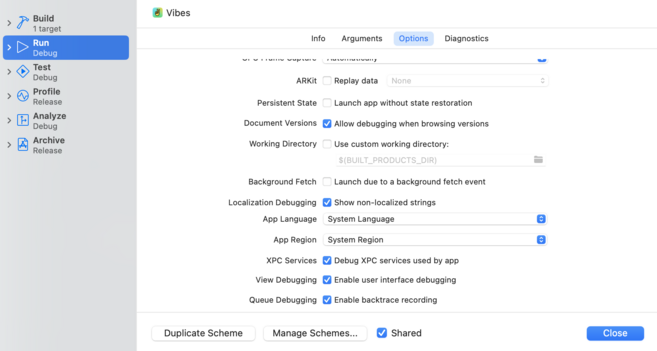
If you’re localizing your app & not sure how to find every string you need to localize, edit your scheme and check “Show non-localized strings” in Run → Options. Then, look for all-caps strings.
via @kharrison
https://useyourloaf.com/blog/finding-non-localized-strings/
🚂 Our engineers on larger projects have been waiting for this GitHub feature for a long time. Can't wait to queue up some PRs! #iOSDevTips
https://github.blog/changelog/2023-02-08-pull-request-merge-queue-public-beta/
Another GitHub tip:
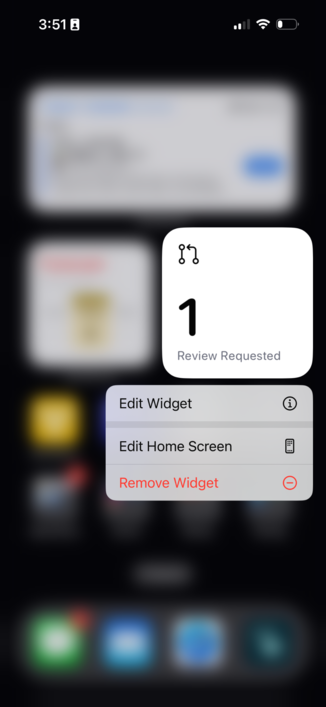
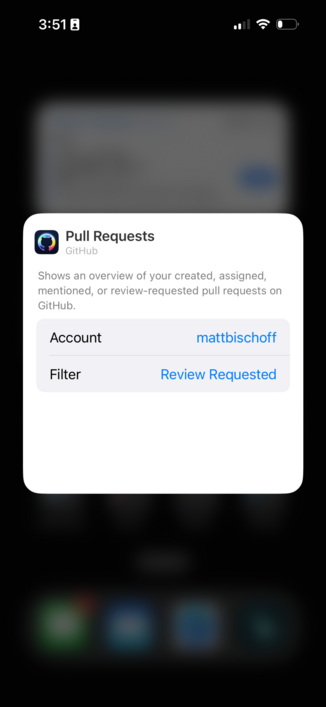
If you find yourself always behind on code review (we’ve been there 😅), set up a Focus Mode for work & add the GitHub pull request widget to your home screen—like
@matthewbischoff does! #iOSDevTips
One of the things we’re most excited about in Xcode 14.3 and iOS 16.4 (out today!) is the new scrollBounceBehavior modifier in SwiftUI 📜 #iOSDevTips https://developer.apple.com/documentation/swiftui/view/scrollbouncebehavior(_:axes:)?changes=latest_minor
via: https://twitter.com/SwiftyAlex/status/1626586781188775941
🤞 Hoping the new backDeployed() API means we’ll be seeing backward-compatible SwiftUI from Apple during #WWDC23 so we can keep shipping great stuff to folks on older versions of iOS! #iOSDevTips
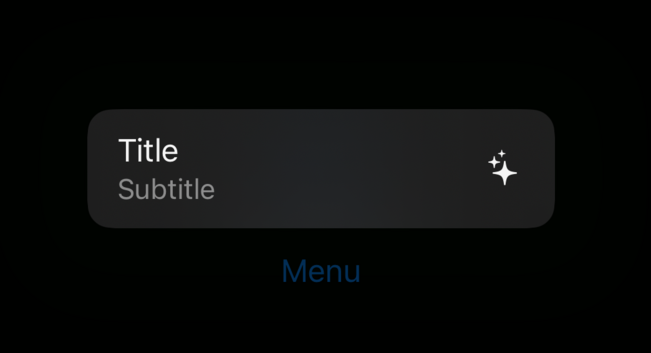
🗺️ Our engineers have stumbled upon this a few times by accident—we didn’t know what was going on until we saw this tweet!
Very cool feature (when done intentionally 😂) #iOSDevTips
via: https://twitter.com/Lee_Kah_Seng/status/1640249889329147905
🚦 With #WWDC23 right around the corner, here’s a helpful blog post from @Mecid about how to use APIs only on operating systems where they’re available! #iOSDevTips
https://swiftwithmajid.com/2023/05/17/api-availability-in-swift/
🧠 The new Observable type greatly simplifies data flow and improves performance in SwiftUI, and our engineers are so excited to use it! #WWDC23
However, there’s a critical gotcha that Apple mentions briefly in their docs—if you use SwiftUI, you’ll NEED to know this. #iOSDevTips
https://developer.apple.com/documentation/swiftui/managing-model-data-in-your-app
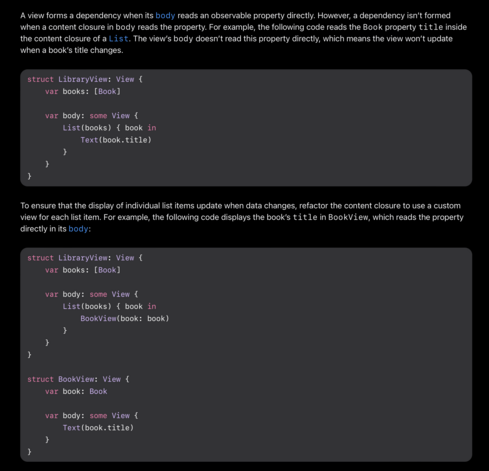
We’ve now seen indications that this behavior may be inaccurately documented. We tested it out ourselves in a minimal sample project, and everything worked as expected without making a new view — it seems like this documentation may simply be incorrect. Phew!
Here’s further discussion on the forums: https://forums.swift.org/t/observable-in-swiftui-confusion/65407

Fitting code on slides sometimes requires some things to be elided. The initializer part is something I think is reasonable to contain within the final version (because it is pretty heinous not to have it and rely on the default value definite initialization). Hence why I am a very strong +1 on the init accessors pitch. To me it is clear we need a solution in that space. The docs should probably be updated. Since that will (with modifications to account for the initializers and identifiable pa...
Another update on this: Apple has confirmed that the docs are going to get updated.
(Thanks @chriseidhof!)
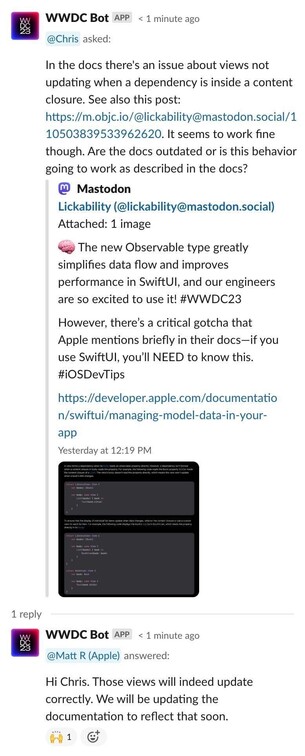
@lickability @chriseidhof Thanks for calling this out originally, and for posting a follow-up!
FYI we updated this document a few days ago, correcting that section as well as a few other changes:
https://developer.apple.com/documentation/swiftui/managing-model-data-in-your-app
Also check out the migration article, which was also updated recently:
Let us know if there’s more feedback or questions we can answer!
In Swift 5.9, if statements are now expressions—which means you can write them inline when declaring constants or variables! 🙌
😇 We’ll use this all the time for targeting features of new versions of iOS. #iOSDevTips
🔂 One of our favorite tiny additions to SwiftUI this year is the new .buttonRepeatBehavior modifier, which lets you make buttons that keep performing an action as you hold them! #iOSDevTips
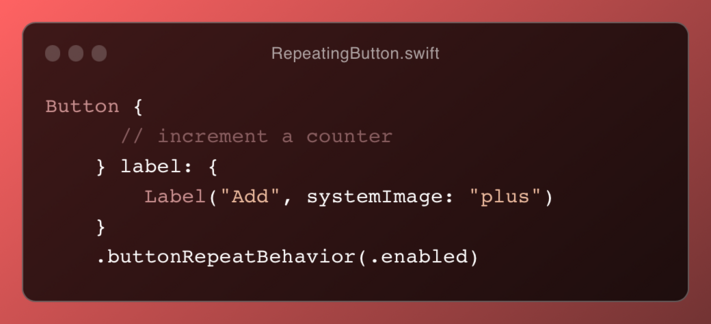

Attached: 1 video So nice that this is now possible with a single line of code in SwiftUI (hold to repeat the action) It even speeds up as you hold it 😍
🤯👠 Our SwiftUI engineers are head over heels for this change. No more need for arbitrary Groups to work around the limit! #iOSDevTips
🔴 Ever since we learned this, we’ve been adding SF Symbols to all of our custom notification actions. So many apps are still missing them! #iOSDevTips
In SwiftUI, Picker is fundamental when you have options to choose from:
🚥 2 to 3? Use a segmented control.
📋 4 to 6? Try a menu.
👇 More than that? Stick with the classic list using this tip from @jordanmorgan. #iOSDevTips
@lickability I think this looks worse than it is.
Previously, `@ObservedObject var books: [Book]` would have been totally invalid – the `@ObservedObject` property doesn't act on arrays, it acts on single objects.
This scenario looks like the same thing, it's just a little more subtle since there's no explicit attribute on the observed object.
@cocoawithlove @lickability yeah, this looks like the same limitation as having nested `@ Published` properties? I’ve had to write a few observers that map nested `objectWillChange` to `self.objectWillChange.send()`
Still good to know though. I think I’ve had one or two cases where I had to manually call `objectWillChange` for some reason, wondering if something like that is still possible?
@lickability This will work in the final version, and the docs are outdated.
See https://forums.swift.org/t/observable-in-swiftui-confusion/65407/4
Fitting code on slides sometimes requires some things to be elided. The initializer part is something I think is reasonable to contain within the final version (because it is pretty heinous not to have it and rely on the default value definite initialization). Hence why I am a very strong +1 on the init accessors pitch. To me it is clear we need a solution in that space. The docs should probably be updated. Since that will (with modifications to account for the initializers and identifiable pa...
@lickability @nicklockwood Yeah.. there’s that magic again. It’s documented somewhere so not totally opaque, but as well as just declaring what you want, you also need a deep understanding of how that declaration is used by the engine that transforms it into imperative code.
When things stop working that becomes a nightmare. Same story as with cocoa bindings, GC, CSS, etc.
I prefer being explicit even if it results in more boilerplate code.
Hiding this code behind a macro is even nicer.


 Matt Ricketson
 Matt Gallagher
 Pavel
Pavel Aviel
Aviel Chris Eidhof
 Thomas Krajacic
 Frank Reiff
 Kyle Bashour
 Harlan Haskins
 Mike Singleton
 lankybutmacho