 Lickability
Every week, one of our iOS devs shares a special tip in the engineering meeting. Here’s this week’s tip from @[email protected]:
Treat your Xcode search results as a to-do list and delete (⌫) results when you no longer need them. #iOSDevTips
Every week, one of our iOS devs shares a special tip in the engineering meeting. Here’s this week’s tip from @[email protected]:
Treat your Xcode search results as a to-do list and delete (⌫) results when you no longer need them. #iOSDevTips
Another tip from @[email protected]:
If you work on one project every day, you’re probably tired of cd-ing to that directory. Save keystrokes by adding "cd /project/directory/here" to your .bash_profile or .zshenv. Now, every new Terminal window and tab will start there! #iOSdevtips
This week’s tip is from @[email protected]:
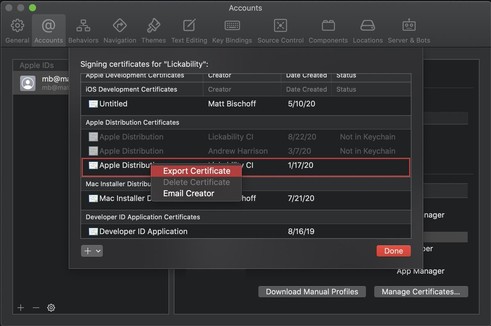
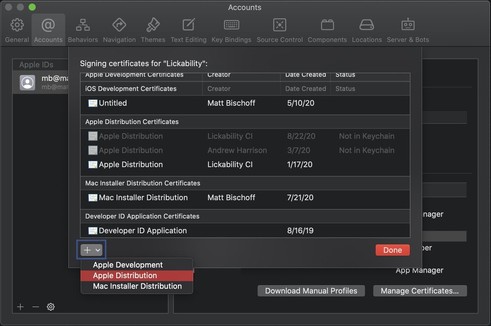
It’s that time of the year again when your application certificates have expired. Did you know you can renew and export your new certificates directly from Xcode’s preferences? #iOSdevtips
Today’s tip is from @[email protected]:
Use the 🔎 icon in Xcode’s Search Navigator to search for patterns like <Any>. Then, you copy and paste those patterns into the Replace field to do large, complex find and replace operations.
A good example might be making all your classes final. 💫
A testing tip from @[email protected]:
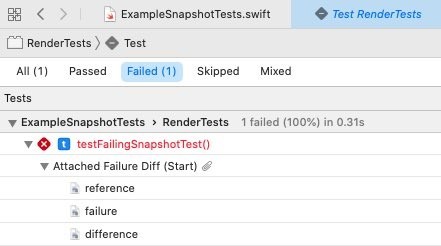
If you use @[email protected]’s SnapshotTesting library, you can see the images and diffs for failing tests right from within Xcode’s Log Navigator. They use a recent Xcode feature called Test Attachments, and it’s so handy. ✨
Today’s tip is from @[email protected] about localization:
🌍 Ever forget to localize a string? Use Xcode’s Refactor → Wrap in NSLocalized String command to make localizing your UI copy a snap.
Right click on any string, run the command, add the comment, and you’re done. #iOSDevTips https://t.co/LroOb0fDsW

“Today’s tip is from @mb about localization: 🌍 Ever forget to localize a string? Use Xcode’s Refactor → Wrap in NSLocalized String command to make localizing your UI copy a snap. Right click on any string, run the command, add the comment, and you’re done. #iOSDevTips https://t.co/LroOb0fDsW”
⤵️ Ever forget which SwiftUI property wrapper you’re supposed to use in a given situation? Happens to the best of us. This week’s #iOSDevTips is from @[email protected], who made this handy interactive decision tree to help you remember.
https://www.hackingwithswift.com/articles/227/which-swiftui-property-wrapper
🧠 Today’s #iOSDevTips installment comes from @[email protected]. It’s a philosophy on naming they bring up in code review a lot:
If you can’t figure out a good, simple name for your type, it may be poorly factored code. Try splitting up the object into small pieces that are easier to name. 🪄
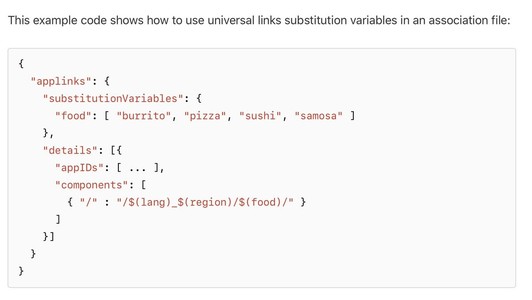
🔗 Today’s #iOSDevTips on Universal Links comes from @[email protected]:
Is your app site association file growing too large? We were able to massively simplify one for a client by using the updated format and new substitution variables introduced in iOS 13.5.
🆕 https://developer.apple.com/documentation/bundleresources/applinks/substitutionvariables
We’re back with more #iOSDevTips 💥
@[email protected] heard about this site via @[email protected] and wanted to share the love—lets you convert your JSON into Codable models for Swift:
quicktype generates types and helper code for reading JSON in C#, Swift, JavaScript, Flow, Python, TypeScript, Go, Rust, Objective-C, Kotlin, C++ and more. Customize online with advanced options, or download a command-line tool.
For our #iOSDevTips post this week, @[email protected] spotted this tweet about a really handy keyboard shortcut that’s especially useful in large Xcode projects. ⌨️
Once you learn it, you’ll use it daily.💡 https://twitter.com/jordanmorgan10/status/1368985366586396676
🛠✨ This week’s #iOSDevTips tweet comes from @[email protected], and @[email protected] has started using it regularly when Refactor and Edit All in Scope don’t fit the bill!
https://twitter.com/MuseumShuffle/status/1379584369388625922
Another week, another #iOSDevTips tweet!
We often attach gifs or videos to our pull requests to show reviewers our features in action. With Xcode 12.5, we’re able to save a few steps and record directly from the simulator! 😍
https://twitter.com/txaiwieser/status/1387892348378652672?s=20
🤩 Our tip this week is from @[email protected]!
To sort all the files in an Xcode group by either name or by type, select the group and navigate to Edit → Sort → By Name or By Type. #iOSDevTips
Here's a tip from @[email protected] 📣
Starting in Xcode 11, you can mark assets as “development assets,” and they won't be added to your shipping app—which is great for test data in SwiftUI previews! #iOSDevTips
This week's tip is from @[email protected]!
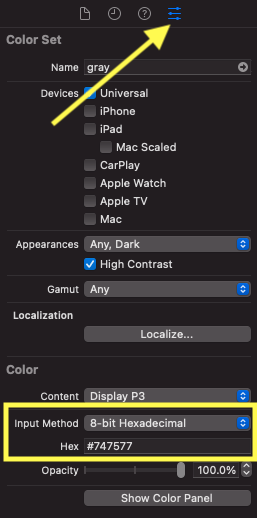
You can specify a hex value when defining colors in asset catalogs by selecting an individual color variant and using the Attributes Inspector. Comes in pretty handy if your design system uses hex values! 🎨 #iOSDevTips
Back with more #iOSDevTips for you! This week's tip comes from @[email protected]:
✨ A tip from @[email protected]:
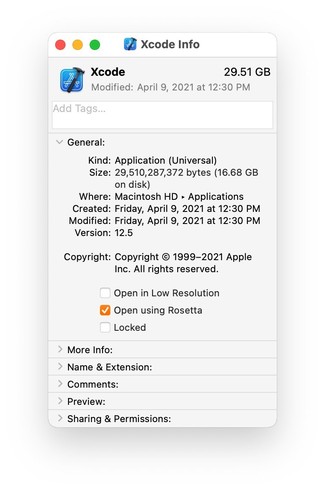
I don’t know who needs to hear this, but if you’re using an M1 Mac and your dependencies don’t support multiple simulator architectures, check “Open using Rosetta” in the Info Panel on Xcode and Simulator, and relaunch! #iOSDevTips
💡 This week's tip comes from @[email protected]:
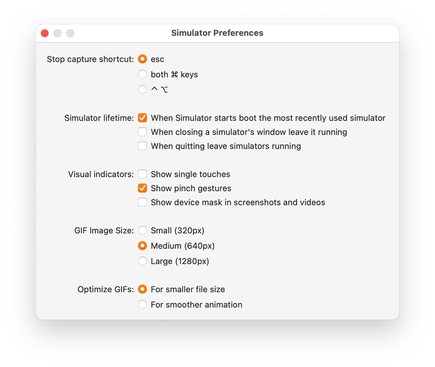
If you're unsatisfied with Xcode Simulator gifs, you can adjust the quality and animation smoothness in the Simulator Preferences menu below—no more choppy gifs! #iOSDevTips
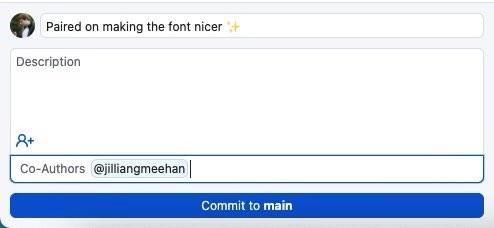
🤝Here’s a tip from @[email protected]: don’t forget to credit your teammates when you’re pair programming using @[email protected]’s co-authors feature. #iOSDevTips
Here’s how to use it: https://docs.github.com/en/github/committing-changes-to-your-project/creating-and-editing-commits/creating-a-commit-with-multiple-authors


 Dan Johansen