 Lickability
Here's a tip from @[email protected] 📣
Starting in Xcode 11, you can mark assets as “development assets,” and they won't be added to your shipping app—which is great for test data in SwiftUI previews! #iOSDevTips
Here's a tip from @[email protected] 📣
Starting in Xcode 11, you can mark assets as “development assets,” and they won't be added to your shipping app—which is great for test data in SwiftUI previews! #iOSDevTips
This week's tip is from @[email protected]!
You can specify a hex value when defining colors in asset catalogs by selecting an individual color variant and using the Attributes Inspector. Comes in pretty handy if your design system uses hex values! 🎨 #iOSDevTips
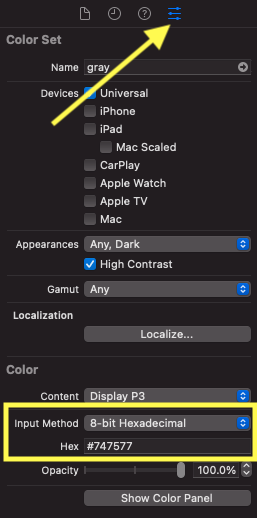
Back with more #iOSDevTips for you! This week's tip comes from @[email protected]:
✨ A tip from @[email protected]:
I don’t know who needs to hear this, but if you’re using an M1 Mac and your dependencies don’t support multiple simulator architectures, check “Open using Rosetta” in the Info Panel on Xcode and Simulator, and relaunch! #iOSDevTips
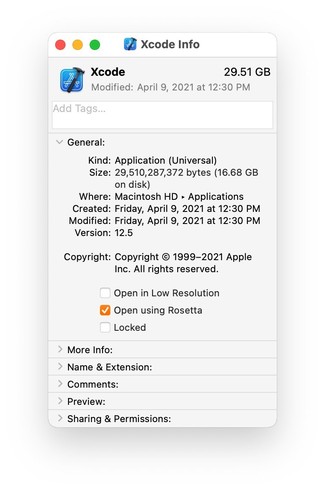
💡 This week's tip comes from @[email protected]:
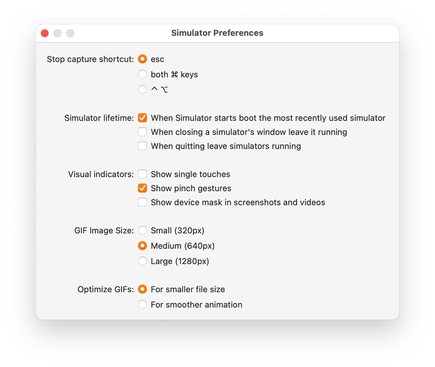
If you're unsatisfied with Xcode Simulator gifs, you can adjust the quality and animation smoothness in the Simulator Preferences menu below—no more choppy gifs! #iOSDevTips
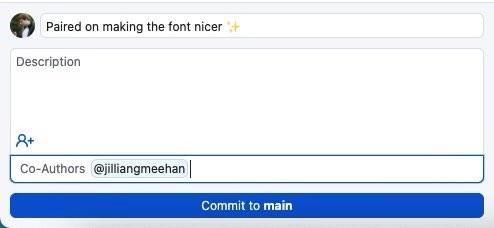
🤝Here’s a tip from @[email protected]: don’t forget to credit your teammates when you’re pair programming using @[email protected]’s co-authors feature. #iOSDevTips
Here’s how to use it: https://docs.github.com/en/github/committing-changes-to-your-project/creating-and-editing-commits/creating-a-commit-with-multiple-authors
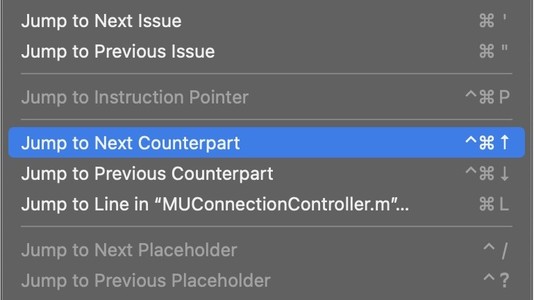
🌟Today’s tip is from our friend @[email protected]! Another super useful keyboard shortcut to remember:
#iOSDevTips https://twitter.com/jordanmorgan10/status/1428081541700325377

“💡Did you know? Xcode Edition 💡 You can zoom out and see all of your open tabs, the same way that you can in Safari, within Xcode. I use this to gain context on all that I've got going on and to quickly choose a file instead of tabbing my way there. The shortcut is "⌘ ⇧ \" https://t.co/DW8AauDlWQ”
@[email protected] 🅰️ In iOS 15, you can limit the min and max sizes of Dynamic Type in any view using the new minimum and maximum contentSizeCategory properties.
This is great for making sure your layout doesn't break at huge sizes (but don't overdo it). #iOSDevTips
https://useyourloaf.com/blog/restricting-dynamic-type-sizes/
“🎨 Cool API Alert 🎨 AXNameFromColor. Snag a human readable string from any CGColor ✨ You can use this for accessibility traits to boost VoiceOver experiences, or even leverage its utility outside of accessibility specific scenarios where you simply need a color's name.”
@[email protected] Ever have your unit tests fail and end up with a console full of logs you don't understand? We've been loving this new feature from Kaleidoscope that helps you get to the bottom of it! 🕵️♂️🔍 #iOSDevTips
https://twitter.com/kaleidoscopeapp/status/1478411978527940613?s=20&t=Rne_1y84L3SBk6Lt84gGGQ
@[email protected] Last year, we found a performance issue in UICollectionViewDiffableDataSource. After reporting the bug & speaking to Apple at WWDC, @[email protected] was excited that it's now fixed in the iOS 15.4 beta!
If you have this issue, try Xcode beta 🎉 #iOSDevTips
👀 Ever wanted to know where and how Apple uses web views in their Mac apps? Use the Web Inspector from Safari → Develop → App Name. #iOSDevTips
https://twitter.com/jimniels/status/1498337278875348994?s=20&t=79LHntuSfogtuJxNJXJAzg
🔎 Have you ever needed to check if one Swift string contains another regardless of case? Use the options parameter on the .range() method & specify .caseInsensitive — thanks to our friend @[email protected] for the tip! #iOSDevTips
📲 Ever needed to find the device ID of a running iOS Simulator? Try this handy Terminal command from @[email protected]:
xcrun simctl list | egrep '(Booted)'
👀 For those times you don’t want to be distracted by Twitter, did you know that you can fullscreen Xcode and the Simulator side-by-side with split screen?
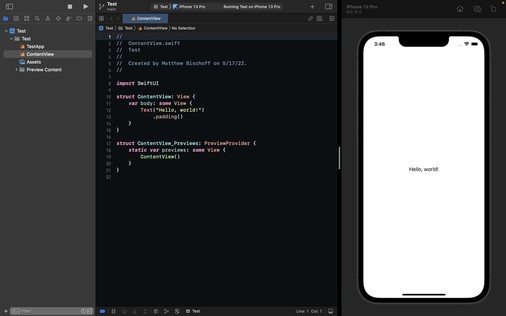
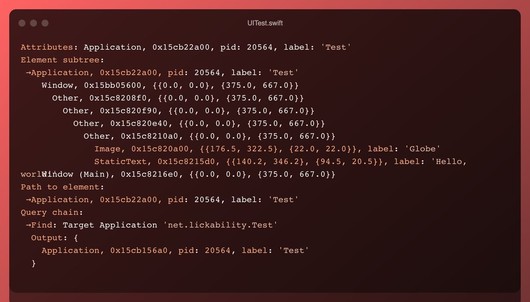
If you’re ever writing UI tests and you want to see a textual representation of the UI tree, run print(XCUIApplication().debugDescription) 🤖
Thanks for the tip @[email protected]! #iOSDevTips
🔎 This is a great #iOSDevTips from @[email protected] ! We’re already using this new feature in iOS 16 to find and fix hangs in our apps.
Our engineers have been waiting for this feature since SwiftUI was introduced! Thanks @[email protected] for the #iOSDevTips 🙏
https://twitter.com/clarko/status/1552383186604216321?s=21&t=0p4GnP-oBWCqgbOK7o30tQ
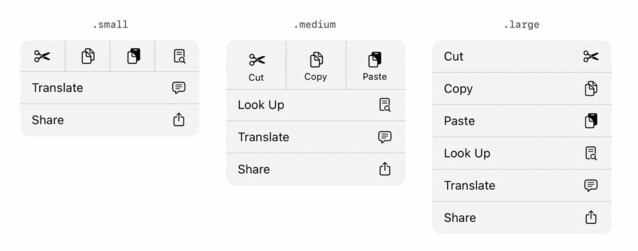
🪧 Our designer was super excited that UIMenu gained size options for elements in iOS 16!
Specify them with the preferredElementSize API:
https://developer.apple.com/documentation/uikit/uimenu/4013313-preferredelementsize?changes=latest_minor
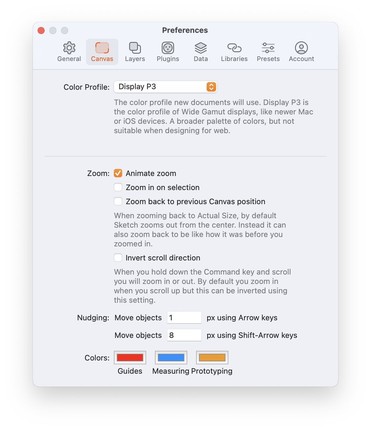
🪫 If the Xcode 14 beta is draining your laptop battery, our friend @[email protected] put together a blog post with a workaround! It's been a lifesaver. #iOSDevTips
https://blog.nihongo-app.com/stop-xcode-14-beta-from-pegging-cpu/
🏎️ This tip from @[email protected] is making our SwiftUI even faster to write in Xcode 14! #iOSDevTips
https://twitter.com/edwardsanchez/status/1570168643962699777
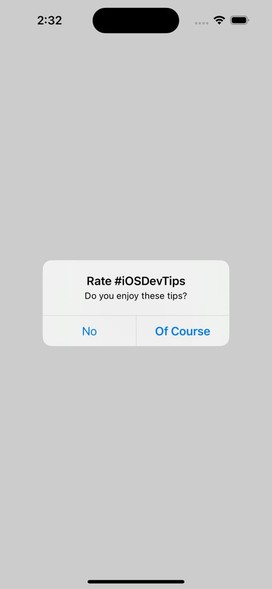
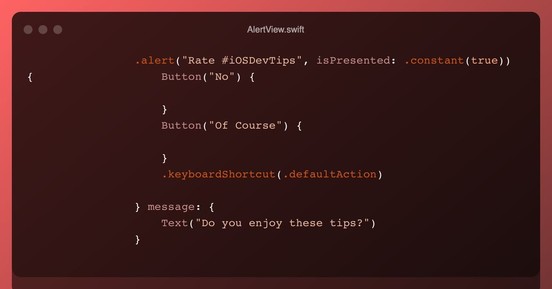
Have you ever tried to bold an alert action in SwiftUI? Here's a tip from @[email protected] to get the styling of a default action—set this modifier on your button:
.keyboardShortcut(.defaultAction)
If you’re frequently submitting builds to App Store Connect, this one weird trick will save you time on every submission! ⏳😅 #iOSDevTips
https://twitter.com/kslazinski/status/1573980451550613504?s=46&t=B9T4IBRs3LLcgzUzDo1VYQ

“👋 Hey, iOS developers. In case someone doesn’t know about this… You can add “App Uses Non-Exempt Encryption” to your Info.plist. After this App Store Connect will stop asking you if your app is using cryptography, every time you upload new build to TestFlight 🙂 #iOSdev”
🤯 While we don’t need to do this often, it’s super handy to have an idiomatic way to iterate over relationships. Thanks for the #iOSDevTips Kyle!
https://twitter.com/kyleve/status/1575353657825972224?s=46&t=M3yeNJZAPcbK0hLlDDLqkA
One of @[email protected]’ favorite Xcode 14 features is the Product → Clear All Issues menu item 🧹
It’s super handy when working on large codebases that sometimes generate spurious warnings or errors during the build process #iOSDevTips
✨ Wanna add some juicy animations to your iOS app but don’t have time to build them from scratch? @[email protected] built the Pow library just for you! (And it’s only $99) #iOSDevTips
This set of resources that recently came out is very helpful—thanks for sharing, @[email protected] 🙏 #iOSDevTips
https://twitter.com/mikaela__caron/status/1587066859278434304?s=12&t=nqshGkzyTDq4x1JiPeQ05A
“💡Have you ever had an app idea, but no clue what to do next? I just saw this in the Apple Developer App, how to plan an app on all of Apple’s platforms, iOS, iPadOS, macOS, etc. It covers what you can do, where to start, and how to take your app further https://t.co/vnAubNcdb1”
We’re back with more #iOSDevTips 👋
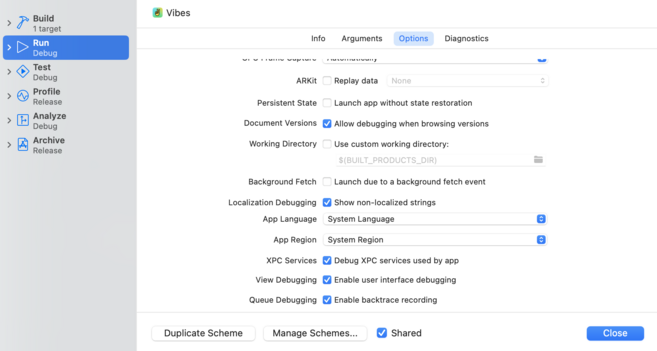
If you’re localizing your app & not sure how to find every string you need to localize, edit your scheme and check “Show non-localized strings” in Run → Options. Then, look for all-caps strings.
via @kharrison
https://useyourloaf.com/blog/finding-non-localized-strings/
🚂 Our engineers on larger projects have been waiting for this GitHub feature for a long time. Can't wait to queue up some PRs! #iOSDevTips
https://github.blog/changelog/2023-02-08-pull-request-merge-queue-public-beta/
Another GitHub tip:
If you find yourself always behind on code review (we’ve been there 😅), set up a Focus Mode for work & add the GitHub pull request widget to your home screen—like
@matthewbischoff does! #iOSDevTips
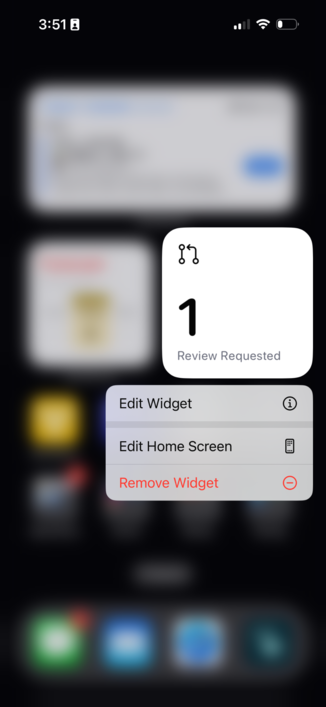
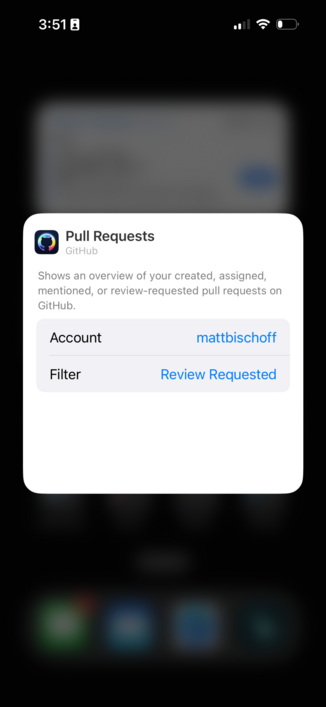
One of the things we’re most excited about in Xcode 14.3 and iOS 16.4 (out today!) is the new scrollBounceBehavior modifier in SwiftUI 📜 #iOSDevTips https://developer.apple.com/documentation/swiftui/view/scrollbouncebehavior(_:axes:)?changes=latest_minor
via: https://twitter.com/SwiftyAlex/status/1626586781188775941
🤞 Hoping the new backDeployed() API means we’ll be seeing backward-compatible SwiftUI from Apple during #WWDC23 so we can keep shipping great stuff to folks on older versions of iOS! #iOSDevTips
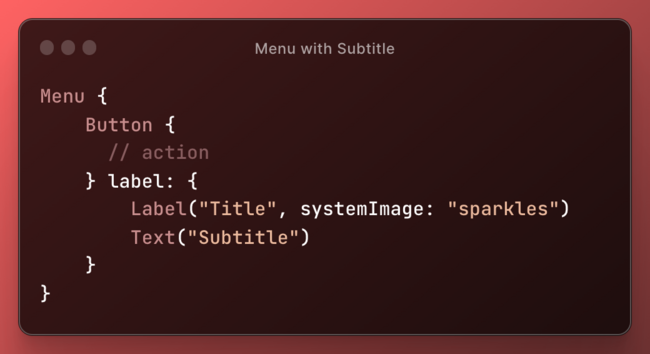
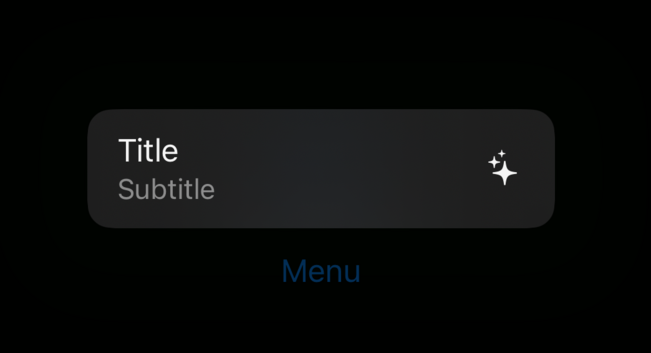
🗺️ Our engineers have stumbled upon this a few times by accident—we didn’t know what was going on until we saw this tweet!
Very cool feature (when done intentionally 😂) #iOSDevTips
via: https://twitter.com/Lee_Kah_Seng/status/1640249889329147905
🚦 With #WWDC23 right around the corner, here’s a helpful blog post from @Mecid about how to use APIs only on operating systems where they’re available! #iOSDevTips
https://swiftwithmajid.com/2023/05/17/api-availability-in-swift/
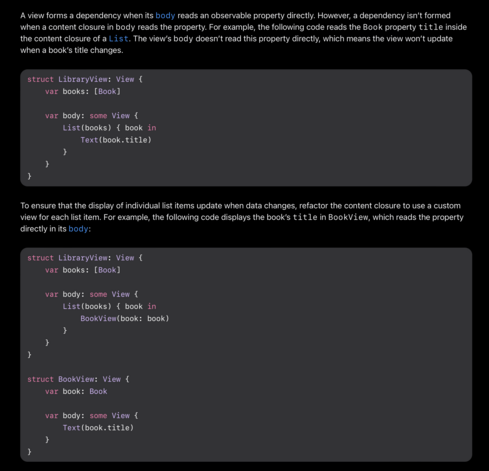
🧠 The new Observable type greatly simplifies data flow and improves performance in SwiftUI, and our engineers are so excited to use it! #WWDC23
However, there’s a critical gotcha that Apple mentions briefly in their docs—if you use SwiftUI, you’ll NEED to know this. #iOSDevTips
https://developer.apple.com/documentation/swiftui/managing-model-data-in-your-app
@lickability @nicklockwood Yeah.. there’s that magic again. It’s documented somewhere so not totally opaque, but as well as just declaring what you want, you also need a deep understanding of how that declaration is used by the engine that transforms it into imperative code.
When things stop working that becomes a nightmare. Same story as with cocoa bindings, GC, CSS, etc.
I prefer being explicit even if it results in more boilerplate code.
Hiding this code behind a macro is even nicer.


 Frank Reiff