
 Naughtylus
 Alright, let's try #NixOS!
The installation is semi-automatic in that you have to do the partitioning yourself, but once you've written the .nix configuration file you need only run nixos-install and once that's done reboot into your new system.
I must say I love the principle of this system-wide config.
I find it much saner than other installation processes. It's like finally standardising that implicit configuration you had to mentally keep track of with other distros install procedures.
Stuff like timezone, users, DEs, keyboard layouts ... If you changed your mind or if you couldn't remember, you had to go back several screens.
For the power user you save a lot of time because you can just scroll past the stuff you don't need like CUPS or touchpad support. Or even not mention it at all if you're not using the default config template I guess
This is basically my experience
https://www.linux.com/learn/intro-to-linux/2017/10/nixos-linux-lets-you-configure-your-os-installing
It's worth skimming through it just to get a general idea of the process through the screenshots
NixOS Linux Lets You Configure Your OS Before Installing
I’ve been using Linux for a very long time. Over the years, I’ve been incredibly happy with how the open source landscape has evolved. One particular area that has come quite a long way is the installation of various distributions. Once upon a time, installing Linux was a task best left to those who had considerable tech skills. Now, if you can install an app, you can install Linux. It’s that simple. And that, my friends, is a very good thing—especially when it comes to drawing in new users.
First thing I notice : The software is a bit behind that of  .
.
For example  is at v3.30.2 on
  whereas on it's at v3.32.2, enough to be lacking the new icon theme.
I guess that's because doesn't follow a rolling release scheme, and I could fix that by using the testing channel (or whatever that's called)
At least I'm discovering new apps though.
I only checked gnome as the DE and then ran the install.
When I looked for a web browser there was only #epiphany (aka just "Web"). I usually use #Firefox so I thought why not give it a go?
I like the gnome integration, minimal interface and the fact that you can turn a webpage into a desktop app. Just like that oversold feature on #android.
But there are no extensions, and I honestly can't live without #darkreader, #abp, and #privacybadger.
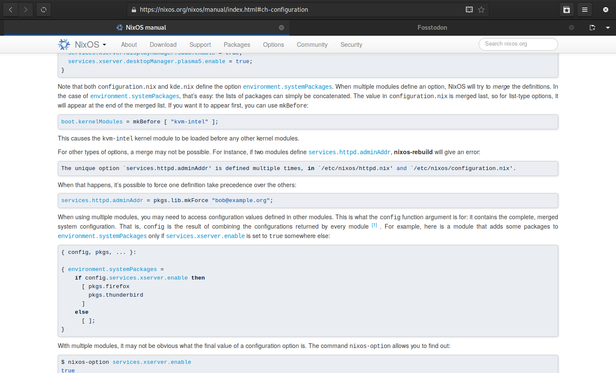
How awesome would it be if I could configure #Firefox extensions as well in my configuration.nix ? 😮
 hexa-
hexa-@Naughtylus You can get that when using home-manager.
https://rycee.gitlab.io/home-manager/options.html#opt-programs.firefox.enable
@Naughtylus Also WIP for NixOS itself here https://github.com/NixOS/nixpkgs/pull/58195.
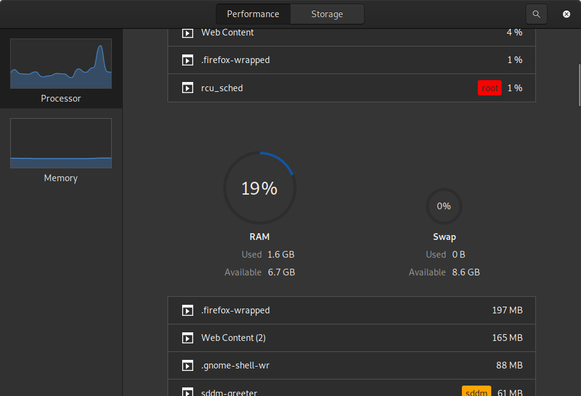
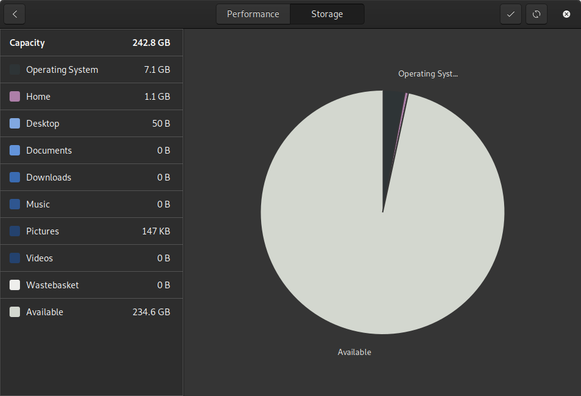
And also gnome-usage! That's a nice little gnome app I didn't know existed.
It's kind of a mashup of gnome-system-monitor and baobab (aka Disk Usage Analyser).
It's very nice and has features not found in its sister apps (like a clear separation of the system-used space) but then lacks some of their features (like a memory usage graph, or network traffic monitoring).
 Mohamed Bekhit
@Naughtylus GNOME indeed has some very nice apps
 ck
ck@Naughtylus Using the unstable channel for a desktop machine is pretty much painless since you can always go back to the previous generation during boot.
@Naughtylus You can do rolling releases by using unstable channel.