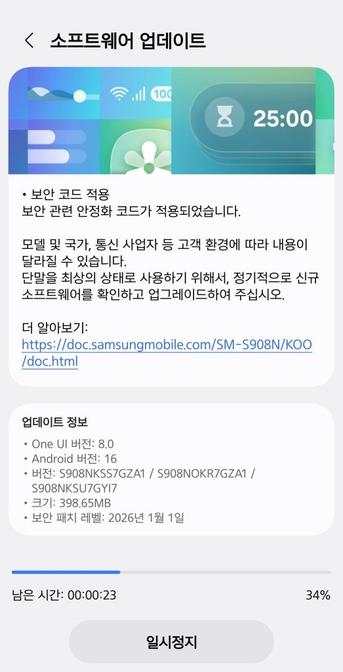
June 2026 security patch is live for Galaxy S24 and S24 FE

Samsung have revealed what vulnerabilities the June 2026 security patch has fixed earlier, as you can see here. This kind of update ensures that your phone, your tablet, and other devices become more secure as updates come along. Those updates are rolled out staggered, depending on your region and your device model. For instance, while the Galaxy S26 gets monthly updates, the Galaxy Tab S11 gets quarterly security updates.

Samsung has started rolling out the June 2026 security patch to the Galaxy S24 flagship series and the Galaxy S24 FE phone, as part of the monthly security update rollout, starting from Korea. You can see the below details of the update for more info.

This security patch has a size of almost 417.19 MB, and it brings the June 5th, 2026 security patch that you can see in the update info. This contains all fixes to vulnerabilities discovered since the last security patch released for these phones.

The following firmware information is found:

To update your Galaxy to this security update, follow these steps:

  • Open Settings, and navigate to System Update
  • Tap on Check for Updates
  • Press Download Now
  • Wait until the download is complete, then press Install Now
  • Wait until the phone installs the update successfully
  • Make sure that you’re connected to a stable and fast Wi-Fi network to avoid high mobile data fees. Never interrupt the update in any way, or problems could occur later. Make sure that you apply all available updates once you update your phone for maximum stability. An update might take 5 to 10 minutes to apply, depending on the device and the type of the update being applied.

    If you’re seeing “Your software is up to date,” this means that the update hasn’t reached your device yet. Keep checking for updates, as Samsung rolls it out gradually to all devices from country to country, usually starting from Korea.

    #Android #Android16 #AndroidB #AndroidBaklava #GalaxyS22 #GalaxyS22Ultra #news #oneUi #S22 #S22Ultra #Samsung #SamsungGalaxyS22 #SamsungGalaxyS22Ultra #smartphone #Tech #Technology #update

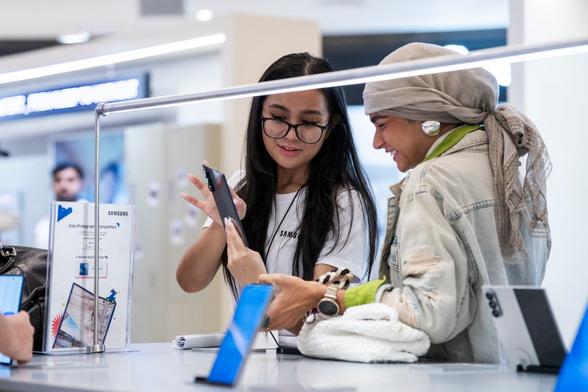
    June 2026 security patch is live for Galaxy S25, Z Fold7, Flip7 FE, and TriFold

    Samsung have revealed what vulnerabilities the June 2026 security patch has fixed earlier, as you can see here. This kind of update ensures that your phone, your tablet, and other devices become more secure as updates come along. Those updates are rolled out staggered, depending on your region and your device model. For instance, while the Galaxy S26 gets monthly updates, the Galaxy Tab S11 gets quarterly security updates.

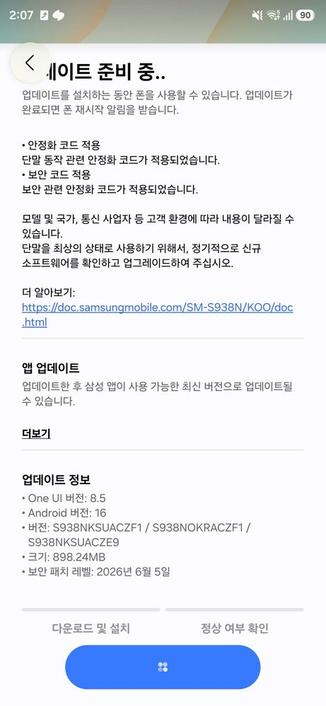
    Not long after the Galaxy S26 and the S25 FE received the security patch yesterday, the company continued the rollout to the Galaxy S25, Z Fold7, Z Flip7 FE, and TriFold phones as of today. However, some of these phones, specially the Galaxy S25, gets missing features, such as Notification Highlights on the Galaxy S25.

    This security patch has a size of almost 898.24 MB, depending on the phone, and they bring the June 5th, 2026 security patch that you can see in the update info. This contains all fixes to vulnerabilities discovered since the last security patch released for these phones.

    S25 – SourceZ Fold7 – Source

    The following firmware information is found:

    To update your Galaxy to this security update, follow these steps:

  • Open Settings, and navigate to System Update
  • Tap on Check for Updates
  • Press Download Now
  • Wait until the download is complete, then press Install Now
  • Wait until the phone installs the update successfully
  • Make sure that you’re connected to a stable and fast Wi-Fi network to avoid high mobile data fees. Never interrupt the update in any way, or problems could occur later. Make sure that you apply all available updates once you update your phone for maximum stability. An update might take 5 to 10 minutes to apply, depending on the device and the type of the update being applied.

    If you’re seeing “Your software is up to date,” this means that the update hasn’t reached your device yet. Keep checking for updates, as Samsung rolls it out gradually to all devices from country to country, usually starting from Korea.

    #Android #Android16 #AndroidB #AndroidBaklava #GalaxyS22 #GalaxyS22Ultra #news #oneUi #S22 #S22Ultra #Samsung #SamsungGalaxyS22 #SamsungGalaxyS22Ultra #smartphone #Tech #Technology #update
    June 2026 security patch is live for Galaxy S26 and S25 FE

    Samsung have revealed what vulnerabilities the June 2026 security patch has fixed earlier, as you can see here. This kind of update ensures that your phone, your tablet, and other devices become more secure as updates come along. Those updates are rolled out staggered, depending on your region and your device model. For instance, while the Galaxy S26 gets monthly updates, the Galaxy Tab S11 gets quarterly security updates.

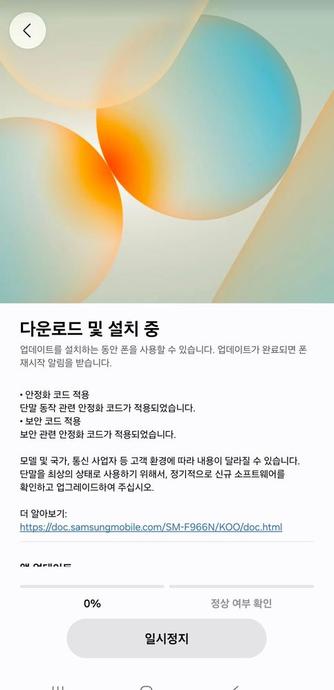
    Samsung has started rolling out the June 2026 security patch to the Galaxy S26 flagship series and the Galaxy S25 FE phone, as part of the monthly security update rollout, starting from Korea. You can see the below details of the update for more info (Source: Alfatürk [1, 2]).

    This security patch has a size of almost 565.41 MB and 324.11 MB for both the Galaxy S26 and the S25 FE phones, respectively, and they bring the June 5th, 2026 security patch that you can see in the update info. This contains all fixes to vulnerabilities discovered since the last security patch released for these phones.

    The following firmware information is found:

    To update your Galaxy to this security update, follow these steps:

  • Open Settings, and navigate to System Update
  • Tap on Check for Updates
  • Press Download Now
  • Wait until the download is complete, then press Install Now
  • Wait until the phone installs the update successfully
  • Make sure that you’re connected to a stable and fast Wi-Fi network to avoid high mobile data fees. Never interrupt the update in any way, or problems could occur later. Make sure that you apply all available updates once you update your phone for maximum stability. An update might take 5 to 10 minutes to apply, depending on the device and the type of the update being applied.

    If you’re seeing “Your software is up to date,” this means that the update hasn’t reached your device yet. Keep checking for updates, as Samsung rolls it out gradually to all devices from country to country, usually starting from Korea.

    #Android #Android16 #AndroidB #AndroidBaklava #GalaxyS22 #GalaxyS22Ultra #news #oneUi #S22 #S22Ultra #Samsung #SamsungGalaxyS22 #SamsungGalaxyS22Ultra #smartphone #Tech #Technology #update
    Launch HN: Intuned (YC S22) – Build and run reliable browser automations as code

    https://intunedhq.com

    #HackerNews #LaunchHN #Intuned #browserAutomation #YC #S22 #techStartup

    Intuned

    A code-first browser automation platform with an AI agent that builds and maintains your automations as deterministic, production-ready code.

    Intuned

    Samsung releases the May 2026 security patch for the Galaxy S22 series

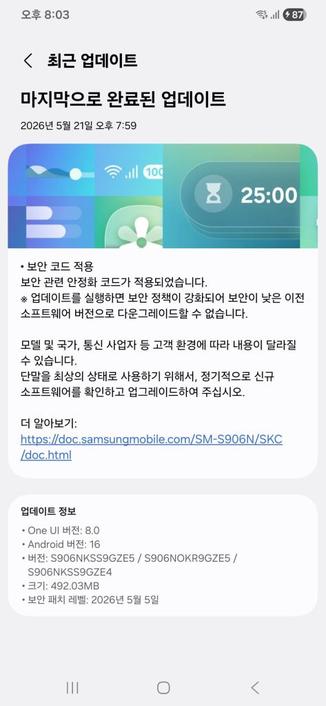
    May 2026 is here, and Samsung have focused on releasing this month’s security patch for the majority of Galaxy users worldwide. As per their rollout schedule for security updates, Samsung have released this security patch to the Galaxy S22 users, starting from the Korean version.

    The following firmware information is found:

    To update your Galaxy to this security update, follow these steps:

  • Open Settings, and navigate to System Update
  • Tap on Check for Updates
  • Press Download Now
  • Wait until the download is complete, then press Install Now
  • Wait until the phone installs the update successfully
  • Make sure that you’re connected to a stable and fast Wi-Fi network to avoid high mobile data fees. Never interrupt the update in any way, or problems could occur later. Make sure that you apply all available updates once you update your phone for maximum stability. An update might take 5 to 10 minutes to apply, depending on the device and the type of the update being applied.

    If you’re seeing “Your software is up to date,” this means that the update hasn’t reached your device yet. Keep checking for updates, as Samsung rolls it out gradually to all devices from country to country, usually starting from Korea.

    #Android #Android16 #AndroidB #AndroidBaklava #GalaxyS22 #GalaxyS22Ultra #news #oneUi #S22 #S22Ultra #Samsung #SamsungGalaxyS22 #SamsungGalaxyS22Ultra #smartphone #Tech #Technology #update

    Update: vergeben

    Möchte jemand diese Hülle für ein #Samsung Galaxy #S22? Sie wurde zwar bereits genutzt, befindet sich aber noch immer in einem ziemlich guten Zustand.

    Ich möchte hierfür nur das Porto in Höhe von 1,80 € als mobile Brief- oder Internetmarke.

    Wer Interesse hat, meldet sich einfach per DM bei mir.

    #FediGive #Wish2Hand #zuVerschenken

    Did #Samsung with their latest #Android update break the camera on the #S22 for everyone or just for me?
    listening to the VOD of yesterdays slayradio show: https://www.youtube.com/watch?v=PPW9vXM-f_U #c64 #music #remix before i head over to https://www.kjell.com/se/butiker/taby-centrum and getting help putting a screen protector i bought from: https://www.kjell.com/se on my @Samsung @[email protected] @[email protected] used #s22 #GalaxyS22 #SamsungGalaxyS22
    February funsies with ziona and Slaygon [#2465]

    YouTube
    Nun hat #Samsung den Software-Support für seine #Galaxy-#S21-#Smartphones eingestellt - mit einer Ausnahme. Besitzer eines #S22 erhalten zudem nur noch eingeschränkte Sicherheits-Updates. https://winfuture.de/news,156622.html?utm_source=Mastodon&utm_medium=ManualStatus&utm_campaign=SocialMedia
    Support-Ende: Samsung schickt ehemalige Galaxy-Flaggschiffe in Rente

    Die Hardware der Galaxy-S21-Serie von Samsung ist noch immer leistungsfähig, doch der Software-Support endet nun endgültig. Samsung streicht die Sicherheitsupdates für die ehemaligen Flaggschiffe. Auch Nutzer des Galaxy S22 müssen sich umstellen.

    WinFuture.de

    Samsung releases the January 2026 security patch for the Galaxy S22 series

    January 2026 is here, and Samsung have focused on releasing the January 2026 security patch for the majority of Galaxy users worldwide. As per their rollout schedule for security updates, Samsung have released the January 2026 security patch to the Galaxy S22 users, starting from the Korean version.

    The following firmware information is found:

    To update your Galaxy to this security update, follow these steps:

  • Open Settings, and navigate to System Update
  • Tap on Check for Updates
  • Press Download Now
  • Wait until the download is complete, then press Install Now
  • Wait until the phone installs the update successfully
  • Make sure that you’re connected to a stable and fast Wi-Fi network to avoid high mobile data fees. Never interrupt the update in any way, or problems could occur later. Make sure that you apply all available updates once you update your phone for maximum stability. An update might take 5 to 10 minutes to apply, depending on the device and the type of the update being applied.

    If you’re seeing “Your software is up to date,” this means that the update hasn’t reached your device yet. Keep checking for updates, as Samsung rolls it out gradually to all devices from country to country, usually starting from Korea.

    #Android #Android16 #AndroidB #AndroidBaklava #GalaxyS22 #GalaxyS22Ultra #news #oneUi #S22 #S22Ultra #Samsung #SamsungGalaxyS22 #SamsungGalaxyS22Ultra #smartphone #Tech #Technology #update