This is a really useful tool for detecting #Linux #audio problems:

"rtcqs is a Python utility to analyze your system and detect possible bottlenecks that could have a negative impact on the performance of your system when working with Linux audio":

https://codeberg.org/rtcqs/rtcqs

Just used this to optimize the audio on my new Linux machine, highly recommended #rtcqs!

rtcqs

rtcqs is a Python utility to analyze your system and detect possible bottlenecks that could have a negative impact on the performance of your system when working with Linux audio.

Codeberg.org
@trancefish @mfuhrmann Wenn es Fragen gibt bzw #rtcqs, ich hilfe gerne! Und #Millisecond benutzt rtcqs im Hintergrund und sollte gleiche Ergebnisse wie rtcqs geben.

All other recommendations that for instance #rtcqs or #Millisecond give are for those that really need stable, ultra low latency. So buffer sizes below 64 samples that result in round-trip latencies below 10 milliseconds. This is the area where threaded IRQs or disabling Spectre/Meltdown mitigations might contribute to getting rid of that stray xrun.

/2

@amadeus When it comes to swappiness I leave it at the default on my main system. But then I don't use any swap on there anymore. And kernels, I used to roll my own real-time kernels but for me personally I've found the Liquorix kernel to perform more than good enough for me. I have to admit that I have to really dive into that matter again, the merging of the real-time patch set has introduced some extra kernel options that I haven't played with. And they're also not a part of #rtcqs yet.

I think it's getting time to remove the swappiness recommendation from #rtcqs and the linuxaudio.org System Configuration Wiki page. It improves the performance of your system with regard to Linux audio by approximately 0%. I've also come across some articles that basically say, leave it at its defaults, that's good enough.

I'd love to hear different thoughts though!

#LinuxAudio

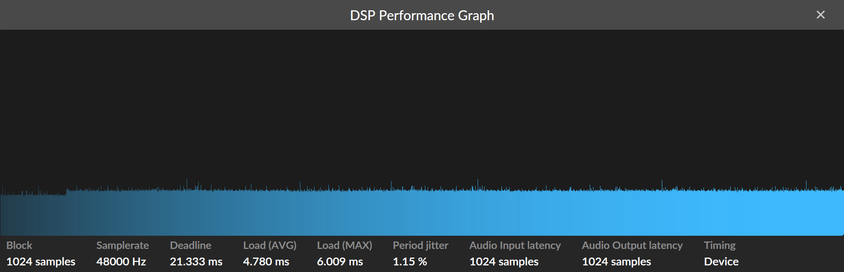
#LinuxAudio #BitwigStudio folk, I have installed and am attempting get the settings to be sticky for #rtcqs. The CPU Frequency Scaling set to performance and Simultaneous Multithreading set to disabled make the greatest positive difference to my system performance.

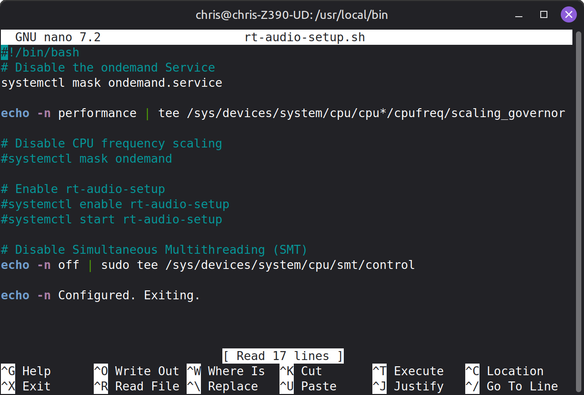
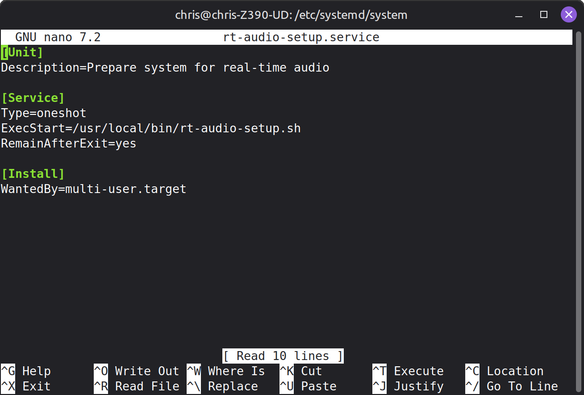
The one downside that I am encountering is to get all my settings to load at boot. There are some handy steps suggested by https://wiki.linuxaudio.org/wiki/system_configuration (linked to from the rtcqs_gui app) and I have set up my own rt-audio-setup.service script. The recommended steps appear to create a recursive loop and I have commented this out.

I can see that the call to set the CPU Frequency Scaling is failing on boot (very brief 'FAILED' alert in red). The SMT is working though. How do I fix this?

Screenshots show the service script to run at boot and the script being called, and another showing the really sweet DSP Performance Graph when all this is working.

[I just found an error on writing this and will reboot and see if I fixed it]

@ambientspace rtirq does not help to decrease CPU usage unfortunately. I'd definitely try #rtcqs and if you have any questions about its output, I'm the author of that tool and happy to help out!

@ambientspace You don't need a low-latency or realtime kernel unless you're doing audio that demands very low round-trip latencies (below 10ms).

Rtirq can help but I don't think it can deal with modern systems using Message Signaled Interrupts (MSI or MSI-X). For systems with MSI-X interrupts #rtcirqus might be an alternative.

As for Milliseconds, it relies on an underlying tool, #rtcqs that in its turn links to wiki.linuxaudio.org. It's command line only but might come in handy sometimes.

@NUND Thanks for the heads-up! #rtcqs
Migrate to FreeSimpleGUI

[FreeSimpleGUI](https://github.com/spyoungtech/FreeSimpleGUI) seems to be alive and well, and hopefully migrating shouldn't be much work.

Codeberg.org