 Hondunauta
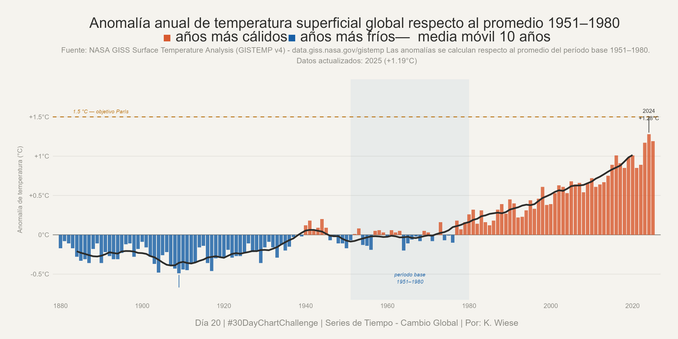
#Día20 | Series de Tiempo – Cambio Global | #30DayChartChallenge | Anomalía anual de temperatura superficial global respecto al promedio 1951–1980. Creada usando #Rstats con #ggplot2, #dplyr, #readr, #scales y #ggtext.
Nifty little #readr / #tidyverse pattern, no need to unzip zip-files:
obis <- read_csv(unz(description = './data/CKI_P1_OBIS_sightings.zip', filename = 'Occurrence.csv'))
@jorge posted a quite interesting #webinar #shortcourse on how to handle data efficiently with #rstats
• data management plans
• version control
• R for reproducible data manipulation
• working on clusters
• data publication
#shateEGU20 #FAIRprinciples #tidyverse #dplyr #broom #tidyr #purrr #readr #ggplot2 #markdown #git #spatialdata
 Yumechi | ゆめち


 Philipp Bayer
 Gerald Leppert, PhD