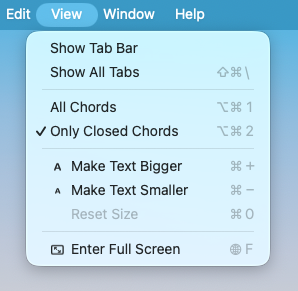
On iOS, I'm happy having the user use the system's text size controls (DynamicType). On macOS, I think I need to provide menu commands to scale the UI. Text scale controls are too new and hidden.

I've got Make Text Bigger (textformat.size.larger), Make Text Smaller (textformat.size.smaller) and Reset Text Size.

1. Is this the right approach?
2. Are those reasonable command names?
3. What, if any, SF symbol should Reset use? #SwiftUI #macDevelopment

The whole idea of going multi-window seems counter to many modern Mac apps, but I figured if it was a single window app the purpose would be just as well served by a web browser. #macdevelopment

Apple approved and I released the Mac build of FretSketch.

The bit I'm unsatisfied with is the handling of View Closed Chords Only. It should be an app setting and managed out of the menu bar, rather than the current scene-based setting which doesn't really work on a multi-window app on macOS.

But the whole app is new, so I reasoned one feature not working is fine for an effective 1.0. I was deeply afraid the whole app concept would be rejected.

Plus I'm moving today. #macDevelopment

I submitted the Mac version of my app. It's still waiting for review. I'm not very happy with a few things about it, but I think I'll leave it in the queue and fix it later. I want to see if this passes review. #macDevelopment

"Drag up to 3 app previews and 10 screenshots here. (1280 ร— 800px, 1440 ร— 900px, 2560 ร— 1600px or 2880 ร— 1800px)"

You're fucking kidding, right? macOS App Store screenshots need to be a particular size?

Edit: Also, my Mac won't display ANY of those resolutions.

Edit #2: Turns out crops are fine. Here, have *a* screenshot. Just one. #macDevelopment #AppStore

I've decided on some future directions for FretSketch:
* Features I've already added and Mac support.

Then (unordered):
* Banjo support.
* Accessibility improvements, ASAFP. Cutting it for 1.0 burned, but I don't know how to handle it in SwiftUI yet. #iOSDevelopment #MacDevelopment

GitHub - caioricciuti/cr-mac-helper: Shell scripts to help manage, clean, and optimize your macOS system. Includes app cleanup, path management, and more.

Shell scripts to help manage, clean, and optimize your macOS system. Includes app cleanup, path management, and more. - caioricciuti/cr-mac-helper

GitHub

To install Git on Mac, open Terminal and enter `xcode-select --install`. This command installs Git along with other Xcode tools. Alternatively, you can use Homebrew by running `brew install git`. Verify the installation with `git --version`.
Read Also: https://devopssaga.com/how-to-install-git-on-mac/

#InstallGitOnMac #MacDevelopment #GitSetup #CodingEssentials #VersionControl

Step-by-Step Guide: How to Install Git on Mac

Discover the power of Git! Learn what Git is, who benefits from it, and why it's popular. Follow our step-by-step guide to easily install Git on Mac using terminal or Homebrew. Get started now!

DevOps Saga

IT'S ALL HAPPENING!

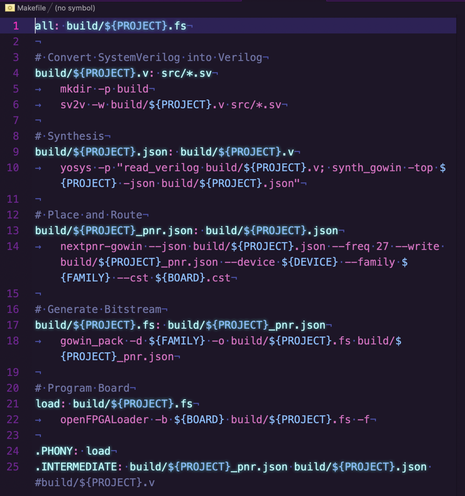
Open-source FPGA toolchain on macOS, in my good-friend-and-text-editor, Nova.

I'm still on the hunt for a better way (on a Mac) to synthesize SystemVerilog directly instead of converting it to Verilog first. If YOU know a way, lmkplskthx!

Nova is a fantastic, extensible tool from @cabel and his pals at @panic

#fpga #macDevelopment #yosys #verilog #systemVerilog #tangNano #panicNova #nova