Dilum Sanjaya (@DilumSanjaya)
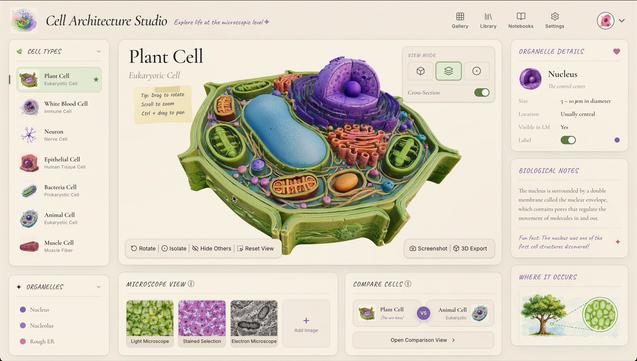
3D 생물학적 구조를 생성해 상호작용적으로 탐색할 수 있는 과학 앱 아이디어를 소개한 트윗이다. UI 디자인에는 GPT Images 2를 사용했고, 코드는 Gemini 3.1 Pro로 작성했다고 언급해 생성형 AI를 활용한 과학 시각화·앱 개발 사례로 볼 수 있다.
https://x.com/DilumSanjaya/status/2053155739389378849
#generativeai #scientificapp #gptimages #gemini #3dmodeling
Dilum Sanjaya (@DilumSanjaya) on X
Fun interactive science app ideas | Part 3
Played around with generating 3D biological structures and made an app to explore them interactively
UI Design
GPT Images 2
Code
Gemini 3.1 Pro
More demos ↓
TechFollow (@TechFollowrazzi)
AI로 과학 앱과 게임을 만드는 데모가 소개됐다. 개발자는 GPT Images 2와 Gemini 3.1 Pro만으로 코드를 작성해 행성 탐사(planetary exploration) 앱을 완성했다. 생성형 이미지 모델과 최신 코딩 보조 모델을 활용한 창의적 애플리케이션 사례로 주목된다.
https://x.com/TechFollowrazzi/status/2051427904991457667
#ai #generativeai #gptimages #gemini #vibecoding
TechFollow (@TechFollowrazzi) on X
🚨 @swyx followed @DilumSanjaya
@DilumSanjaya is a software engineer vibe-coding interactive science apps and games with AI. His latest demo is a planetary exploration app, built with GPT Images 2 and code written entirely by Gemini 3.1 Pro.👇
Gregor (@bygregorr)
이미지 생성에는 GPT Images 2를, 3D 모델 생성에는 Tripo를 쓰는 깔끔한 파이프라인이 소개됐다. 또한 생성물의 스타일 일관성을 유지하기 위해 reprompting보다 ControlNet을 덧씌우는 방식이 더 효과적이라고 언급해, 3D 에셋 제작 워크플로우와 스타일 제어에 유용한 실전 팁을 제시한다.
https://x.com/bygregorr/status/2049938674238775329
#gptimages #tripo #controlnet #3dmodeling #generativeai

Gregor (@bygregorr) on X
@DilumSanjaya GPT Images 2 for concept then Tripo for 3D is a clean pipeline, but ControlNet on top of your generations keeps the style consistent across asset variations way better than reprompting.
ImPaul (@impaulxyz)
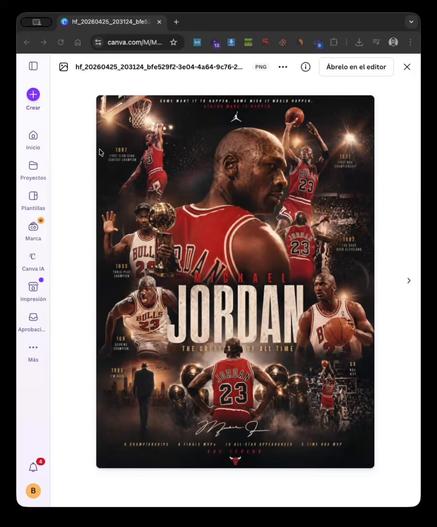
Canva에서 GPT Images 2.0으로 생성한 포스터를 레이어 단위로 100% 편집 가능하게 만들 수 있다는 소식이다. 텍스트와 이미지를 분리해 원하는 대로 수정할 수 있어, 생성형 AI 결과물을 실제 디자인 작업에 더 유연하게 활용할 수 있다.
https://x.com/impaulxyz/status/2048297847078932489
#canva #gptimages #generativeai #design #imageediting
ImPaul (@impaulxyz) on X
Tus Posters con GPT Images 2.0 por fin son 100% editables
Con Canva puedes separar las capas y personalizar cada texto o imagen. Se acabó el conformarse con lo que te dé la IA: ahora el diseño es 100% tuyo
Te explico cómo hacerlo 👇
 sayzard