Sur #linuxMint cinnamon j’ai installé gpaste2 avec l’extension GPaste rechargé, j’ai configuré le raccourci super+v pour afficher l’historique des copier/coller.

Y a moyen d’avoir un truc pas buggé ?

Genre j’ai deux instances apparemment au bon d’un moment : si je clique sur l’icône dans la barre des tâches je n’ai pas la même chose qu’avec le raccourci (qui a arrêté de suivre apparemment).

C’est pénible.
Si j’enlève l’applet j’ai juste le truc avec le raccourci qui ne suit plus les changements...

Y a que sur KDE que je n’ai pas de problème avec les clipboard manager.

#linux #cinnamon #gpaste #clipboardmanager

Bumped + fixed #gpaste (#gnome #clipboard manager) build in #guix. I still use gnome although planning to switch to #sway > 1.5 years already. And this is the one of most useful packages/extensions for me out there in gnome ecosystem
Everything is just stolen from nixpkgs

https://debbugs.gnu.org/cgi/bugreport.cgi?bug=77780
I lost functionality of #gpaste. It reverted back .... https://github.com/Keruspe/GPaste/issues/365
Only one item in history (ie: Gpaste doesn't keep history anymore) · Issue #365 · Keruspe/GPaste

I recently upgraded to Fedora 34 and i discovered that my Gpaste history is empty, save for one item: the last thing copied. It appears that Gpaste 3.40.2 only keeps the last item in history, even ...

GitHub

If you're a #Linux user, what's a desktop integration you can't live without?

For me, #gpaste is easily one of those. I use it every day. If you use copy/paste a lot on #Gnome, I highly recommend it!

https://github.com/Keruspe/GPaste

GitHub - Keruspe/GPaste: Clipboard management system

Clipboard management system. Contribute to Keruspe/GPaste development by creating an account on GitHub.

GitHub

Some good news. I filed a bug about #GPaste and immediately got a response that a release is already in the works! Looks like a similar story for the other extensions I'm using.

A good thing about those trying out the #Fedora Beta is that we also get to help 3rd party integrations get ready for general release with PRs, testing, etc., so stuff is more likely to be in place for the general public on release.

Like now I just need to sit here and figure out how to survive without my #Gpaste widget (I love that #KDE has the clipboard integration just baked in by default).
Další článek od @ondrejkolin. Tentokráte o pokročilé práci se schránkou pomocí nástroje #Gpaste: https://mojefedora.cz/gpaste-z-terminalu-do-schranky-snadno-a-rychle/
Gpaste: z terminálu do schránky snadno a rychle | MojeFedora.cz

MojeFedora.cz
#Perl #GTK #GPaste
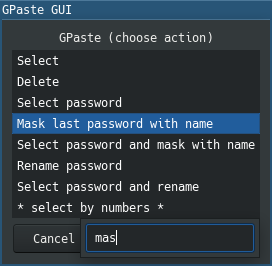
Now my old utility that manages clipboard history is completely rewritten in #Perl5 and #GTK2 and works a lot faster:
https://github.com/unclechu/gpaste-gui
Previous implementation that was written in #Bash using #Zenity for #GUI:
https://github.com/unclechu/gpaste-zenity
unclechu/gpaste-gui

gpaste-gui - Simple and handy GUI for managing clipboard history of GPaste daemon