🎉 Behold! A thrilling tale of coders quaking in their boots at the mere mention of "git rebase"😱. Fear not, dear reader, because in this extensive guide, we're assured that the very worst outcome is... wait for it... deleting your work! 🤔💥 Because nothing spells confidence like a digital facepalm.
https://www.brethorsting.com/blog/2026/01/git-rebase-for-the-terrified/ #gitrebase #codingadventures #digitalfacepalm #programmerhumor #techguides #HackerNews #ngated
Git Rebase for the Terrified | Aaron Brethorst

Personal website for Aaron Brethorst - Seattleite, technology leader, photographer, transit enthusiast, erstwhile non-runner.

Stacked Diffs with `git rebase --onto`

Using git `rebase --onto` workflow to work with stacked diffs

Starting Monday off with a nasty Git merge conflict and some rebase loop hell. Because why not.

#Git #GitRebase

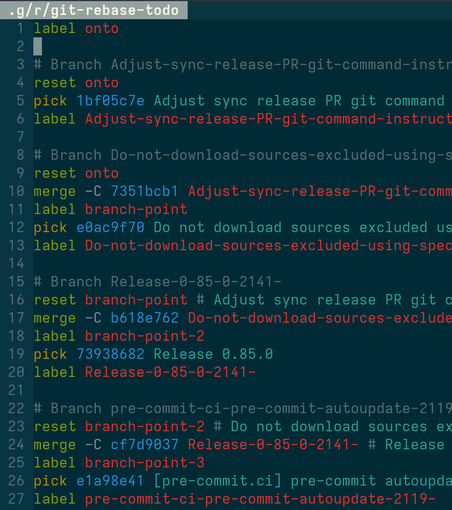
`git rebase -i --rebase-merges`
allows you to recreate merge commits in the history; absolutely mind blowing

I hope I'll never use it.

#git #GitRebase

@raboof Oh, nice!

> the break command (added in Git 2.20)


Sweet! I've been using the trick originally described, putting a dummy edit after the merge and then resetting back to the merge, for years!

I absolutely love --rebase-merges and use it many times per day to build and keep track of multiple parallel PRs.

#git #GitRebase #GitRebaseInteractive

« The #GitRebase command allows you to adjust the history of your #Git repository. It's a useful feature, but of course, mistakes can be made. Use the #GitReflog command to recover. » by Agil Antony on @osdc
https://opensource.com/article/23/1/git-reflog
Recover from an unsuccessful git rebase with the git reflog command

The git rebase command allows you to adjust the history of your Git repository. It's a useful feature, but of course, mistakes can be made. Use the git reflog command to recover.

It's still far from finished, but please welcome Bluebird! A Mac app for rewriting git history extremely quickly.

Reorder commits, amend old ones and fixup any two—with just a drag-and-drop or a couple of keystrokes.
Never slow down to save workdir changes—they're preserved automatically—and ⌘Z anything, even conflict resolutions.
It's direct manipulation for git rebase! No special mode needed.

I still have a lot to do, but boyyy is the app starting to feel useful 😊

#macos #gitrebase

https://www.slideshare.net/slideshow/embed_code/key/CfDm6GMpv73he1#tizen-upstream-coop-tdc2014-pcoval# #OpenSource flows I explained for #Tizen in 2014 to improve upstream/downstream cooperation are still valid today, anyone need to learn #GitRebase soon or later, more https://purl.org/rzr/presentations
tizen-upstream-coop-tdc2014-pcoval

oh wow this is super useful
> --fixup=reword:<commit> creates an "amend!" commit which replaces the log message of <commit> with its own log message but makes no changes to the content of <commit>.‌git-scm.com/docs/git-commit#Do…

#git #gitRebase #gitFixup #gitAutosquash
Git - git-commit Documentation

I just did my first #GitRebase #RebaseMerges and it was awesome.

So have have these two subfeatures that are independent, and a third subfeature that requires them both, so I make two PRs, feature-1 and feature-2, and one draft. The draft merges the other two and I continue working while people look at the proper PRs.

I discover something while working on the draft that requires a fix to feature-1. So I just:

* commit that fix
* git rebase --rebase-merges $REBASE_BASE --interactive
* in the rebase-todo, move that fix commit to the section that describes the feature-1 branch
* [code]git push my_remote $FIX_COMMIT_NEW_ID:feature-1
* continue working

awesomesauce
LIBRANET.de | Search