Can You Loop Inside a Loop?
A loop in programming is a control structure that repeatedly executes a block of code or low code as long as a specified condition is met. It enables programmers to automate repetitive tasks, iterate over data structures (like collections, arrays, or lists), and efficiently handle scenarios where the same operation needs to be performed multiple times. Using loops, developers can build cleaner, more concise code and reduce redundancy.
The simplest and most common way of looping in coding is through the use of a for loop. A for loop allows you to execute a block of code a specific number of times by defining an initialization, a condition, and an increment/decrement operation in a single, compact structure. It is widely used in many programming languages due to its clarity and versatility, especially when the number of iterations is known in advance.
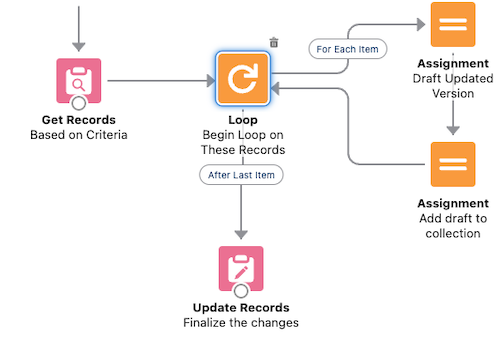
Image source:
https://admin.salesforce.com/blog/2022/automate-this-how-to-use-loops-in-flowLoops within Loops (Nested Loops)
Loops within loops, often referred to as nested loops, are not inherently antipatterns, but they can become problematic depending on the context and scale of the data being processed. Nested loops are perfectly valid when dealing with scenarios that naturally require a hierarchy of iterations. However, they can lead to performance issues, especially when both loops iterate over large collections, resulting in increased complexity. This can significantly slow down the execution of code or low code.
Are Nested Loops an Antipattern?
When there are more efficient and optimized alternatives available, then nested loops become an antipattern. Additionally, deeply nested loops can reduce code readability and maintainability, making it harder for other developers (or even your future self) to understand and modify the code.
The key is to assess whether the nested loop is the simplest and most efficient approach for the given problem. If not, it’s worth exploring alternative strategies to improve performance and code quality.
Loops in Flow
Loop have limited functionality in flows: You have to loop over a collection, and you can only determine whether you want to loop first to last or the other way around. Salesforce flow lacks all the other sophisticated ways you can loop in code.
For loop can be achieved in Salesforce flow by leveraging the assignment and decision elements. A loop element cannot be used to create a for loop. To loop 5 times in Salesforce flow you do the following:
Create a counter variable CounterVar.Increment the counter variable value by one using an assignment element functionality. Configure the assignment element to show CounterVar Add 1.Add a decision element to check whether the CounterVar equals 5. If not send to flow back to step 2.Collections
In Salesforce Flow, collections are a type of variable that can store multiple values of the same data type, allowing you to manage and process lists or groups of records efficiently within a flow. Collections are particularly useful when you need to handle bulk data operations, such as looping through records, performing actions on multiple items, or passing data between flow elements, flows and code.
Salesforce flow also lacks the capability of building and processing complex collections compared to the the functionality in code.
When are Nested Loops Necessary?
When you are processing related records, nested loops may be necessary. Before you take that route, please consider more efficient alternatives by evaluation the following factors:
- When modifying multiple records with the same field values, you don’t need to loop and build a collection to be used outside your loop. One single update element with criteria can do this for you. Example: Close all cases matching a specific criteria (e.g. under Account Acme).
- When checking whether a specific junction object record exits before creating a new one, consider leveraging the collection filter element. This setup seemingly results in a nested loop because the collection filter outputs a collection. However, internal loop iterates at most a single time, and therefore does not present a performance concern.
- When checking whether a record exists before creating it, consider leveraging the check matching record functionality in the create element. This functionality currently does not work for junction object records, and the matching record criteria builder is limited. Read Create by Checking a Matching Record in Flow to learn more about this functionality.
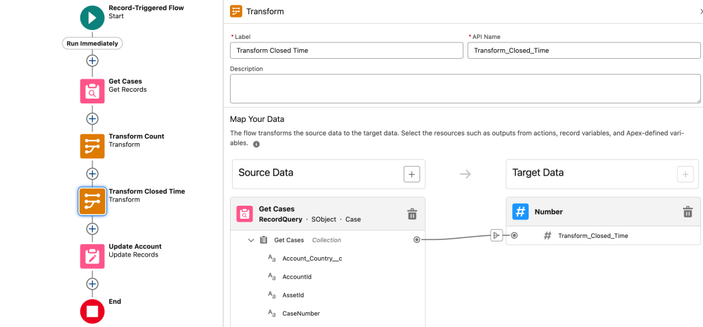
- Check whether you can leverage the transform element to save one of the loops in your nested loop setup. Read 6 Things You Can Do With The Transform Element to learn more about this topic.
- When comparing two collections and finding common and uncommon members, consider invocable Apex actions on UnofficialSF. These actions leverage the enhanced collection functionality in code to bring efficiency to your flow.
Optimize Collections and Avoid Nested Loop Pitfalls
In addition, consider using the assignment element for getting count of members in the collection, and the transform element for getting sum of number field values in a collection. While these are not tips related directly to nested loops, they may save you one loop within your nested loop configuration.
Finally, remember that the get element now supports a maximum number of records to get. This number can be set to any number between 1 and 2,000. Also note that the collection sort will take the same parameter while sorting the records, allowing the collection to be trimmed to a smaller member count.
If you considered all the alternatives, you can still use nested loops. Avoiding DMLs and SOQLs (Gets) inside your loops, you could avoid most of the governor execution limits. Your biggest risk is going to be hitting the dreaded Apex CPU limit error.
Conclusion
When designing Salesforce Flows, it is important to avoid nested loops whenever possible to maintain efficiency and prevent performance issues, especially when dealing with large datasets. Nested loops can significantly increase the number of iterations, leading to potential governor limit exceptions and reduced performance in the Salesforce environment. Instead, consider using collection processing techniques, such as using formulas, assignment elements, or collection filters. Additionally, leverage Apex Actions for complex logic. There are scenarios where nested loops are absolutely necessary, such as when processing multi-level data structures or implementing hierarchical logic. In such cases, it is crucial to minimize the loop size by applying filters beforehand and optimizing the logic within the loop. This ensures the flow remains scalable and maintainable. Ultimately, the key is to strike a balance between avoiding unnecessary complexity and using nested loops judiciously when the business logic demands it.
Explore related content:
Salesforce Flow Best Practices
Can You Use DML or SOQL Inside the Loop?
How The Transform Element Saves You Loops
Start Element Formulas
#Antipattern #ForLoop #Loops #NestedLoops #SaleforceAdmins #Salesforce #SalesforceDevelopers
 Begrepen.be
 Markus Redeker 🐘
 TechKeysX
 Andy Engin Utkan
 Happy Coding Bot


