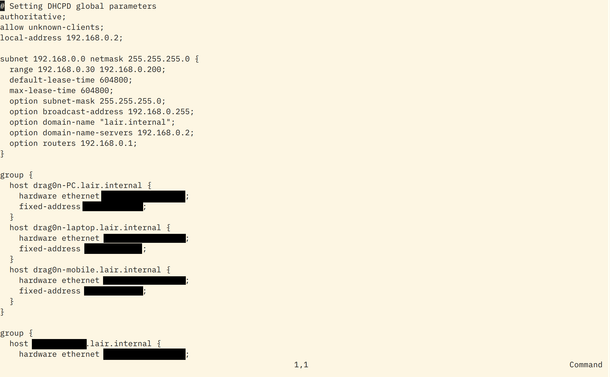
Now that the #arm64 boards are installed, it was time to use them as redundant #DHCP server and #DNS resolvers; using #dhcpd and #Unbound on both  #OpenBSD and  #FreeBSD.

https://www.tumfatig.net/2026/redundant-dhcp-server-and-dns-resolver-using-openbsd-and-freebsd/

Redundant DHCP server and DNS Resolver using OpenBSD and FreeBSD

Some time ago, I set up Redundant DHCP server and DNS Resolver using OpenBSD . Time has past and one of the Raspberry Pi board I own is now running FreeBSD while the ODROID HC4 is running OpenBSD . I secured both my DHCP server and DNS resolver services running on those boards so that I can perform maintenance on one machine without turning down the whole services set.

Anyone recommend a non-infuriating dhcp server for Linux which can talk to a database (ideally SQLite but I can do Postgres) for things like reserved IPs?

Was using dnsmasq years ago but have been using kea recently (and good lord I'd love to dump it into the sea because it's a mess.)

#Linux #dhcp #dhcpd

Крастерский маршрутизатор на FreeBSD из старого компа

Доброго свободного времени, товарищи! в этой своей первой статье хотел бы вам рассказать как я будучи далёк от сетевых технологий перешел с роутера мыльницы на старый комп из-под дивана.

https://habr.com/ru/articles/1012524/

#freebsd #unbound #mpd5 #pf #dhcpd

Крастерский маршрутизатор на FreeBSD из старого компа

Доброго свободного времени, товарищи! В этой своей первой статье хотел бы вам рассказать как я будучи далёк от сетевых технологий перешел с роутера мыльницы на старый комп из-под дивана. Зачем? Как-то...

Хабр

Finally (2), I have some good enough DHCP server!  

Tried kea from ISC — it works but requires some additional actions to be launched under #NetBSD. It has very strange default paths for file with leases, PIDs and logs:
- /usr/pkg/var/lib/kea/
- /usr/pkg/var/lib/run/kea
- /usr/pkg/var/log/kea

BTW, it could be changed via playing with some environment variables.

Also, the default startup script uses keactrl to launch DHCP server and keactrl requires some configuration for it. So, to use "service kea start" there are two configuration files are necessary:
- /usr/pkg/etc/keactrl.conf — the main configuration file for server.
- /usr/pkg/etc/kea/keactrl.conf — the configuration file for keactrl.

Then, I tried the dhcpsd — the new promising successor of ISC dhcpd, which could be configured with configuration file in Lua and conforms Unix FHS — all necessary files lies in the right places: /var/run, /var/log, etc. Sadly, it doesn't work: server starts but there are no leases for clients and no any errors in the log :-(

Then, I found cmu-dhcpd in the repos — there is a dhcpd from Carnegie Mellon University with some patches from Princeton. And, finally it works! And it also conforms Unix FHS: main configuration in the /etc/dhcpd.conf, PID-file in the /var/run/dhcpd.pid and logs in the /var/log/messages  

#selfhosting #dhcp #DHCPv4 #dhcpd

Lost half an hour the other day wondering why my OpenBSD dhcpd was so damn slow to serve a client. Of course I was testing by reconnecting a wire to an interface that didn't have portfast. It dawned on me when the delay seemed to be roughly 30 seconds

#openbsd #portfast #dhcpd #dhcp

DHCP: настройка серверов, Relay и анализ трафика в Wireshark

Приветствую! В любой сети устройства должны получать IP-адреса, шлюзы и DNS-серверы, чтобы корректно обмениваться данными и иметь доступ в Интернет. Конечно, можно настраивать всё вручную, но в реальной жизни это неудобно и часто приводит к ошибкам. На помощь приходит протокол DHCP (Dynamic Host Configuration Protocol) . Его задача проста - автоматически раздавать клиентам все необходимые сетевые параметры, включая IP, маску подсети, шлюз и DNS. В этой работе мы подробно разберём, как работает DHCP, от процесса обмена сообщениями DORA (Discover, Offer, Request, Acknowledge), через анализ сетевого трафика в Wireshark, до настройки DHCP-сервера на MikroTik и Ubuntu-Server . Мы также рассмотрим дополнительные возможности протокола, такие как DHCP Relay, который позволяет обслуживать клиентов в других подсетях.

https://habr.com/ru/articles/940058/

#dhcp #dhcprelay #dhcpd #iscdhcpserver #mikrotik #gns3 #dhcp_server #dora #windows #ubuntuserver

DHCP: настройка серверов, Relay и анализ трафика в Wireshark

Приветствую! В любой сети устройства должны получать IP-адреса, шлюзы и DNS-серверы, чтобы корректно обмениваться данными и иметь доступ в Интернет. Конечно, можно настраивать всё вручную, но в...

Хабр
dhcpd(8): use UDP sockets instead of BPF

Next step testing #IPv6only operation in my local network, I wanted to give #dhcp "option 108" (IPv6-only preferred) a try.

I'm running #ISC #dhcpd on my #FreeBSD router/firewall, so I looked at the manuals:

https://man.freebsd.org/cgi/man.cgi?query=dhcp-options

Ok, added "option option-108 00:00:00:00;" based on that, which dhcpd rejected 🤔

From finding random different examples for custom options and with some trial and error, I found I have instead to declare the option:

option v6only code 108 = integer 32;

... and then use it like this:

option v6only 0;

Ok, what's up with documentation here? 🙄

At least it works, verified on my phone running #Android 14. No #IPv4-address from my pool any more. Instead, 192.0.0.4 appeared, seems it automatically configures a #clat...

dhcp-options

What do you use to monitor that a subnet has a functioning dhcp server?

I am looking for an output I can put into #grafana and make an alert is there are timeouts or response is too slow.

#dhcp #dhcpd #grafana

@cnxsoft
Ugh official/recommended #dhcpd replacement uses a configuration file format that does not allow for comments 😕
#json isn't a good format for humans