Re: #3dprinting

#bdsensor was a bust because I use an ultra-flat, #MandelaRoseworks heated bed with embedded magnets. Magnets unfortunately fuck with Eddy currents and thus no bueno.
It's unfortunate, I really like the technology and being able to do a scan of the bed by just running the probe across it is awesome and high density scans take essentially the same amount of time as low density ones. Nothing like a 30x30 bed mesh created in under 20 seconds. But alas, I'm back to the #BLTouch. It just works despite not being "best".

I spent a weekend converting the system to #Klipper and while it works, I haven't noted any big benefits compared to Marlin.

In fact, because I need to write macros from scratch and at some point figure out how to use the LCD on the printer, I'd say it's overall more complex. For some reason it's also running slower.

That said, at some point I should be able to wire in an #ADXL345 which will help me deal with harmonics better.

Lastly, I think it would be awesome to use the nozzle as a probe, so I have passively been pondering how to mount #piezo sensors to do so. But my platform wasn't designed for them, so I will probably need to make hardware of some kind.
My thought at the moment is a disc with a lip on it so that it will hold the piezo sensor away from the bed, and then use a aluminum spacer around the bed screws on top/through the piezo so that anything pressing on the bed transmits down to the sensor.

All in time.
#tinkering

Back to #3dprinting

I converted from a run of the mill #bltouch to a #bdsensor and so far it's awesome, but it's for a few quirks I'm nailing down.

Height is crucial to good operation but it's also low enough that if you get it wrong you're smacking the print with the sensor or it's not working.

Building bed meshes in seconds is amazing, but I also found that moving the price up after meshing can cause a failure.

Marlin works but particularly while tinkering is a lot of back and forth, the big gotcha that #Marlin has against it. Compiling.

Realistically; #Klipper would be my best bet but every time I go down that route I get burned.

Nighttime entertainment โ€ฆ

โฌ›โฌ›โฌ›๐ŸŸฅโฌ›

#3Dprinting #BLtouch #Ender5pro

Call me scale, baby! โš–๏ธ ๐Ÿ™ƒ

Long overdue re-calibration of my #Ender5Pro with the bed leveling knobs. Used a piece of chocolate bar wrapper cardboard to get a consistent height at the four adjustment points.

Since I use #BLtouch for distance, the manual calibration is only used for a leveled surface and not for bed-to-nozzle distance.

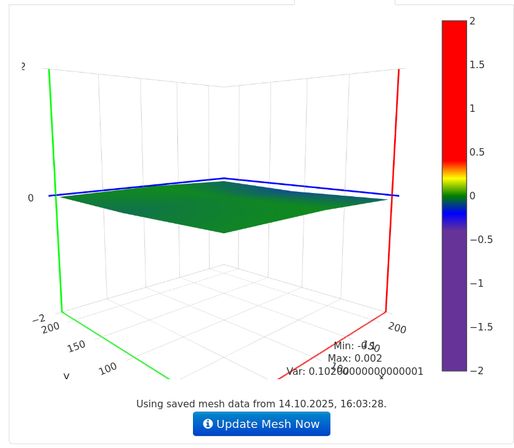
The Bed Level Visualizer confirmed it: a variation of 0.102mm from lowest to highest point just after one cycle of calibration (maybe 10 minutes, including confirmation).

Thatโ€™s better than my last time after 2 hours.

#3Dprinting #OctoPrint

โ€ฆ but also the good feeling when itโ€™s finally โ€œjust printingโ€ ๐Ÿ™ƒ

#3Dprinting #Ender5pro #BLtouch

The only light source by the printer right now is a #BLtouch โ€ฆ

So, this is my maximum available space on my printer when slicing with #Cura. Instead of 220x220 I had to use 219,8x219,8 in order to Cura accepting this.

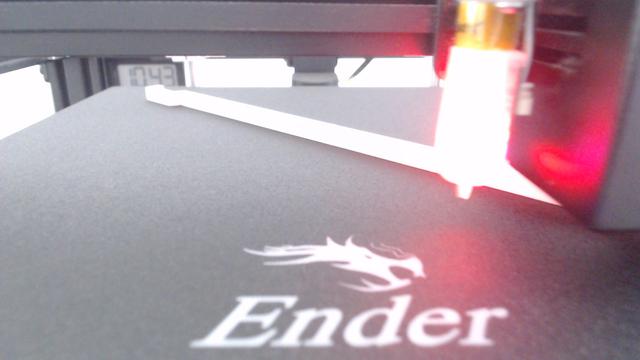
In the top left corner where the tiny handle is, the first layer is flawless and evenly closed with connected rows of filament that is plane on the print bed.

In the middle where the heating element is, there also is a small patch where it's perfect, but overall the first layer quality degrades from top left to bottom right - up to a point where the individual lines are not very well connected at all.

Since I'm using a #BLtouch for automatic bed leveling during print I assume there is something else not quite right. Maybe the bed is not straight between the 9 individual measurement points.

Fortunately this completely becomes not relevant when printing more than just one layer.

#3Dprinting #Ender5pro #BedLeveling #FirstLayer

Hello there! What do you mean with "Too close"? ๐Ÿ˜†

๐ŸŸฅ

#BLtouch #OctoApp #closeup #3Dprinting

Fuck it, thatโ€™s fine! ๐Ÿ™ƒ โ€ฆ And it just took me almost 2 hours.

Auto-home, create mesh, adjust knobs, repeat.

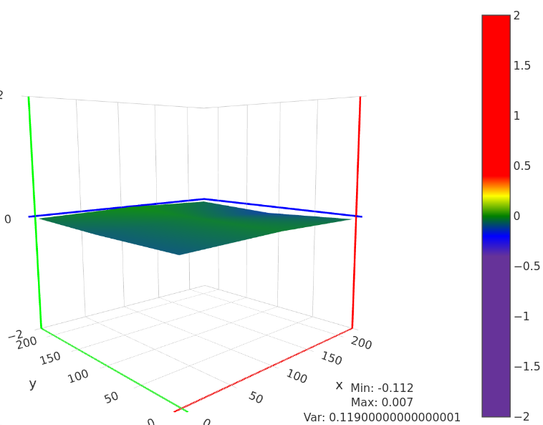
Itโ€™s really hard to level 9 points in a 3D space when you can control only 4 of the points but all of the points are on the same plane. I also have a feeling that my print bed is slightly uneven.

But the total difference of 0.119 millimeters is very much below my usual layer height of 0.2 millimeters.

โ€ฆ and it is only the base bed leveling. The mesh is used by the firmware to even out the layers by adjusting the nozzle height above the print bed.

#Ender5pro #BLtouch #3Dprinting #OctoPrint #BedLevelVisualizer

Ages ago I installed a #BLtouch on my #Ender5pro and always do a leveling for each print, which never failed me.

Recently I messed with the physical leveling of the bed by changing the screw positions and eyeballed the leveling (screw all four screws hand-tight in,and then unscrew them by 3 revolutions each).

And I just checked ... a difference of shy over a millimeter. I think I did a pretty good job by just looking at the distance between the nozzle and the bed.

Visualization is done by the awesome OctoPrint-BedLevelVisualizer plugin for #OctoPrint. For my printer, this #gcode configuration properly creates the mesh visualization without manually modifying any of the printer's settings.

M190 S80 ; Set bed temperature G28 ; auto-home all axes @BEDLEVELVISUALIZER ; monitor output for level data G29 ; probe for bed levels G1 X0 Y0 F2000 ; return print head to home M140 S0 ; turn off print bed G91 ; relative mode on G1 Z60 ; lower print bed by 60mm G90 ; relative mode off

You might want to change the bed temperature to a value you usually use (M190 S80 where 80 is the temperature)

In the wiki they say use M420 V to store the created mesh, but this is what G29 with BLtouch already does.

The last three commands are purely aesthetic.

... and now I'm going to turn some screws ๐Ÿ™ƒ

#3Dprinting

GitHub - jneilliii/OctoPrint-BedLevelVisualizer

Contribute to jneilliii/OctoPrint-BedLevelVisualizer development by creating an account on GitHub.

GitHub