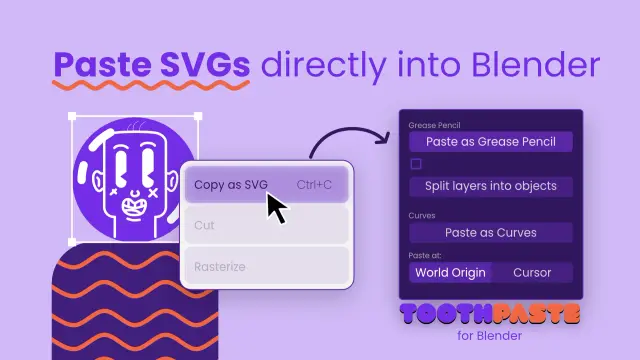
The update to ToothPaste (Paste SVGs) to support 5.1 is live along with a few improvements:

- Materials now transfer correctly
- Multilevel masks are now supported

Enjoy!

#blenderaddons

Itโ€™s springtime! ๐ŸŒท
Everything starts blooming. What about you? Ready to upgrade your 3D toolkit? ๐Ÿ˜ป

Get Full Plan 25% off !!! ๐ŸŽ‰๐ŸŽ‰๐ŸŽ‰
With Full Plan, you gain access to the largest library integrated into Blender. More than 120K assets will be unlocked, and your workflow will skyrocket. ๐Ÿš€
You will also do something great for your community. By subscribing, you will support asset creators and open-source development. ๐ŸŒˆ

https://www.blenderkit.com/discount

#3d #blender #cgi #blenderkit #blenderaddons

ToothPaste for Blender (Paste SVGs) is now officially on Blender Extensions! Super happy!

It's completely free and you can try it out directly from inside Blender > Properties > Get extensions and type in "ToothPaste" in the search box.

https://extensions.blender.org/add-ons/toothpaste/

Don't forget to rate and comment - it would help me resolve any issues!

#b3d #blender3d #blenderaddons #blender

ToothPaste (Paste SVGs)

Paste SVG from Clipboard as Grease Pencil or Curves

Blender Extensions

Very soon I'll be releasing the very first update 1.1.0 for ToothPaste for Blender! It lets you paste SVGs directly in #b3d! A lot of new features are coming up, I'll talk about it more pretty soon.

It's inspired by its cousin plugin - ToothPaste that works with After Effects and @chechoribero was kind enough to let me use the same name.

#blender3d #blenderextensions #blenderaddons

Did you know that with BlenderKit you can find and install add-ons directly in Blender? ๐Ÿ™€Our new feature makes it very easy. Try it now and get a 15% discount on all paid add-ons! ๐Ÿ”ฅ๐Ÿ”ฅ๐Ÿ”ฅ
https://www.blenderkit.com/get-blender-add-ons/

#blenderkit #blender #blenderaddons #3dartist

I made these pie menus a while ago and have been using them to make structuring my node trees more efficient. This extension makes it possible to colorize multiple nodes at once quickly:
Get it for free on Gumroad:

https://lumpengnom.gumroad.com/l/NodeColorToolsPie

#blender #blender3d #3d #extensions #addon #blenderaddons #node #organize

Blender Addon - Node Color Tools Pie

Elevate your workflow with the Pie Menus of Node Color Tools Pie, the essential add-on for managing node colors in Blender. Designed for clarity and speed, this tool allows you to color multiple nodes at once, making it easier to navigate complex node trees.Works with Blender 4.2 and above. Install like any Blender Extension. Key Features: Quick Color Application: Use Quick Color Pie Menu for preset colors, random color assignment, color removal, or copying colors across nodes, all with directional selection for fast results. Customizable Colors: In Precise Color Pie Menu, set and save five unique colors, tailored to your preferences. Also includes options for random, copy, and color removal. Sidebar Backup: All functions are available in a sidebar menu for those who prefer a traditional setup. Customizable Hotkeys: Boost your efficiency even further with customizable hotkeys available in the add-on preferences. Perfect for organizing and visualizing large node networks, Node Color Tools brings order to your workspace with effortless color control.Two Dynamic Pie Menus:Quick Color Pie Menu Set All Selected Nodes to Specific Colors: Choose from a selection of hard-coded colors for a fast and consistent look. Random Color Assignment: Instantly apply random colors to your selected nodes for a fun and dynamic layout. Remove Color: Clean up your node tree by easily removing color from selected nodes. Copy Color from Active Node: Quickly replicate the color of the active node to other selected nodes with directional selection for speed and efficiency. Precise Color Pie Menu Customizable Color Options: Customize the color for each pie menu option, allowing for more personalized control over your node organization. Random, Copy, and Remove Functions: Includes all the essential functions from the first pie menu, ensuring flexibility in your workflow. Sidebar Menu for Backup:For those who prefer a more traditional interface, a comprehensive sidebar menu contains all functions except for hard-coded colors. This serves as a reliable backup for users who may not favor pie menus.Why Choose Node Color Tools? Streamlined Workflow: Save time and enhance your productivity by managing node colors in bulk. Enhanced Organization: Easily distinguish between different sections of your node trees, leading to a clearer and more manageable workspace. User-Friendly Design: With intuitive pie menus and a backup sidebar, adapting to your preferred workflow has never been easier. Transform the way you work with nodes in Blender! Download Node Color Tools today and take control of your node colors like never before.

Gumroad

๐Ÿš€ Transform your #Blender workflow with J Texture Tools! Easily combine and split PBR/ORM textures to enhance productivity and streamline your projects. Perfect for 3D artists and game designers. Get it now! ๐ŸŒŸ

https://youtu.be/CuGoaKFaSIA

Go get it here:
- KoFi: https://ko-fi.com/s/977f4033b5
- Gumroad: https://joaulo.gumroad.com/l/jtt

#3DArt #GameDesign #BlenderAddons

J Texture Tools [Blender Addon]

YouTube

Well... this indeed is a must-have!

What a "madman" !! ๐Ÿ˜‚

https://youtu.be/YE9rEQAGpLw?si=48eeEW8aEGZZi7Mg

#b3d #blender3d #camera #blenderaddons

Make Your Renders Unnecessarily Complicated

YouTube