 Fabien
Photographer 5.8.2 is available with Bloom Kernel textures, Library subfolders support, Post FX animation support and a lot of fixes and stability improvements.
Photographer 5.7.3 is available with hopefully the last fixes for Blender 5.0 compatibility!
https://chafouin.gumroad.com/l/photographer5
Added a new Render Overrides panel with Dicing Camera and Film Transparency per-camera, and fixed the Lens Softness that broke with Blender 4.5 compositor changes.
Now let's focus on 5.1 compatibility :)
#blender #blender_addon
https://chafouin.gumroad.com/l/photographer5
Added a new Render Overrides panel with Dicing Camera and Film Transparency per-camera, and fixed the Lens Softness that broke with Blender 4.5 compositor changes.
Now let's focus on 5.1 compatibility :)
#blender #blender_addon

Photographer 5 - Blender Add-on
Photographer is the most complete Camera and Lighting add-on for Blender 3.x and 4.x, compatible with EEVEE and Cycles (LuxCore is not supported anymore).It vastly expands your camera and lighting toolset with Physical Camera properties, Bokeh textures, Camera and Lens Post FX, Physical Lights with photometric units, Gobos and IES... It also includes Render Queue manager, Mixer interfaces for Lights, Emissive materials and Worlds.NOTE: This is the official page from the developer of the addon. Please make sure to only buy and download content from this page in order to get proper support and safe, virus-free files. There are some fake resellers out there.If you own Photographer 4, check out your Photographer content files to find an upgrade coupon. You should only pay for the upgrade, not the full price.Photographer 5 exclusive features: Camera and Lens Effects, adds Lens distortion, Chromatic Aberration, Fringing, Sharpen, Film Grain and more... (works best with Blender 3.5 and its realtime Viewport Compositor) Light Gobos and IES (Cycles only), add textures to your lights in a couple of clicks to break up that perfect CGI look. A small library of textures is included and will keep growing. Light Placement Modal, quickly create a Light on the object under the mouse, or create faster character lighting using a target and orbit controls. Photographer Main Camera, introducing a hierarchy where one camera will define the default settings for the scene. Improved Light Mixer UI, now more usable with many lights in your scene. Improved World Mixer with HDRI Meshes that receives light, shadows and reflections. World HDRI ground meshes, that receives shadows and lighting for great integration results. Camera Position Bookmarks to store several locations per camera. Collection Snapshots, to store different versions of your scene per camera. Camera Portal one-click creation. Camera Sensor and Resolutions Database from https://physicallybased.info/ More accurate Field of View calculation with a smarter Sensor Fit. Many other user experience improvements and bug fixes. Camera Post FX - art by Quentin PointillartAdvanced Light Modal (Alt+Click on the Add Light buttons) and Gobo texturesIncludes previous version features: Light Mixer, a user-friendly interface to manage the lights in your scene, using collections and light groups. World Mixer, a user-friendly interface to manage your HDRI and World materials per-camera. Emissive Mixer, a user-friendly interface to manage the emissive materials in your scene. Optical Vignetting and Bokeh textures support for cameras. Exposure using real camera settings (ISO, Aperture, Shutter Speed) or more artist-friendly controls (EV value) Physical Light units (Lumen, Candela, Lux) with Color temperature and Presets Viewport Auto Exposure Lens Shift and Automatic Shift to fix vertical perspective for Archviz renders Dolly Zoom Motion Blur control using Shutter Speed or Shutter Angle White Balancing with viewport picker Resolution per camera with artist-friendly presets View Layers per camera Autofocus (Single, Continuous or Tracking) Focus Plane and Depth of Field limits Camera list and Master Camera that can switch between cameras Easy-to-use Camera Targets Render Queue to render one or all cameras at once, incrementally saving your images as well as storing them in new render slots Bokeh and Optical Vignetting exampleImproved and Automatic Lens ShiftDolly ZoomIf you have any question before buying, please check the FAQ and reach out if you still have answered questions.Documentation is available hereFor more information on how to use the add-on, please watch my Youtube channel.Keep in mind that the add-on has received a lot of updates and some new features might have changed or are not be visible in the older videos.Cover image created with the help of Photographer 5 by Quentin Pointillart.
One-click Camera Portal creation in the next Photographer update, with working Field of View and Resolution #blender #blender_addon #rendering
Also coming in the next Photographer update: Collection snapshots, when you just want to quickly store different versions of your scene per camera, without having to deal with all the View Layers complexity.
Coming in the next Photographer update:
Camera Sensor Formats from the amazing https://physicallybased.info/ database by my good friend @apq
 Bazza 🔶
Photographer 5.6.1 is now available for Blender 4.5 and 5.0.0!
https://chafouin.gumroad.com/p/photographer-5-6-1-is-finally-available-compatible-with-blender-4-5-and-5-0-alpha

Because the ground projection is limited in perspective, new Cube and Dome-projected HDRIs are coming to Photographer #blender #blender3d #photographer #blender_addon
I feel a little proud to discover that
@reynantem is a happy user of Photographer. His artworks are always beautiful !
https://reynantemartinez.com #blender #blender3d #b3d #blender_addon #photographer
https://chafouin.gumroad.com/l/photographer5/
@reynantem is a happy user of Photographer. His artworks are always beautiful !
https://reynantemartinez.com #blender #blender3d #b3d #blender_addon #photographer
https://chafouin.gumroad.com/l/photographer5/
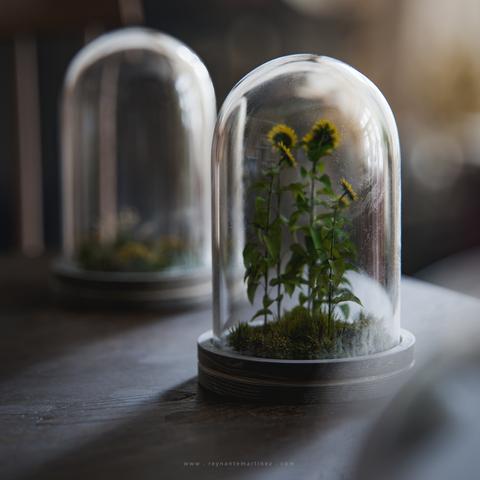

Photographer 5.4.0 is officially out! With new bloom controls that work with viewport compositing https://chafouin.gumroad.com/l/photographer5
#blender #b3d #blender3d #blender_addon #photographer #hdri
#blender #b3d #blender3d #blender_addon #photographer #hdri
Photographer 5 - Blender Add-on
Photographer is the most complete Camera and Lighting add-on for Blender 3.x and 4.x, compatible with EEVEE and Cycles (LuxCore is not supported anymore).It vastly expands your camera and lighting toolset with Physical Camera properties, Bokeh textures, Camera and Lens Post FX, Physical Lights with photometric units, Gobos and IES... It also includes Render Queue manager, Mixer interfaces for Lights, Emissive materials and Worlds.NOTE: This is the official page from the developer of the addon. Please make sure to only buy and download content from this page in order to get proper support and safe, virus-free files. There are some fake resellers out there.If you own Photographer 4, check out your Photographer content files to find an upgrade coupon. You should only pay for the upgrade, not the full price.Photographer 5 exclusive features: Camera and Lens Effects, adds Lens distortion, Chromatic Aberration, Fringing, Sharpen, Film Grain and more... (works best with Blender 3.5 and its realtime Viewport Compositor) Light Gobos and IES (Cycles only), add textures to your lights in a couple of clicks to break up that perfect CGI look. A small library of textures is included and will keep growing. Light Placement Modal, quickly create a Light on the object under the mouse, or create faster character lighting using a target and orbit controls. Photographer Main Camera, introducing a hierarchy where one camera will define the default settings for the scene. Improved Light Mixer UI, now more usable with many lights in your scene. Improved World Mixer with HDRI Meshes that receives light, shadows and reflections. World HDRI ground meshes, that receives shadows and lighting for great integration results. Camera Position Bookmarks to store several locations per camera. Collection Snapshots, to store different versions of your scene per camera. Camera Portal one-click creation. Camera Sensor and Resolutions Database from https://physicallybased.info/ More accurate Field of View calculation with a smarter Sensor Fit. Many other user experience improvements and bug fixes. Camera Post FX - art by Quentin PointillartAdvanced Light Modal (Alt+Click on the Add Light buttons) and Gobo texturesIncludes previous version features: Light Mixer, a user-friendly interface to manage the lights in your scene, using collections and light groups. World Mixer, a user-friendly interface to manage your HDRI and World materials per-camera. Emissive Mixer, a user-friendly interface to manage the emissive materials in your scene. Optical Vignetting and Bokeh textures support for cameras. Exposure using real camera settings (ISO, Aperture, Shutter Speed) or more artist-friendly controls (EV value) Physical Light units (Lumen, Candela, Lux) with Color temperature and Presets Viewport Auto Exposure Lens Shift and Automatic Shift to fix vertical perspective for Archviz renders Dolly Zoom Motion Blur control using Shutter Speed or Shutter Angle White Balancing with viewport picker Resolution per camera with artist-friendly presets View Layers per camera Autofocus (Single, Continuous or Tracking) Focus Plane and Depth of Field limits Camera list and Master Camera that can switch between cameras Easy-to-use Camera Targets Render Queue to render one or all cameras at once, incrementally saving your images as well as storing them in new render slots Bokeh and Optical Vignetting exampleImproved and Automatic Lens ShiftDolly ZoomIf you have any question before buying, please check the FAQ and reach out if you still have answered questions.Documentation is available hereFor more information on how to use the add-on, please watch my Youtube channel.Keep in mind that the add-on has received a lot of updates and some new features might have changed or are not be visible in the older videos.Cover image created with the help of Photographer 5 by Quentin Pointillart.