WE AND THE COLOR
This Visual Editorial Art Book InDesign Template Redefines How Creatives Present Art
Some templates exist to fill space. Others exist to frame meaning. This Adobe InDesign editorial art book template, designed by McLittle Stock and available on Adobe Stock, belongs firmly in the second category. It carries a quiet confidence that most layout templates simply lack. The spreads don’t shout. They breathe. And that restraint, more than anything else, is what makes this template worth talking about.
Download the template from Adobe StockPlease note that this template requires Adobe InDesign installed on your computer. Whether you use Mac or PC, the latest version is available on the Adobe Creative Cloud website—take a look here.
Download a visual editorial art book layout as an Adobe InDesign template, designed by McLittle Stock. Download the template from Adobe StockVisual editorial art book templates are having a genuine moment right now. Galleries, independent publishers, fine art photographers, illustrators, and even brand studios are rethinking how they package and present creative work. The PDF portfolio feels dated. The Instagram grid feels disposable. So what fills that gap? A thoughtfully designed art book layout — one that treats the work with seriousness and the reader with respect.
This template does exactly that. Moreover, it does it in a format that any designer, regardless of experience level, can actually use.
What Makes an Editorial Art Book Layout Template Different from a Standard InDesign Template?
Most InDesign templates are built for utility. They help you lay out text, align columns, and hit a deadline. An editorial art book InDesign template operates under a completely different logic. Here, the layout is not a container for content. Instead, the layout is the content.
This distinction matters enormously. A standard brochure template asks: Where does the information go? An editorial art book template asks: how does the image feel on this page? What tension exists between the typography and the photograph? How much white space earns silence, and how much earns emptiness?
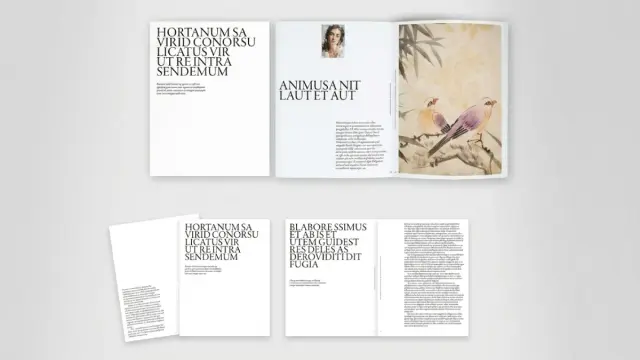
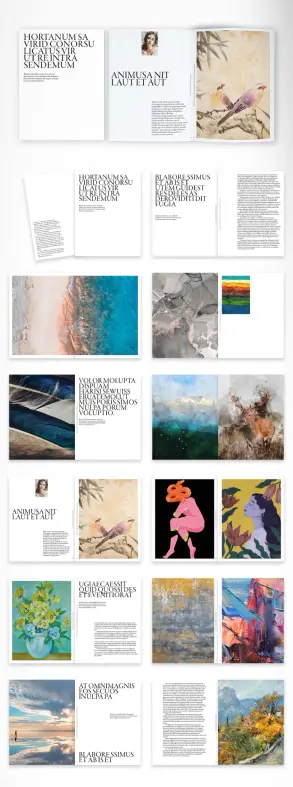
This McLittle Stock template answers those questions beautifully. The spreads alternate between full-bleed image moments and restrained typographic compositions. Bold, condensed serif headlines sit alongside narrow columns of body text. Paintings appear as standalone full-page bleeds or curated in multi-panel grid arrangements. The result is a pacing system — what I’d call a Visual Breath Sequence — where tension and release trade off across pages with editorial intelligence.
Furthermore, the template operates across a wide tonal range. Aerial landscape photography, classical oil paintings, flat graphic illustration, and delicate botanical art all appear in the preview, and each fits the layout without friction. That tonal versatility is not accidental. It reflects a layout designed around compositional principles rather than specific content categories.
The Typography Hierarchy Does More Than Organize — It Signals
Look at the headline treatment in this template. The large, stacked serif type — condensed, high-contrast, unabashedly bold — does not merely label a section. It asserts authority. It tells the reader: this publication takes itself seriously.
Typography in editorial art books carries enormous responsibility. It sets the expectation before a single image registers. The headline style here references the visual grammar of mid-century European art catalogues and contemporary independent publishing. It feels informed without feeling derivative.
Body copy columns are narrow and generous in line spacing. That combination slows the reading pace intentionally. Art books are not read — they are experienced. The typographic design supports that mode of engagement.
Why Art Directors and Independent Publishers Should Pay Attention to This Template
Here is an honest observation: most ready-made InDesign templates for art books fall into one of two failure modes. They are either so generic that they could belong to any industry, or so ornate that they overpower the artwork itself. This template avoids both traps.
The layout system uses what I’d define as Compositional Neutrality — a design posture where the template architecture recedes just enough to let the artwork lead, while still maintaining enough structural personality to feel curated rather than invisible. That is genuinely difficult to achieve, and it is the most important quality a visual editorial art book template can have.
Additionally, the US Letter format makes this immediately practical for North American publishers, studios, and independent creatives who need both digital and print-ready output. The CMYK color mode supports professional offset and digital printing without color conversion headaches. These are not minor details. They are the difference between a template that looks good in a mockup and one that survives production.
Who This Template Actually Serves
Let’s be specific. This editorial art book InDesign template works particularly well for the following use cases:
- Fine art photographers building a physical or digital portfolio publication
- Illustrators and painters creating a self-published artist monograph
- Galleries producing exhibition catalogues on a constrained budget
- Creative directors developing a luxury lookbook or brand editorial
- Design educators creating course materials or student showcase publications
- Independent publishers launching a visual essay or zine in a professional format
In each of these contexts, the template provides immediate structural credibility. You start with a layout that already knows what it is. Your job becomes curation, not construction.
The Editorial Art Book InDesign Template and the Rise of the Independent Creative Publisher
Something meaningful is shifting in how creatives think about publishing. The tools to produce gallery-quality printed books are no longer exclusive to large publishing houses. Print-on-demand platforms, digital distribution, and tools like Adobe InDesign have democratized the production side entirely. Yet the design side — the actual editorial layout work — has remained a bottleneck.
Templates like this one close that gap. They transfer curatorial intelligence into a reusable, customizable structure. Think of it as a Layout Language Transfer — the encoded design decisions of an experienced editorial designer, available to anyone who can use InDesign.
This matters for the broader creative economy. When independent photographers, painters, and illustrators can produce publications that look genuinely professional, they change how their work is perceived. A hand-bound zine signals one thing. A sixty-page art book with editorial-grade typography signals something entirely different. Both have value. But they serve different contexts, different audiences, and different price points.
Moreover, the customizability of this template means that two different creatives using it will produce two completely different publications. All images and texts are placeholder elements. Replace them with your own content, adjust the color palette, swap typefaces if needed, and the template becomes your template. That adaptability is core to its value.
What the Spread Compositions Tell Us About Layout Intelligence
Study the spreads in this template carefully. Several compositional strategies repeat across pages, and each one reflects a deliberate editorial choice.
First, the full-bleed landscape photographs create visual anchors. They stop the reader. They demand attention before the page turn. Second, the multi-panel arrangements — particularly the pages where two or three paintings appear side-by-side — create curatorial dialogue between works. Third, the typographic-heavy spreads use negative space aggressively, giving the headline room to register at scale.
Together, these strategies create what I’d call a Tri-Rhythm Layout System: impact spreads, dialogue spreads, and rest spreads. The sequence creates momentum without fatigue. It is the same rhythm that experienced editorial designers use when building magazine features or gallery catalogues. Finding that rhythm embedded in a downloadable template is genuinely impressive.
How to Customize This Visual Editorial Art Book Template Effectively
Downloading a template and replacing placeholder text is the beginning, not the end. Here is how to approach customization thoughtfully.
Start with image curation, not placement. Before opening InDesign, select your final image set. Organize works by tonal weight — dark, mid, and light compositions. Then sequence them so the template’s built-in rhythm amplifies your content rather than fights it.
Respect the typographic system. The existing headline and body type hierarchy carries significant visual intelligence. Changing typefaces is absolutely an option, but do so with intention. Choose a replacement that maintains the same contrast between display and text weights.
Use the CMYK color mode as a starting point for your palette. If your artwork carries a dominant color — warm ochres, cool blues, desaturated neutrals — you can carry that tone into decorative elements or section dividers while keeping the primary layout clean.
Don’t over-populate the white space. The generous margins and breathing room in this template are structural, not accidental. Resist the urge to fill every empty area. The negative space is doing compositional work.
Printing This Art Book Template: What You Need to Know
The template’s CMYK color mode and US Letter format (8.5 × 11 inches) make it compatible with most professional print-on-demand services, local print shops, and offset printers. For best results, embed all fonts and flatten transparency before exporting to PDF/X-1a or PDF/X-4 format.
If you plan to print a small run physically, consider uncoated stock for a gallery-quality matte finish, or a semi-gloss coated paper for maximum photograph reproduction quality. Both work with this layout. Your paper choice will shift the overall register of the publication significantly, so order samples before committing to a full print run.
The Editorial Art Book InDesign Template as a Strategic Asset for Creative Professionals
Here is a perspective worth considering: a professionally designed art book publication is not just a portfolio document. It is a positioning tool. It signals seriousness, commercial viability, and editorial vision to gallery directors, collectors, brand collaborators, and editorial clients.
A template that enables independent creatives to produce that level of publication — quickly, affordably, and without compromising visual quality — has genuine strategic value. Not just aesthetic value. Strategic value.
Furthermore, the art book format travels well. Send a digital PDF to an international gallery. Ship a printed copy to a potential collector. Upload a preview to your website. Each context reads the same level of editorial intention. That consistency across distribution channels is something Instagram and Behance portfolios simply cannot provide.
I genuinely believe that the creatives who will differentiate themselves over the next five years are the ones who invest in physical and digital publishing artifacts that carry editorial weight. This template is a legitimate starting point for that investment.
Adobe Stock and the Expanding Ecosystem of Professional InDesign Templates
McLittle Stock’s contribution to Adobe Stock reflects a broader trend: professional-grade InDesign templates are increasingly available at a fraction of the cost of custom design work. The quality ceiling has risen significantly. Five years ago, the template market was dominated by generic corporate formats. Today, editorial art book InDesign templates like this one demonstrate that template design has matured into a serious creative discipline.
For creative professionals who use Adobe Creative Cloud, the integration is seamless. Download, open in InDesign, and begin customization immediately. No conversion, no compatibility friction, no rebuilding from scratch.
Forward-Looking Prediction: The Editorial Art Book Will Become the Standard Creative Portfolio Format
Here is a prediction worth recording: within five years, the editorial art book — whether printed, digitally distributed, or both — will become the expected portfolio format for serious fine art, photography, and illustration professionals. The PDF portfolio and the social media grid will remain. But neither will carry the cultural authority that a thoughtfully designed publication carries.
The tools to produce these publications already exist. Adobe InDesign templates like this one lower the barrier to entry further. As the quality floor rises across independent creative publishing, the differentiator will not be whether you have a publication. It will be how well-designed that publication is.
Download the template from Adobe StockTemplates like this McLittle Stock editorial art book layout give independent creatives a genuine head start. The structure is already there. The editorial intelligence is already embedded in the layout. What you bring is the work itself — and that, ultimately, is the only part that cannot be templated.
Frequently Asked Questions About the Visual Editorial Art Book InDesign Template
What software do I need to use this editorial art book template?
You need Adobe InDesign to open, edit, and customize this template. The file is formatted specifically for InDesign and is not directly compatible with other layout applications. Adobe InDesign is available through an Adobe Creative Cloud subscription.
What is the page size of this art book InDesign template?
The template is designed in US Letter size, which measures 8.5 × 11 inches. This format is standard for professional printing in North America and compatible with most print-on-demand services and commercial printers.
Is this template suitable for professional printing?
Yes. The template uses CMYK color mode, which is the standard color space for professional offset and digital printing. Export your final document as a PDF/X-1a or PDF/X-4 file for best print compatibility. Always embed fonts and images before sending to a printer.
Can I replace all the placeholder images and text with my own content?
Absolutely. All images and text in the template are placeholder elements. You can replace every element with your own photographs, illustrations, paintings, or other artwork, along with your own copy, titles, and captions. The template is fully customizable within Adobe InDesign.
What types of creative projects work best with this editorial art book template?
This template suits a wide range of creative projects, including fine art photography books, artist monographs, gallery exhibition catalogues, luxury brand editorials, illustration portfolios, and independent visual essays. The layout system accommodates photography, painting, illustration, and mixed-media art equally well.
Who designed this visual editorial art book InDesign template?
McLittle Stock, an Adobe Stock contributor, designed this template. It is available for download on Adobe Stock and comes with a commercial-use license that covers both personal and professional projects.
Do I need advanced InDesign skills to customize this template?
Intermediate InDesign skills are sufficient for basic customization — replacing images, editing text, and adjusting colors. More advanced modifications, such as restructuring the grid system or altering the master page layouts, benefit from stronger InDesign experience. The template’s clean construction makes it accessible to designers at multiple skill levels.
Can I use this template for a digital-only publication?
Yes. While the CMYK color mode is optimized for print, you can export the completed document as an interactive PDF or adapt it for digital distribution. For screen-only use, you might consider adjusting the color profile to RGB for more vibrant on-screen color rendering.
What makes this art book InDesign template different from a standard magazine template?
An editorial art book template prioritizes image presentation and compositional breathing room over information density. This template uses a Tri-Rhythm Layout System of impact, dialogue, and rest spreads that mirrors gallery-quality catalogue design — a structure that standard magazine templates rarely employ. The result feels more like a curated publication than a periodical.
Where can I download this visual editorial art book InDesign template?
This template is available for download on Adobe Stock. Search for McLittle Stock’s editorial art book template using relevant keywords on the Adobe Stock platform to locate and license the file directly.
Check out other popular graphic design templates here at WE AND THE COLOR.
#AdobeInDesign #AdobeStock #artBookTemplate #brochure #BrochureTemplate #design #graphicDesign #InDesignTemplate