Fun with #NetBSD 10.1 and Sharp #Zaurus #PDA.

Command line:

skint -l anim2.scm | ppmscale 2 \
| wish ppm.tcl; \
skint -l map.scm -e '(begin (main) (exit))' \
| pnmscale 1 | wish ppm1.tcl

@hrw I have my two #Zaurus devices for one day…
OpenBSD on the Sharp Zaurus SL-C3100

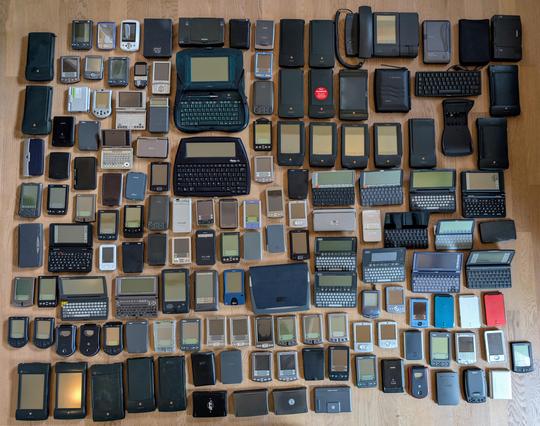
Anyone remember PC Expo? I attended PC Expo '98 and '99 at the Jacob Javits Center in NYC, mainly with an interest in handheld computing.

https://www.flickr.com/photos/blakespot/albums/72157604598587867/

#PCExpo #tech #techconference #conference #NYC #Javitscenter #nineties #PDA #WindowsCE #Newton #NewtonOS #Palm #Zaurus #Psion #PalmSizePC #PocketPC

Boots #NetBSD directly without intervention.
Look Ma, no hands!

(Edited: Replaced the animated GIF that is maliciously converted to a static image by John Mastodon by an mp4 file. Thanks to @evgandr for pointing this out!)

#NetBSD #zaurus #sl_c1000 #boot

Subject: #Wikipedia and other knowledge bases for the #Zaurus

This is personal tech email offered with only that much context. I'm experimenting with simply posting some of my outbound email to different people.

Q1. JM said: I found in my archives a ported version of smbmount for the Zaurus. I will focus on learning to setup the loopback but is a SMB mount anything that can be useful?

A1. OldCoder responds: "smbmount" is used to access Windows shared folders that are located on Windows boxes in a local network. The Zaurus version probably wouldn't work with boxes that are running newer releases of Windows. So, the short answer is probably "no", but it isn't 100% ruled out.

Q2. JM said: I did as you said and the Zaurus via the Opera browser displayed the file correctly both times! The text and image was displayed.

A2. OldCoder responds: Bingo was his Name-O.

This is the take-away: If we get the right type of loopback filesystem to work on the Zaurus, I can probably create browseable encyclopedias for you [and other Zaurus users] that will work in the web browser but without search.

It might be possible to add search using external Zaurus CLI or GUI tools. However, the larger encyclopedias might be too large for that to work. You have a sense of what might happen based on your experience the other day.

Nothing is guaranteed yet to work. However, tests should be relatively simple. If it doesn't work, no harm done.

The pluses would be as follows: Multiple encyclopedias or knowledge bases. Only one [1] large file for each of them. No millions of files to copy. Not much work needed except for a bash script that sets up loopback.

The next steps are as follows:

a. Look into Zaurus loopback support. Use "dd" to create a file of zeroes that is from 50 MB to 100 MB in size. Format the file as ext2fs. Mount that file using loopback. Copy the recent test HTML file and image into the mounted filesystem. Confirm that that copy of the recent test HTML file and image can be viewed in the browser.

The odds of this part working are good.

b. Find out if the Zaurus does, or doesn't, support one of the compressed filesystems that existed about 25 years ago. We can talk about (b) after you finish (a).

c. If (a) works, you can have a few encyclopedias or similar works but not all of Wikipedia. If both (a) and (b) work, you can have Wikipedia as well.

Q3. JM said: I like that screenshot of WikiVoyage! I never heard of that. Very nice! If given a choice I would actually prefer to have something other than Wikipedia.

A3. OldCoder responds: If (a) above works, the odds are that Wikivoyage and a few other knowledge bases will work. If both (a) and (b) above work, you can have Wikipedia as well, but this is optional and up to you.

The available knowledge bases include:

* Wikipedia. Size: 100 GB. This one requires (b).

* Different subsets or versions of Gutenberg. Millions of books [legal due to out of copyright]. Size: 5 GB to 100 GB. This one requires (b). For technical reasons, it might or might not work for the Zaurus.

* Wikibooks. Size: 6 GB if (b) works or 2X to 4X and up otherwise. This is a collection of textbooks for different ages.

* Wikiquote. Size: 1 GB if (b) works or 2X to 4X and up otherwise.
* Wikisource. Size: 20 GB if (b) works or 2X to 4X and up otherwise.
* Wikispecies. Size: 3 GB if (b) works or 2X to 4X and up otherwise.
* Wikiversity. Size: 3 GB if (b) works or 2X to 4X and up otherwise.
* Wikivoyage. Size: 1 GB of (b) works or 2X to 4X and up otherwise.

* Australian Slang, Online Etymology Dictionary, Food Glossary, Chess Glossary, The Devil's Dictionary, and a few other random knowledge bases: Details at a later date.

* Any small 1990s to 2000s website that is still online and can be captured.

Newer websites can be sometimes be captured, too, but it's far more difficult to capture them and to make them work offline. Except for single web pages, even highly dynamic web pages. It's easy to capture those.

Sites with 10,000s of files or large amounts of dynamic content can't be captured.

The preceding option includes Zaurus websites that you have or that can be captured.

In short, a Zaurus Stick can be prepared that includes everything to do with the Zaurus, including articles and binary or source packages, in Web form. Plus mountable knowledge bases of other types. You have the option of snail-mailing such sticks to other Zaurus people.

N4. OldCoder adds: My motivation for preparing detailed notes of this type is in part to start or encourage FOSS or writing projects. This includes whatever works for the Zaurus. If time permits, maintain your own detailed notes on things, in text or DOC form, success or failure, and provide me at a later date with the notes.

If you write on other subjects, either fact or fiction, and are comfortable with the CC BY-NC-SA International license, feel free to include that.

Illustration: Screenshot of the Wikispecies website.
Date: August 06, 2025
Subject: #Zaurus and Offline #Wikipedia

I think that personal email I'll post
A post isn't a boast
It's just bits of a Coder life
If context is lacking, the thumb-tacking
is that there will be tech thoughts rife

Q1. JM says: The Zaurus uses ext2 for its filesystem and FAT32 for /home/documents, I think mostly so it can be used as a USB mounted mass storage device. Of course, FAT32 does not allow symlinks, which I have become fond of. I currently use the compact flash slot with a sd card adapter. The Zaurus mounts the CF as an IDE device, which is neat.

A1. OldCoder says: I wouldn't do the following for important files initially. It's too risky.

However, in theory, you can put a ext2fs loopback file in a FAT32 filesystem, mount the file using a loopback method, and the result is ext2fs in FAT32. The Zaurus kernel is supposed to support this. We'll need to see.

Better still, the Zaurus kernel might support at least one type of compressed read-only filesystem. Combine that with loopback and a Zaurus Wikipedia Flash Stick is practical.

I think that one compressed read-only filesystem made it into the Zaurus kernel sources. The question is, did the Zaurus developers enable the feature at build time?

Or it might be possible to build a new Zaurus kernel or a kernel module to support what you need. This would require a Zaurus True Believer. Which, of course, you are.

Q2. JM says: I found a 2008 wikipedia dump online in static HTML format. It was only a 15GB .7z file, so I downloaded it to experiment with. This is a dump with images.

I uncompressed it and the .7z turned into a 200gb tar file. This has been extracting all day and there are still 124 million files left to go! I have no idea how large it will be, but I'm guessing more than a TB? That is some serious compression coming from a 15GB file!

A2. OldCoder says: I think that you have something different than you think.

Remember that text files can be significantly compressed. However, this said, a 15GB 7Z file that is partly images should work out to less than half a TB uncompressed. But it could be larger if what I suspect is true is true.

My 2023 Wikipedia dump is 15 years newer than yours and 6 times larger in compressed form. But it contains only 24 million files. Your copy contains 124 million files. That works out to 124 minus 24 or 100 million extra files despite your dump being 15 years older.

Your dump probably includes a large number of non-essential meta files such as histories. And, if the extra files are small, they might take up a disproportionate amount of disk space due to inode minimum block allocation.

You're likely to be happier with a new and optimized dump.

N3. OldCoder says: Be advised that newer Wikipedia dumps, just text and images without histories or special pages, are close to 100 GB compressed. That does probably work out to multiple TB uncompressed.

If you'd really, truly, like to experiment with Wikipedia immediately, I'll link you to one of those dumps. And to the source code for a CLI tool that will unpack it.

You'll see why I say "really, truly" after you read the list below. However, the primary ingredient needed is patience.

You'd need the following:

* The time and bandwidth needed to D/L a 100 GB file.
* A sturdy ext2fs drive with TB of free disk space
* Repeat, sturdy. It's going to be pounded.
* I don't know the number of TB required. It might be 3 to 6.
* Tens of millions of free inodes.
* Probably 1 to 2 weeks of calendar time to unpack the dump.
* If the dump is interrupted, a trick will be needed to restart it.
* After that, millions of files will need to be renamed to have ".html" extensions.
* A Perl script can be used to do that.
* You'd probably need to put a Zaurus file search tool on top of the output tree.

The result might, repeat, might work directly as a browser compatible offline copy of Wikipedia.

On the bright side, you could interrupt the extraction process after just an hour to look at some of the extracted files. I don't think that images will work in general, though, until everything is extracted.

I found some old handheld devices in my drawer: #Zaurus #SL-C1000 and HP 95LX.

The HP’s LCD is dead (as expected). I might order a new polarizing sheet to fix it. But the SL-C1000 still works like a charm, so I decided to run the latest #NetBSD release on it.

I was lucky to find this repo by @tsutsuii:
https://github.com/tsutsui/netbsd-teokureliveimage-zaurus/

All I had to do was tweak the scripts a bit and run it.

Big thanks to @tsutsuii for making this a breeze.

@habr25
Ух ты. У меня были те #Zaurus.
Точно помню первый 700 и толстячка 860.
Очень достойный аппарат. Жаль, что вся платформа #qtopia не получила никакого развития :(