Debbie D. 🇨🇦 🇩🇪
WordPress Achievements: Unlock Secret Badges and Activity Streak Rewards https://hughsviewsandnews.com/2026/06/01/wordpress-achievements-secret-badges-activity-streak-rewards/ #Achievements, #BloggingAdvice, #BloggingCommunity, #BloggingMilestones, #HowTo, #WordPress, #WordPressAchievements, #WordPressBadges, #WordPressFeatures, #WordPressUpdates
 Hugh's Views & News
 WordPress Achievements: Unlock Secret Badges and Activity Streak Rewards
Introduction to WordPress Achievements and Badges
Have you noticed any WordPress achievement notifications popping up on your blog lately?
From secret badges to impressive activity streaks, WordPress now rewards bloggers for showing up, creating content, and staying consistent. But how do these achievements work, and what do you need to do to unlock them?
What WordPress Achievements and Badges Are
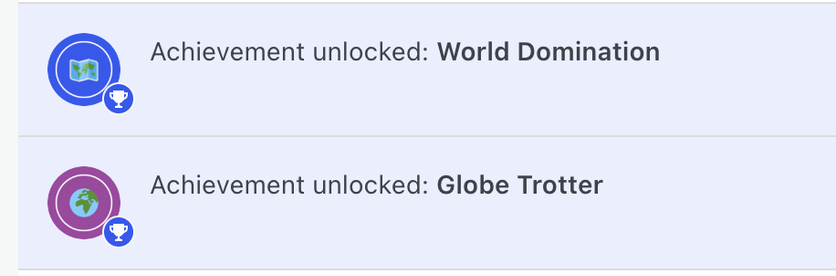
Here’s a screenshot of some of the achievement notifications I’ve earned on WordPress recently.
There are lots of achievement awards available. Although there are no plans to add more, Dean Sas, who works for Automattic on WordPress.Com, and his team, who all came up with the idea, told me that they’d like to add more every so often.
Secret Badges and How to Unlock Them
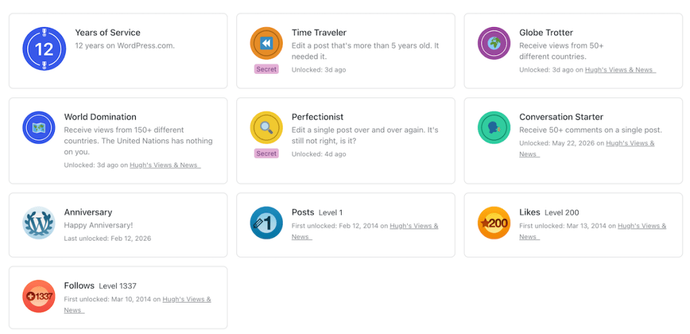
Some of the achievements are secret, meaning you won’t know how to earn them, which I think adds to the fun. I recently unlocked and earned one of the secret awards after editing a post that was more than five years old. Why was I editing a post that was more than five years old? Well, we all do that, don’t we? After all, blog posts need updating, especially those that continue to receive lots of traffic.
Tracking Your WordPress Activity Streaks
Another fun feature is the ‘Activity Streak.’ The more you log on and use WordPress, the longer your activity streak. You can also earn a freeze on your activity streak so you don’t break it.
So, if you aren’t able to log in one day, no fear, as the freeze you earned protects the streak.
As you can see, I’m on fire!
Privacy Settings for Your WordPress Badges
Your Achievements page is private by default. If you want to share it, you can make it visible to other logged-in WordPress.com users by toggling the settings in the top-right corner of the Activity Steak block.
Where can you find your WordPress achievements?
Like a lot of other interesting features, you can find the achievement page for you and your blog by clicking the ‘Reader‘ icon, then clicking ‘Reader Profile‘ (at the bottom of the left-hand menu), and finally the ‘Achievements’ tab.
Give it a go and see what achievements you have already earned. You may be surprised.
You will also see all the locked achievements waiting for you to open and earn. How many can you unlock?
To display your achievements in a post or on social media, copy and paste the URL of your achievement page.
New Notifications
I’ve also noticed these new notifications popping up in my blog every day.
Quite a nice touch, as I can revisit the post to update, share, or repost it. Thank you WordPress.
Have you earned any WordPress achievements? If so, which ones? Have you been receiving WordPress achievement notifications? What do you think of the idea?
You can follow me at the following sites.
The featured image in this post was created using the WordPress image generator. AI was used to check for grammar and spelling mistakes and to help with the layout of the post.
Copyright @ 2026 hughsviewsandnews.com – All rights reserved.
#Achievements #BloggingAdvice #BloggingCommunity #BloggingMilestones #HowTo #WordPress #WordPressAchievements #WordPressBadges #WordPressFeatures #WordPressUpdates

 Einstieg in WordPress