Aptivi Choco Pack is now Aptivi Packaging

When we started making packages for our applications, we resorted to making Chocolatey packaging for our applications, such as Nitrocid and BassBoom. This was made in an effort to make installation…

Aptivi

Aptivi Choco Pack is now Aptivi Packaging

When we started making packages for our applications, we resorted to making Chocolatey packaging for our applications, such as Nitrocid and BassBoom. This was made in an effort to make installation of our applications easier and simpler, complete with documentation.

We have earlier introduced WinGet packaging for our applications, such as Nitrocid and BassBoom earlier this year to provide an easy way to install them, knowing that WinGet is shipped with Windows 11 as a built-in system component.

Now, we are very excited to announce that the Choco Pack organization on GItHub has been renamed to Aptivi Packaging!

This was done to better reflect its purpose as a repository for our packaging efforts for our applications, with more to come. Right now, you can access this organization to view two repositories: WinGet and Chocolatey metadata packages.

To learn more about the new organization’s name, please visit Aptivi Newsroom below.

Learn more #Aptivi #AptiviChocoPack #AptiviPackaging #Chocolatey #news #Tech #Technology #update #winget

Как я спас компьютеры миллионов юзеров Winget. История одного форка «Запрета»

Недавно я обнаружил вредоносный форк Zapret — да-да, тот самый Zapret 2 GUI. А дальше вы можете почитать нажав «Узнать больше!» Узнать больше!

https://habr.com/ru/articles/1032982/

#вирус #вирусный_анализ #winget

Как я спас компьютеры миллионов юзеров Winget. История одного форка «Запрета»

Недавно в официальном репозитории Microsoft Winget был обнаружен вредоносный форк популярной утилиты Zapret. Речь идет о проекте под названием Zapret 2 GUI (ID: loop-uh.Zapret2) (P.S. Сейчас вы его...

Хабр

Fixing WinGetCreate fork synchronization issue when submitting a WinGet manifest

WinGet is a package manager that is made by Microsoft for modern Windows systems. It simplifies application installation by downloading it from official sources without having to manually search the web. There are also helpers that make installation using WinGet much easier, such as UniGetUI.

When you are an application developer and you are submitting WinGet manifests using WinGetCreate, it uses the GitHub API to fork the winget-pkgs repository to your GitHub account to make submission faster. However, one day, you might run into this error message when you’re trying to submit a manifest:

PS C:\Users\aptiv\manifests\a\Aptivi\BassBoom\1.0.0> wingetcreate submit C:\Users\aptiv\manifests\a\Aptivi\BassBoom\1.0.0 Manifest validation succeeded: True Submitting pull request for manifest... The forked repository could not be synced with the upstream commits. Sync your fork manually and try again.

This message means that your fork has become so outdated that WinGetCreate couldn’t safely submit your manifest to create a pull requests for inclusion to the WinGet repository. This is clearly indicated in the message: The forked repository could not be synced with the upstream commits. Sync your fork manually and try again.

In order to fix this, you’ll have to manually synchronize your fork. Follow the below steps:

  • Open your GitHub account, and search for your fork of winget-pkgs. For example, our fork of winget-pkgs is found under AptiviCEO/winget-pkgs.
    • You can search your fork with this URL: https://github.com/<ACCOUNT>?tab=repositories&q=winget-pkgs&type=&language=&sort=
  • Press Sync Fork. You should see the below message saying that your fork is out of date.
  • Press Update Branch. Your fork should then be synchronized to the latest commit that is pushed to the main repository, microsoft/winget-pkgs. Verify that your fork is up to date like the below picture:
  • Now, submit your package again using WinGetCreate. If everything is OK, you should be able to submit a manifest, just like below:
  • PS C:\Users\aptiv\manifests\a\Aptivi\BassBoom\1.0.0> wingetcreate submit C:\Users\aptiv\manifests\a\Aptivi\BassBoom\1.0.0 Manifest validation succeeded: True Submitting pull request for manifest... Pull request can be found here: https://github.com/microsoft/winget-pkgs/pull/367938
  • Verify that your pull request is created successfully with the expected contents. For example, the BassBoom v1.0 pull request has been created.
  • At this point, wait for the moderation team to give a review on your pull request.
  • If you are still experiencing failures when pushing manifests to WinGet’s official repository using WinGetCreate, let us know!

    #news #Tech #Technology #update #winget #Wingetcreate
    Fixing WinGetCreate fork synchronization issue when submitting a WinGet manifest

    WinGet is a package manager that is made by Microsoft for modern Windows systems. It simplifies application installation by downloading it from official sources without having to manually search th…

    Aptivi
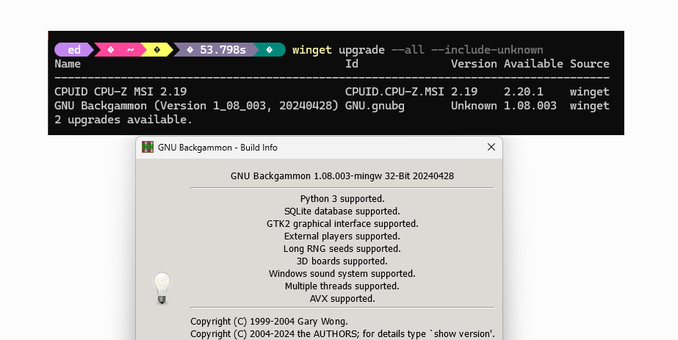
    How 'bout that? UniGetUI has logos now, too -- more than #WinGet can display right now, in fact! See what I mean? #WindowsInsiders #MVPbuzz
    Hey! A new PowerToys release is out, plus an incremental hotfix. Let's see how long it takes to show up thru #WinGet upgrade... #WindowsInsiders #MVPbuzz https://www.edtittel.com/blog/timing-wingets-update-pipeline.html
    Timing WinGet's Update Pipeline - Ed Tittel

    OK then, I just read at WinAero that a new PowerToys v0.99.0 is out. Checking via WinGet upgrade in PowerShell it’s not yet in the pipeline. Nevertheless, the app itself is happy to grab said update from its GitHub repository, as you can see in the lead-in graphic. I’m now conducting an experiment. I’ll be … Continue reading Timing WinGet’s Update Pipeline →

    Ed Tittel
    .#WinGet Update starts showing icons. Woo-hoo! #WindowsInsiders #MVPbuzz