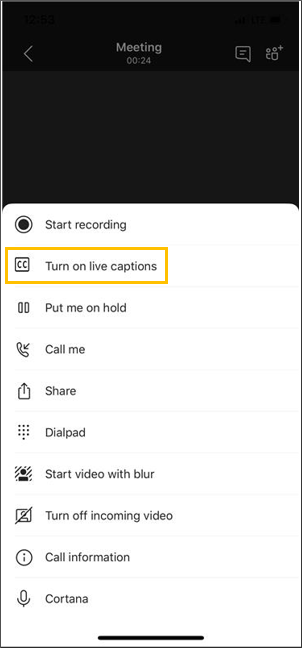
I'm currently in a community event from Workplace Ninjas Denmark https://www.meetup.com/wpninjasdk/events/312783505/rsvp/ And they are obviously speak a lot of Danish, which NOT the same as Dutch 😉

But thanks to the #MicrosoftTeams Live Caption with Translation I can follow it pretty good. You or the organizer do require a Teams Premium or M365 Copilot license https://support.microsoft.com/en-us/office/use-live-captions-in-microsoft-teams-meetings-4be2d304-f675-4b57-8347-cbd000a21260#setuptranslatedcaptions #WeekITtip #Microsoft365
I trained myself to use the UPN above the down level (samaccountname) format e.g username@domain,com vs domain\username. But there have been a few times when authentication failed because I used the wrong one. Be sure to try the other format before diving further in troubleshooting #WeekITtip #Microsoft

The biggest gain is achieved by changing your default domain and checking existing objects. In addition, the default DKIM signing domain is often the MOERA domain. Take a moment to properly configure each custom domain as well, enhancing #security.

Read more here for a more detailed explanation and how to monitor the use of MOERA domains: https://techcommunity.microsoft.com/blog/exchange/limiting-onmicrosoft-domain-usage-for-sending-emails/4446167?WT.mc_id=M365-MVP-5000976

#WeekITtip #MSExchange #Microsoft365

Limiting Onmicrosoft Domain Usage for Sending Emails | Microsoft Community Hub

We are announcing that all Exchange Online customers who send external email should start switching to custom (aka vanity) domain names.

TECHCOMMUNITY.MICROSOFT.COM

Last week #Microsoft announced an important change throttling #MSExchange Online outbound mail using *.onmicrosoft.com, or MOERA (Microsoft Online Exchange Routing Address). This is done to limit malicious\unsolicited mails from trail tenants, which is indeed a problem.

The impact for organizations using custom domains is limited. However, orgs might not be aware that some non-user objects use MOERA domains per default (i.e. Booking app, notifications etc.).

#WeekITtip #Microsoft365 #Security

In any case, if you still have or use Lens: time to look for alternatives that suit your needs. I think there are better options than the M365 Copilot, for me native iPhone is adequate. Especially with OCR built-in.

Read more here: https://mc.merill.net/message/MC1131064
Admin M365 MC: https://admin.microsoft.com/ref=MessageCenter/:/messages/MC1131064
#WeekITtip #Microsoft365

MC1131064 - Microsoft Lens app will retire | Microsoft 365 Message Center Archive

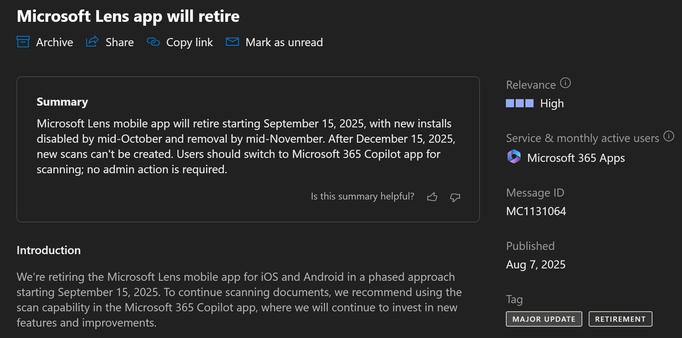
Microsoft Lens mobile app will retire starting September 15, 2025, with new installs disabled by mid-October and removal by mid-November. After December 15, 2025, new scans can't be created. Users should switch to Microsoft 365 Copilot app for scanning; no admin action is required.

It makes me sad as a was a avid user during conferences to get photos of projected slides unskewed and suitable for social media. To be fair, I haven't used Lens probably since 2019, the last year I went to a lot of conferences. After that a lot of hybrid conferences and (pre-)shared slidedecks limited the need for photos or live tweeting for that matter.
#WeekITtip #Microsoft365

This #Microsoft365 Message Center #MC1131064 hurt a little: Microsoft Lens app will retire. Starting this September in phases and concluding on 15 December 2025. The replacement app is the Microsoft365 Copilot app, although it certainly does not have feature parity with Lens.

#WeekITtip #Microsoft365

If you are responsible for your orgs mail infrastructure, definitely read this post and evaluate the impact of disabling Direct Send: https://techcommunity.microsoft.com/blog/exchange/direct-send-vs-sending-directly-to-an-exchange-online-tenant/4439865?wt.mc_id=M365-MVP-5000976

#WeekITtip #Security #SMTP #Mail #Microsoft365

Direct Send vs sending directly to an Exchange Online tenant | Microsoft Community Hub

This post discusses what Direct Send is, is not, and how to help control email sent directly to your tenant.

TECHCOMMUNITY.MICROSOFT.COM

Direct Send is defined as your organization sending mail to #MSExchange Online using a sender domain that is an accepted domain AND which is not send via any authentication (user or via Connectors). In some cases you might require this functionality, however this obviously can open your organization up to receive spoofed mails. Those should be filtered, but depending on the complexity the ability to disable Direct Send is a welcome option.

#WeekITtip #Security #SMTP #Mail #Microsoft365

Recently the #MSExchange product group posted an article on disabling #SMTP Direct Send and after feedback reposted it with some additional clarifications because there were some misconceptions on the definition. I have had similar discussions with organizations. It depends on your configuration what the impact might be, but IMHO it is a welcome option to reduce your attack surface but you obviously need to understand it correctly.

#WeekITtip #Security #SMTP #Mail #Microsoft365