It Worked on My Machine (Literally)
I have a TRMNL on my desk. If you haven’t seen one, it’s a little e-ink display from trmnl.com that shows you whatever you tell it to: your calendar, the weather (but in Haiku form), a far side comic, a random Studio Ghibli picture. The whole device runs on plugins, and the nice thing is you can write your own. I’d been meaning to build a TRMNL plugin since I got my device, and I finally landed on an idea that was small enough to actually finish: show what I’m currently reading on StoryGraph.
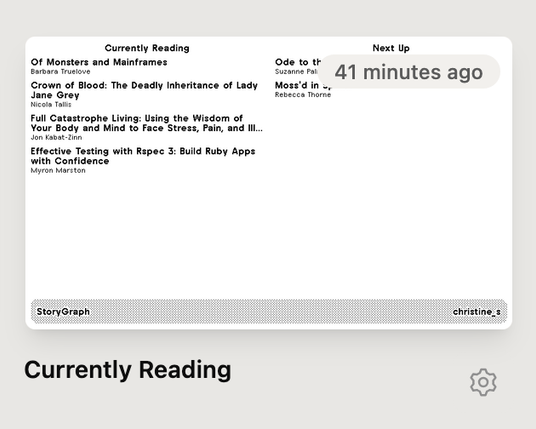
Just three things, really. My profile name, what I’m currently reading, and the next couple of books in my to-read pile. That’s it. A small project. I even said the words “basic, simple plugin” out loud, which in hindsight was me daring the universe.
The plan
TRMNL plugins can fetch their data a few different ways. The one that fit was polling: TRMNL pings a URL on a schedule, gets back some JSON, and renders it with a Liquid template. So I needed a small server that returns my reading data as JSON, plus the templates to lay it out on the screen.
The catch: StoryGraph doesn’t have a public API. No tidy endpoint to call. If I wanted the data, I’d have to scrape it off my public profile page. I found a reference project, storygraph-api, that does exactly this, and it gave me the lay of the land: the URLs to hit (`/currently-reading/username`, `/to-read/username`) and the HTML structure of a book on the page.
I wanted to keep this lightweight. Plain Ruby where I could, a real framework only if I needed one. For a service with two or three JSON routes, plain Ruby plus Rack is plenty. No Rails, no Hanami, just a Rack app and Nokogiri to parse the HTML. Easy.
The first wall
Before writing a line of application code, I did the one thing I always tell other people to do: I tested the riskiest assumption first. Could I even fetch a StoryGraph page?
$ curl https://app.thestorygraph.com/profile/christine_s
HTTP 403
Hm. I added a browser User-Agent. Still 403. I added the full set of Chrome headers, the `sec-ch-ua` bits, a cookie jar, all of it. Still 403. Then I looked at the response headers and saw the actual story:
cf-mitigated: challenge
server: cloudflare
StoryGraph sits behind a Cloudflare managed challenge. My polite little `curl` request was getting waved off at the door before it ever reached their servers. And here’s the part that surprised me: it wasn’t about the headers at all. Cloudflare was fingerprinting the TLS handshake itself. Real browsers negotiate TLS in a particular, recognizable way (the cipher order, the extensions, the whole shape of the “hello”), and `curl` does it differently. You can spoof every header in the world and you’ll still look like a robot, because the give-away happens one layer down, before any headers are sent.
The thing that actually worked
The fix turned out to be a tool I’d never had a reason to use before: curl-impersonate. It’s `curl` rebuilt to mimic a real browser’s TLS fingerprint exactly. Same ciphers, same curves, same handshake shape as Chrome.
$ curl_chrome136 -s -o /dev/null -w '%{http_code}' \
    https://app.thestorygraph.com/currently-reading/elliek
200
Two hundred. The door opened. Watching that `403` flip to `200` was easily the most satisfying moment of the whole project. The challenge wasn’t checking who I claimed to be, it was checking how I spoke, and now I had the correct vocab.
Building the actual thing
With the hard part de-risked, the rest came together quickly, which is how these things usually go once the scary unknown is gone.
The service is a small Rack app. One real endpoint, `/reads.json`, that takes a username and a limit. It fetches two pages through curl-impersonate, hands the HTML to a Nokogiri scraper that pulls out each book’s title, author, and cover, and returns a clean little JSON payload. There’s a `/health` route and a tiny index page, and that’s the whole surface area.
A few decisions I’m happy with:
- Caching. Scraping is slow and I didn’t want to hammer StoryGraph every time TRMNL polls. An in-memory cache with a thirty-minute TTL means repeated polls cost nothing and I stay a good citizen.
- Failing soft. If a scrape fails, the endpoint still returns `200` with an `error` field instead of a `500`. A blank e-ink screen tells you nothing. A screen that says “couldn’t load, is the profile public?” at least tells you where to look.
- Retries. StoryGraph occasionally drops a rapid second request, so the fetcher retries with a short backoff.
Then the templates. TRMNL supports four layout sizes (full, two halves, and a quadrant), and I wrote Liquid for each, with the empty and error states baked in so the display always has something sensible to show. I wrapped it all in a Docker image that installs the right curl-impersonate build for the architecture, and I had a passing test suite running against saved HTML fixtures so I wasn’t hitting the network on every run.
It worked. Locally, it really worked.
The second wall (this one was my fault)
I pointed the scraper at my own profile and got a redirect to a sign-in page. My books were nowhere.
It took me an embarrassing minute to realize: my StoryGraph profile was private. Of course it was. Public profiles scrape fine; private ones bounce you to the login wall, exactly as they should. The fix was a single toggle in my StoryGraph settings, and suddenly there I was in JSON form: Eloquent Ruby, Effective Testing with RSpec 3, The Staff Engineer’s Path. Reader, my to-read pile is exactly as on-brand as you’d expect.
To see it on the actual device, I ran the container locally and pointed a cloudflared tunnel at it, which gave me a temporary public URL to paste into TRMNL. A minute later my little e-ink screen lit up with my current reads. I may have done a small chair dance.
The twist
The tunnel was never meant to be permanent (it runs off my laptop, and the URL changes every time it restarts), so the next step was deploying somewhere real. I built the Docker image for Fly.io, set my username, and shipped it.
The health check was green. The scrape failed. Every. single. time.
Same code. The exact same image that had just pulled my books down on my Mac, now returning “couldn’t load the profile” from the cloud, over and over. I retried. I checked the profile was still public. I stared at it for a while.
Then it clicked, and it’s the lesson I keep coming back to. curl-impersonate beats Cloudflare’s fingerprint check. It does nothing about Cloudflare’s IP reputation check. My Mac sits behind a residential IP that looks like a person. Fly’s machines sit on datacenter IP ranges that Cloudflare knows perfectly well belong to a hosting provider, and it blocks them on sight, accent or no accent. The request from my laptop and the request from Fly were byte-for-byte identical in every way I controlled. The only difference was where they came from, and that difference was the whole game.
It worked on my machine. The single most clichéd sentence in software, and here it was, completely literal and completely true.
What I actually learned
The code was never the hard part. I spent maybe an afternoon on the Rack app, the scraper, the templates, all of it. I spent far longer learning that a request has properties I’d never had to think about: the shape of its handshake, the reputation of the address it leaves from. Those live underneath the application entirely, and no amount of clean code touches them.
There are real ways forward from here. I could run it from a residential connection (an always-on box at home behind a stable tunnel). I could route the outbound requests through a service that provides residential IPs and handles the Cloudflare dance for me. Each is a tradeoff between cost, complexity, and how much of my own hardware I want babysitting a reading list. For now, the laptop tunnel does the job, and I’ve left the deploy config in the repo for when I commit to a permanent home.
I’m planning to share the code once it’s had the cleanup it badly needs. It works, but “works” and “ready to show people” are two different states, and right now there are a few rough edges I’d rather not hand to anyone. When it’s tidied up I’ll post the repo, so if you want to build something similar for your own TRMNL, keep an eye out.
But the plugin itself is done, and it’s genuinely lovely to glance over at my desk and see what I’m reading rendered in crisp e-ink. A simple project that turned into a short tour of everything that happens to a web request before your code ever sees it. I’ll take it. I just won’t call the next one “simple” out loud.
#cloudflare #docker #flyIo #rack #ruby #storygraph #trmnl #webScraping Byteful
 Zyte
Zyte

 HackerNoon
 christine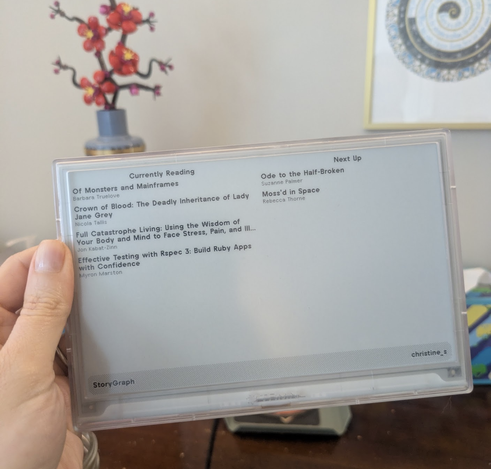



 Hackaday [Unofficial]