 PsychoticSheep
That was definitely one of the coolest experiments I’ve ever done!
Just before Christmas 2024, a VRAM block on my GTX 780 in my old PC (Core i5-650 / 8 GB RAM) gave out. You could see it in the typical screen artifacts, and GPU-Z also showed a broken reading. (Image 2)
I ran MATS on the card and managed to identify the defective memory (unfortunately no photo). During my research, I discovered that Nvidia uses six memory banks of 512 MB each. I also came across the tool Old NVIDIA artifacts, which is designed for Kepler GPUs. With it, I was able to modify the BIOS to disable the defective memory bank.
After flashing with NV-Flash, I ran MATS again, and the test completed successfully (Image 3). On the desktop, no artifacts were visible anymore, and GPU-Z was back to normal, except the card now shows 2.5 GB instead of 3 GB of VRAM (Image 4).
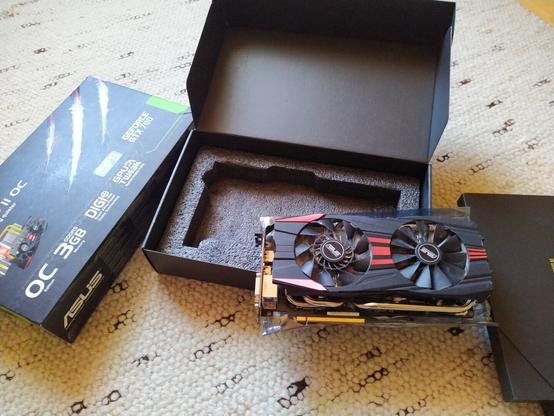
Since support for the 470 driver is ending, the card no longer initializes properly without boot parameters, and it was heavily damaged anyway, I replaced it with a used RX 570 with 4 GB VRAM for 40 €. The GTX 780 is now peacefully sleeping in its box, and maybe one day it will be awakened again (Image 1).
#GPURepair #GTX780 #TechExperiment #HardwareModding #VRAMFix #OldNvidiaArtifacts #KeplerGPU #PCMasterRace #RetroGaming #RX570 #NerdLife #PCEnthusiast
Just before Christmas 2024, a VRAM block on my GTX 780 in my old PC (Core i5-650 / 8 GB RAM) gave out. You could see it in the typical screen artifacts, and GPU-Z also showed a broken reading. (Image 2)
I ran MATS on the card and managed to identify the defective memory (unfortunately no photo). During my research, I discovered that Nvidia uses six memory banks of 512 MB each. I also came across the tool Old NVIDIA artifacts, which is designed for Kepler GPUs. With it, I was able to modify the BIOS to disable the defective memory bank.
After flashing with NV-Flash, I ran MATS again, and the test completed successfully (Image 3). On the desktop, no artifacts were visible anymore, and GPU-Z was back to normal, except the card now shows 2.5 GB instead of 3 GB of VRAM (Image 4).
Since support for the 470 driver is ending, the card no longer initializes properly without boot parameters, and it was heavily damaged anyway, I replaced it with a used RX 570 with 4 GB VRAM for 40 €. The GTX 780 is now peacefully sleeping in its box, and maybe one day it will be awakened again (Image 1).
#GPURepair #GTX780 #TechExperiment #HardwareModding #VRAMFix #OldNvidiaArtifacts #KeplerGPU #PCMasterRace #RetroGaming #RX570 #NerdLife #PCEnthusiast


 Reddit Tech VN Bot