@reticuleena @MrGR
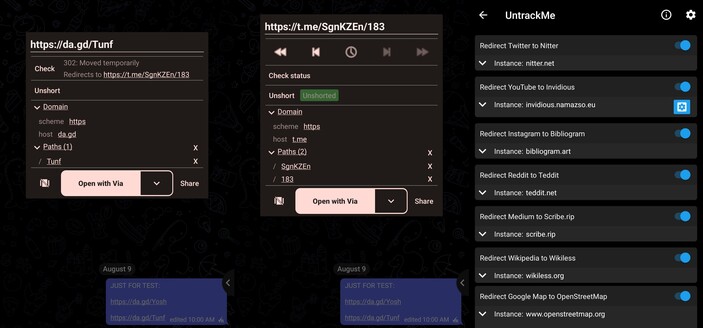
Ich nutzte unter Android die App #URLCheck. Die gibt es sowohl im PlayStore als auch auf #FDroid. Die wird als Standardbrowser gesetzt und öffnet ein Fenster, in dem ich unter anderem auch die Parameter deaktivieren kann. Außerdem kann ich dort auswählen, an welche App der Link übergeben wird. Kann ich nur empfehlen. Hilft auch, wenn man unabsichtlich auf einen Link klickt. 😉
Edit: Hashtags gesetzt
Más del 90% de los ataques cibernéticos comienzan con un simple enlace malicioso.
¿Seguro que deberías abrirlos sin revisar? 🤔
En el video de hoy te enseñaremos como revisar enlaces antes de abrirlos y protegerte de riesgos innecesarios. 😎
#Telefonos #Moviles #Android #Ciberseguridad #Seguridad #Privacidad #OpenSource #NoTeDejesEngañar #AndroidSecurity #PrivacidadEnInternet #Foss #AppGratis #AndroidApps #DigitalSecurity #MobilePrivacy #URLCheck #TechTips #ProtegeTuDatos
After I saw the URLCheck an Android app was mentioned in some toots I downloaded it and started to use it. Not only can it strip tracking from URLs but it gives me the ability to copy links, while before my preferred mastodon client on Android Moshidon only allowed me to open links in the system browser (default browser) or in the in-app browser.
What's your default #browser #app on #Android set to?