Revisiting #typograf for #KateEditor. It’s actually a lot easier than I made it before. So, install typograf-cli
npm install typograf-cli -g
In Kate, add External Tool.
Name: Typograf (or anything)
Executable: typograf (with `-g` installation flag, it should be in your $PATH)
Arguments: --stdin -c /home/andrew/.config/typograf/typograf.json
Input: %{Document:Selection:Text}
Working directory: empty
Mime types: empty
Save: none
Trigger: none
Output: Replace selected text
Editor command: typograf
`-c` is for a settings file if you want to change the default behavior. It really wants a full path for some reason, so no `~/`.
You can customize these to process the entire document, for example. But I just add a keyboard shortcut, and it does the magic on a selected text.
---
Bonus, in #micro you can add
"Alt-y": "command:textfilter typograf --stdin -c /home/andrew/.config/typograf/typograf.json",
to `.config/micro/bindings.json` for the same result.
---
https://github.com/typograf/typograf-cli
 marco_kerler
 BMO
BMO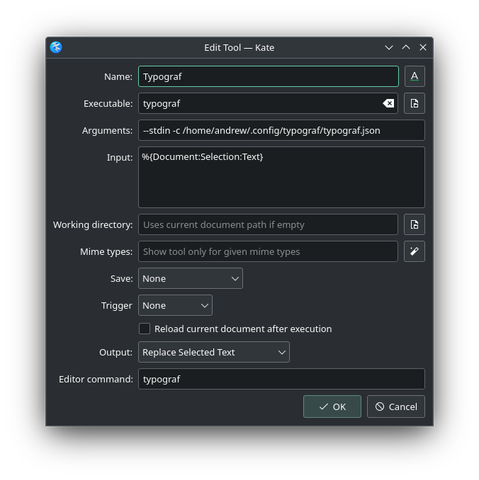

 Andrew