**Integrating Deye hybrid inverter to Home Assistant**
Read it on my blog, it has a nicer image/text layout (than on fedi).
Setup and a bit of history
Some years ago when I asked national grid provider for permission for solar, they said no. My house is connected to an old village transformer and they denied all power exports. They said there are too many solar power plants with net metering in my area. 2 years ago I acquired a small balcony PV and I could export up to 600W (but I consumed 92% of produced power that covered about 10% of my consumption).
This year I got permission for PV (with a battery) and export limit of 1.5kW. The grid hasn’t changed, but a local electro contractor said it’s because of some new houses in the area. More consumption – more production allowed. But that’s just a rumor. Anyways, I’m happy I got permission and a small export allowance.
So I decided to upgrade my balcony solar setup (600W HERF microinverter – see blog post) with 12 kW rooftop panels + Deye 12kW hybrid inverter + Deye batteries (thanks to Velog company who did the consulting and installation).
Deye’s inverter typically works in grid-tied mode, but my setup includes also a main manual switch that can be used to disconnect the grid and connect the whole house to inverter’s UPS port. This means I can be fully off-grid if I want to (or if there is a longer grid failure).
Access to inverter’s data
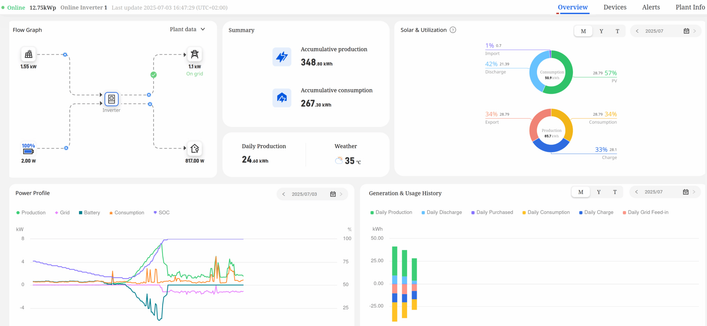
Deye cloud app is nice, but … it’s a cloud app and I’m allergic to cloud apps by the nature. It shows PV status and nice charts, but it updates slowly (every few minutes). I’m also concerned about data privacy and the feeling of being controlled by someone from China (or whatever country). What if they go bankrupt and I lose the access to my inverter? I’m not paranoid, it happened to some other manufacturers of smart devices.
Therefore I was looking for a local access to the inverter and integration to Home Assistant.
There are several ways to access Deye’s inverter data:
- Cloud: via wifi dongle + Deye cloud app:
- Local: via Deye’s wifi dongle + local wifi access via Home Assistant / Solarman integration
- Local: via modbus & RS485 port connected to ESP32.
I’ve set-up the second option for now.
Setup of ha-solarman
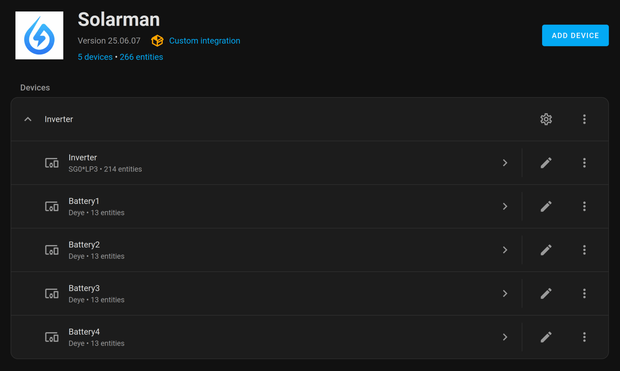
There are at least 2 versions of solarman integration for Home Assistant (by Stephan Joubert and by David Rapan). I’ve chosen the David’s one (ha-solarman). I’ve installed it via HACS.
It offers 266 entities (214 for inverter and 13 per battery).
Polling issues of Deye cloud app
Soon after I enabled ha-solarman, I’ve noticed some of the PV devices (mostly batteries) show as offline in Deye Cloud App. I’m not the only one with this issue:
https://github.com/davidrapan/ha-solarman/discussions/208
It looks like this specific setup (Deye inverter + Deye batteries) cause mentioned issues.
It looks also like Deye’s wifi dongle, or rs485 port, can not serve both (cloud app and solarman) equally / without issues.
It would be great if Deye’s engineers updated the dongle’s firmware in a way to prioritize Deye’s traffic (which is rare anyways, every few minutes). Or, if Solarman changed its request to allow Deye’s traffic in between. I don’t know.
I’ve researched forums and reduced refresh inteval from 5 seconds to 15.
I edited custom_components/solarman/const.py file and changed TIMINGS_INTERVAL_SCALE = 3 (default was 1). This increased refresh interval from 5 to 15 secs.
It looks like this is a compromise and both (Deye and Solarman) are happy. I would like faster refresh interval, but for now it’s good.
Showing Deye’s data in Home Assistant
Then I edited Home Assistant’s Energy dashboard and used some of the 216+ inverter’s entities provided by ha-solarman, namely:
Grid consumption: Inverter Total Energy Import
Return to grid: Inverter Total Energy Import
Solar production: Inverter Total Production
Battery systems: Inverter Total Battery Discharge, Inverter Total Battery Charge
Those 5 entities are enough for HA to show its built-in daily energy consumption cards properly:
and also a Sankey chart:
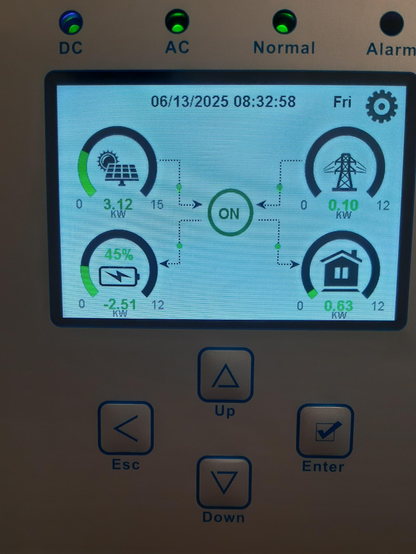
I’ve also added Power Flow Card Plus (via HACS) which shows the current energy power distribution:
For this card, I used the following solarman’s entities:
Grid: Inverter Grid Power
Solar: Inverter PV Power
Battery (combined): Inverter Battery Power
Home: Inverter Load Power .This entity would show the correct house’s power load if I didn’t have another microinverter PV. Therefore I created a new helper entity “Total House Power Load” that summarizes Inverter Load Power + Microinverter Power.
Individual devices: I’ve added some devices with bigger consumption that are connected to the grid by smart plugs.
There is also Sunsynk Power Flow Card available from HACS, but I didn’t manage to configure it fully yet:
For example, I don’t know why it’s showing 20% at the right side of the battery’s SOC (state of charge).
Smart loading of boiler
I’ve added/modified two automations that observes export power. If the export power is below -1000W for more than 30 seconds, it turns on heatpump, increases the temperature from ordinary 50 to 55C and forces heating of the water in the boiler.
The second automation turns on dehumidifier in the basement if there is excess of solar power.
The behaviour of the system
This is a typical PV power profile. Solar panels’ power is increasing until the battery is full, then the inverter starts limiting the production. Instead of a smooth curve, it is something like this (image below) The chart tells that my consumption is too low between 11-19.
Now, in summertime, batteries are full around 10-11AM. During the night the house consumes 30-50% of the battery.
Export to grid kicks in after the battery is full and if there is excess of solar energy. It starts around 10-11AM and gradually stops at around 19:00-19:30. The limit is currently set at 1.2kW, which means 10kWh is exported/sold during the day. The selling price is a half of a buying price. It’s not much, but it’s something.
The swings/spikes in export power are caused by turning on and off the bigger consumers, like ceramic hob. The export goes up to 3kW briefly, then it swings to import 3kW, then inverter catches up/stabilizes and reduces exporting/importing. That happens when the battery is full. I’m thinking about replacing the old ceramic hob that works discretely (on-off for few seconds) with induction hob, which works more continuous. If anyone has hands-on experiences with the effect of induction hob on the inverter’s behaviour, please let me know.
Because of these power swings, a very small grid import was needed (0.1 – 0.3 kWh per day).
Conclusion
After a week of using Deye’s inverter, batteries and Home Assistant, I can say that I’m quite satisfied with it. It is quite configurable and most importantly, all my energy comes from – the sun.
If I needed faster refresh of data, I’ll take a look into direct connection to RS485 port/ESP32.
Related posts
https://blog.rozman.info/integrating-deye-hybrid-inverter-to-home-assistant/
#deye #homeassistant #solar #solarman Tomi
Tomi
 myHome.zone

 Trending Tech Nieuws
 Bastian 🦊

 Plastiker
 krejgo
 balkonsolar