Unlock seamless browsing across Apple devices with iCloud Tabs in Safari. Different from Tab Groups, ensure it's on in iCloud settings. Then, find your synced tabs in Safari's tab view. A bit hidden, but so convenient. #iCloudTabs #SafariTips #AppleEcosystem

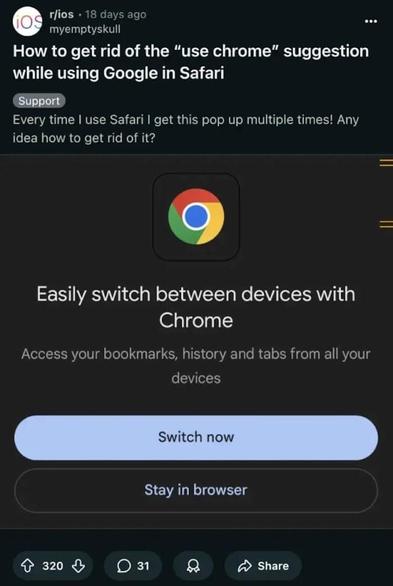
Sick of Google’s relentless “Use Chrome” pop-up hijacking your Safari sessions? 🚫 Learn how to instantly block it with Safari’s “Hide Distracting Items” or top ad blockers. Browse in peace again! Full guide👇 #SafariTips

https://pupuweb.com/how-can-you-instantly-eliminate-the-annoying-use-chrome-prompt-in-safari/

How Can You Instantly Eliminate the Annoying “Use Chrome” Prompt in Safari? - PUPUWEB

What’s the Most Effective Way to Permanently Block Google’s Frustrating Chrome Pop-Up in Safari? If you’re constantly interrupted by Google’s persistent

PUPUWEB
¿Sabías que puedes compartir pestañas de Safari entre tus dispositivos Apple con iCloud Tabs? 🌐✨ Activa la opción en ajustes de iCloud y accede a tus pestañas desde cualquier dispositivo. ¡La comodidad que no sabías que necesitabas! 📱💻 #SafariTips #iCloudTabs
One of the best features of Safari is "Hide Distracting Items." Here's how to use it 👇
Open Safari and go to a webpage.
Tap Safari Address Bar icon.
Choose "Hide Distracting Items."
Select elements you don’t want, and they’ll disappear just like in Avengers: Infinity War.
For more useful tips and tricks, follow @igeeksblog!
.
.
#SafariTips #TechHacks #igeeksBlog #Safari #distracting #mode #tips #tricks