 Ambraven
Why the fuck is darkgray lighter than gray in qml ? Is it a JS thing ??
 KDAB
KDABEvery team learns differently — that’s why KDAB’s in-company #training programs are built around your goals. Customize the curriculum, schedule, and location to fit your needs. Explore topics like #QtDev, #Cpp, #QML, #3D, #Debugging, and more.
Learn more: https://training.kdab.com/in-company-training/
https://training.kdab.com/in-company-training/
 Habr
HabrКак правильно управлять диалогами в QML: Singleton + JavaScript Promise
Уже не первый раз сталкиваюсь в проектах на Qt QML с проблемой управления диалогами и всплывающими окнами. QML — декларативный язык и это здорово! Мы описываем, что хотим видеть на экране, и, если всё сделали правильно, при запуске программы получаем желаемый результат. Но иногда хочется динамики — и именно с диалогами начинаются проблемы, которые все решают по-разному. Кто-то продолжает так же декларативно описывать диалог для очередного экрана приложения. Да, так можно поступить, но у этого подхода есть несколько проблем. Первая — код начинает разрастаться. Даже если вынести диалог в отдельный компонент, его всё равно придётся «тюнить» каждый раз перед отображением, что не очень удобно. Вторая проблема, как по мне, куда хуже — при создании экрана в приложении будут созданы и все дочерние элементы. То есть диалог может потреблять память, хотя по факту пользователь может так им и не воспользоваться. Другой вариант, который тоже часто встречается — это обёртка диалога в Component и его непосредственное создание в нужный момент. С точки зрения потребления памяти это уже лучше, но проблему лишнего кода это не решает. Зачастую из-за подготовки такого диалога кода может оказаться даже больше. К тому же нужно не забывать вызывать destroy() для всех динамически созданных объектов, когда они больше не нужны. Всё становится ещё хуже, если один и тот же диалог нужен в нескольких местах. В большинстве случаев люди либо не парятся, либо им просто некогда — и в итоге мы видим обычную копипасту тут и там.
https://habr.com/ru/articles/1032896/
#Qt #QML #диалоги #Singleton #JavaScript_Promise #QtQuickControls #Dialog #динамические_компоненты #createObject #управление_памятью
Qt 6.12 introduces a new way to provide QML controller objects using externally supplied singleton instances.
With QQmlEngine::setExternalSingletonInstance, declarative QML registration can now use application-provided singleton instances while preserving tooling and optimization benefits.
Read more: https://www.kdab.com/singleton-controllers-in-times-of-declarative-qml/

If your work touches Qt, C++, Rust, or embedded Linux, our monthly newsletter might be worth following - technical publications, events, and what's moving across the ecosystem, once a month: https://www.kdab.com/newsletter/

 Wulfy—Speaker to the machines
That's what autonomous AI #agents are...
...discorporated drones
Nice find with #QML
Big pants corporate are already setting dates for #QuantumAoocalypse ~2030
KDAB offers technical training for software developers working with Qt/QML, Modern C++, 3D/OpenGL, Rust and more. With more than 20 years of experience in the field, training courses can be adapted to different team requirements and experience levels.
#QtDev #QML #Cpp #OpenGL #RustLang #3D #Debugging #Profiling
Full Portfolio:
https://training.kdab.com/portfolio/
 Fretchen
What's the foundation of quantum computing? Understanding Atomic, Molecular & Optical (AMO) physics is key. For instance, spectroscopy helps us analyze quantum states. Dive into our 20 AMO lecture notes: https://www.fretchen.eu/quantum/amo/?utm_source=mastodon&utm_campaign=growth-agent #QuantumComputing #QML #Physics
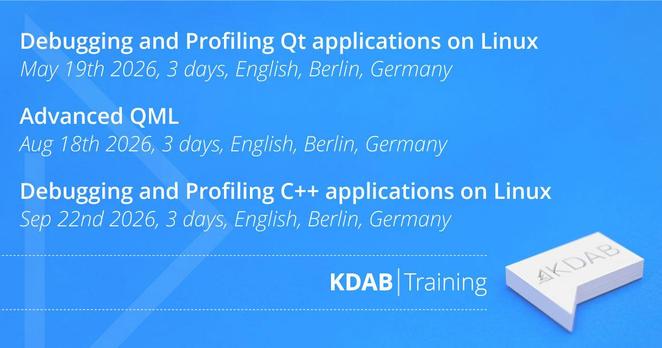
This is an overview of upcoming KDAB training courses on debugging and profiling for Qt and C++ applications on Linux, as well as advanced QML covering topics such as QML/C++ integration and application architecture.
Training schedule: https://training.kdab.com/scheduled-training/
#QtDev #QML #CPlusPlus #Linux #SoftwareDevelopment #Performance #Debugging #Profiling
 ciopor
I'm looking for someone familiar with QML/Qt Quick/Kirigami who could help.
I've always had an issue with Qt Quick apps being **painfully slow**, especially when resizing, and I still don't understand why.
However, I found two workarounds.
A comparison: the same sample - different settings:
1. Default
2. QSG_RENDER_LOOP=basic
3. QT_QUICK_BACKEND=software
Why do these make apps so much faster? Shouldn't GPU acceleration be better? I'm using an RX 6600 with Mesa.