Working on a 2-page spread #MonthlyCalendar #Stencil for 3.5x5.5" #PocketJournals
6 rows of 7 because a few months spill across 6 week-blocks, a little note space at the bottom of the second page, a space for the month, and spaces to write in day names...

Modular Stencil System For 3.5"x5.5" Pocket Notebooks (Field Notes, Moleskine, & Others) by howtophil
Expanding on the full-page stencils I've made for 3.5x5.5 pocket notebooks, this is a modular set of stencils that allow you to easily have regular or wide ruled lines, dots, grids, tables, and blank spaces on each page in various configurations to suit your needs. Small, Tall, and Stout are the three sizes I've gone with for a set of simple module sizes. I hope they work well for you. They seem to be working well for me. I use them in some "cost-effective" 3.5x5.5-inch blank journals but, as that is the same size as some Field Notes and Moleskine pocket notebooks, they should work in those just as well.The "dot" templates will require a micron-style pen, a mechanical pencil, or (I found out) a "Tombow Fudenosuke WS-BH Calligraphy Brush Pen Hard" also works. If you choose to use a pencil, you have the option to erase the dots after you've gridded or drawn out whatever you like.You can use the layout stencils to mark out the basic design, then use the modules to put lines, grids, and dots into those boxes. Of course, you can skip the layout stencils and simply use the module stencils, placing them freeform as you wish. My full-page 3.5x5.5-inch stencils here: https://www.thingiverse.com/thing:7058617My full-page 3.5x5.5-inch dot-stencil here: https://www.thingiverse.com/thing:7059128Models for these and the other stencils are one TinkerCAD for you to tinker to your personal tastes: https://www.tinkercad.com/users/gEfJm2CRHZS
#Modular #Stencil System For 3.5"x5.5" #PocketNotebooks (#FieldNotes, #Moleskine, & Others)
This is an extension to my full-sized stencils for 3.5x5.5-inch #pocketJournals. This lets you add regular/wide #ruledLines, #dots, #grids, #tables, etc as you like in blank notebooks.
#Thingiverse #3Dprinter Downloads: https://www.thingiverse.com/thing:7060429
Also on #TinkerCAD: https://www.tinkercad.com/users/gEfJm2CRHZS
Modular Stencil System For 3.5"x5.5" Pocket Notebooks (Field Notes, Moleskine, & Others) by howtophil
Expanding on the full-page stencils I've made for 3.5x5.5 pocket notebooks, this is a modular set of stencils that allow you to easily have regular or wide ruled lines, dots, grids, tables, and blank spaces on each page in various configurations to suit your needs. Small, Tall, and Stout are the three sizes I've gone with for a set of simple module sizes. I hope they work well for you. They seem to be working well for me. I use them in some "cost-effective" 3.5x5.5-inch blank journals but, as that is the same size as some Field Notes and Moleskine pocket notebooks, they should work in those just as well.The "dot" templates will require a micron-style pen, a mechanical pencil, or (I found out) a "Tombow Fudenosuke WS-BH Calligraphy Brush Pen Hard" also works. If you choose to use a pencil, you have the option to erase the dots after you've gridded or drawn out whatever you like.You can use the layout stencils to mark out the basic design, then use the modules to put lines, grids, and dots into those boxes. Of course, you can skip the layout stencils and simply use the module stencils, placing them freeform as you wish. My full-page 3.5x5.5-inch stencils here: https://www.thingiverse.com/thing:7058617My full-page 3.5x5.5-inch dot-stencil here: https://www.thingiverse.com/thing:7059128Models for these and the other stencils are one TinkerCAD for you to tinker to your personal tastes: https://www.tinkercad.com/users/gEfJm2CRHZS
 HowToPhil (Phillip R)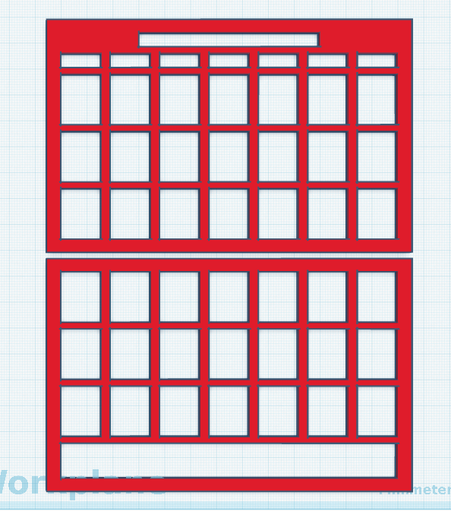
 HowToPhil