 thiccpaws
I’ve got two #Aperture libraries that I’d like to convert to #CaptureOne, but it seems Capture One just references them?
Is there any way to actually import the photos to Capture One and also the edits made on Aperture?
I’ve got two #Aperture libraries that I’d like to convert to #CaptureOne, but it seems Capture One just references them?
Is there any way to actually import the photos to Capture One and also the edits made on Aperture?
abeMeda 7.8.7 now also supports imorting WinCatalog XML exports - analog to the already supported catalog formats. You can create reports of your WinCatalog data, and export them to xml - and then import those XML into new catalog files in abeMeda.
And if you still have the original discs and media, you can then connect those imported catalogs to their actual volumes, and update them using their original files - in order to add thumbnails and a lot more data to them that the import can not supply.
Check out this and many other improvements in our new abeMeda 7.8.7: https://abemeda.com/en/news_files/abeMeda787.html
#abeMeda7 #Windows #RAW #Olympus #Canon #Nikon #Fuji #DigitalAssetManager #Photography #MusicLibrary #VideoTools #PhotoLibrary
#AudioProducer #MusicStudio
#BookLibrary #PhotographySoftware #PhotographyWorkflow #Photosoftware #DAM #MediaPro #iView #Software #PostProduction #Archives

with abeMeda 7.8.7 we have now established much better access to the stored data in our catalogs, mainly the stored previews. With the hugely enhanced Photo Export you can now make use of the generated previews, even if the original files may not (or no longer) be available.
And you can of course not only export and convert photos, but many more media files (like videos, audio files' cover art, PDFs, books [ePub] or comics [CBR|CBZ], ...) - any files' previews can also be exported now.
This can be useful if an external storage is temporarily out of reach, or even extremely helpful to salvage files after a data loss, when you have only your catalogs left.
Check it out in our new abeMeda 7.8.7: https://abemeda.com/en/news_files/abeMeda787.html
#abeMeda7 #Windows #RAW #Olympus #Canon #Nikon #Fuji #DigitalAssetManager #Photography #MusicLibrary #VideoTools #PhotoLibrary
#AudioProducer #MusicStudio
#BookLibrary #PhotographySoftware #PhotographyWorkflow #Photosoftware #DAM #MediaPro #iView #Software #PostProduction #Archives


Today, we are very happy to finally release abeMeda 7.8.7 !
abeMeda 7.8.7 is a comprehensive new release with a number of improvements and important fixes overall. It brings new formats like OGG, WMA, JXL or FCPX support, and now offers a new WinCatalog import and many new options in the Find Editor (like relative dates, seasons or GPS altitude). Additional scheduling options for AutoUpdate, support for new metadata like Exposure Bias, an expanded Photo Export and a number of other additions and improvements complete this package.
Find out more: https://abemeda.com/en/news_files/abeMeda787.html
#abeMeda7 #Windows #RAW #Olympus #Canon #Nikon #Fuji #DigitalAssetManager #Photography #MusicLibrary #VideoTools #PhotoLibrary
#AudioProducer #MusicStudio
#BookLibrary #PhotographySoftware #PhotographyWorkflow #Photosoftware #DAM #MediaPro #iView #Software #PostProduction #Archives

Happy Thanksgiving to all our users who celebrate! We hope you have a wonderful holiday with your loved ones.
Tomorrow, for Black Friday, you (and everyone else around the world) can enjoy our special offer for this holiday season: starting tomorrow Nov 29th through next Tuesday, Dec 3rd, we offer a 20% discount for all abeMeda licenses purchased through our BMT Micro Store.
Apply the discount code ABEMEDABF24 during checkout to participate!
Find out more here: http://www.abemeda.de/en/news_files/BlkFriday24.html
#abeMeda7 #Windows #RAW #Olympus #Canon #Nikon #Fuji #DigitalAssetManager #Photography #MusicLibrary #VideoTools #PhotoLibrary
#AudioProducer #MusicStudio
#BookLibrary #PhotographySoftware #PhotographyWorkflow #Photosoftware #DAM #MediaPro #iView #Software #PostProduction #Archives
Who is using the #Hasselblad "Phocus" photo editing software on #macOS?
We are currently working on improving the integration of our #NeoFinder photo library with the FFF and 3RF RAW files from Hasselblad cameras, and we are interested in more testers, and also feedback.
Please contact us.
#Catalog #Olympus #Canon #Nikon #Fuji #PhotoManager #Photography #Photographer #Lightroom #PhotographySoftware #PhotographyWorkflow #PhotoLibrary #IndieDev #Aperture #Apple #iMatch
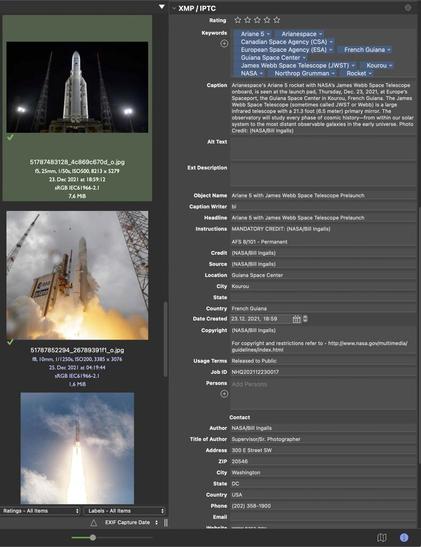
We have updated the Photo Library section of the #NeoFinder website, so you can see what NeoFinder offers to a #photographer, both amateur and pro level.
https://www.cdfinder.de/photo-organizer.html
Check it out, and learn about thumbnails, EXIF, XMP, metadata, renaming, find, geotags, and so much more!
#macOS #iOS #Catalog #Olympus #Canon #Nikon #Fuji #PhotoManager #Photography #Lightroom #PhotographySoftware #PhotographyWorkflow #PhotoLibrary #IndieDev #MediaPro #iView #Software #Aperture #Apple #iMatch
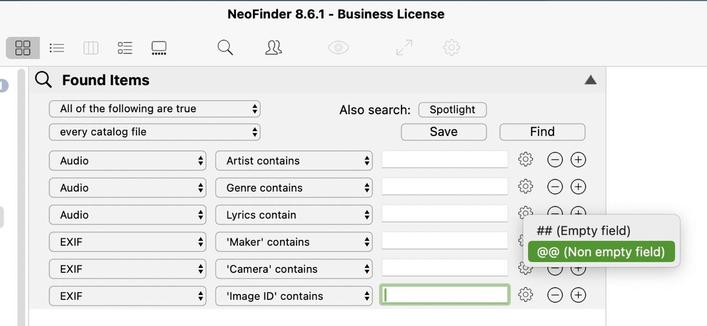
The NeoFinder Find Editor has new search options for empty and not empty field for all textual ID3 and EXIF fields:
https://www.neofinder.de/forum/phpBB3/viewtopic.php?p=495#p495
#NeoFinder8 #macOS #Catalog #Olympus #Canon #Nikon #Fuji #MediaAssetManager #Photography #MusicProduction #VideoTools #PhotoLibrary #AudioProducer #MusicStudio #Apple #BookLibrary #PhotographySoftware #PhotographyWorkflow #PhotoSoftware #IndieDev #MAM #DiskLibrary #DiskTracker #MediaPro #iView #Software #PostProduction #Archives
"Thank you again for your awesome product! Super appreciate the KYNO migration support and all the active updates you do."
#NeoFinder for #macOS is also used by a Pacific Wild, a wonderful wildlife protection organisation in Canada
#Catalog #Olympus #Canon #Nikon #Fuji #Photography #MusicProduction #VideoTools #PhotoLibrary #AudioProducer #MusicStudio #Apple #PhotographySoftware #PhotographyWorkflow #PhotoSoftware #IndieDev #Software #PostProduction #Archives
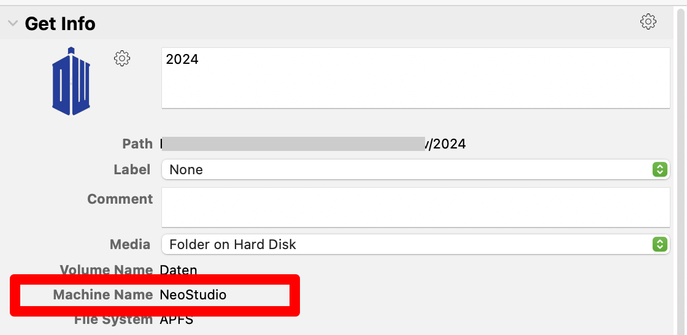
Cataloging or Updating a Catalog now adds the name of the computer that was doing the Update to the #NeoFinder Catalog.
This helps when you catalog volumes with generic names like "Macintosh HD" on multiple Macs in your network.
https://www.neofinder.de/forum/phpBB3/viewtopic.php?p=493#p493
#macOS #Olympus #Canon #Nikon #Fuji #Photography #MusicProduction #VideoTools #PhotoLibrary #AudioProducer #MusicStudio #Apple #BookLibrary #PhotographySoftware #PhotographyWorkflow #PhotoSoftware #IndieDev #Software #PostProduction #Archives
 abeMeda
 NeoFinder for macOS and iOS