One UI 8.5 Beta 2 released, One UI 8.5 Beta goes Phase 2!

One UI 8.5 Beta 2 has been released for the following countries:

In addition to that, the beta program is finally open to those who are living in the following countries:

This means that everyone living in the above countries can now try out One UI 8.5 in its beta form! If you still don’t have the banner in your Samsung Members app, wait for a few minutes up to a few hours, and you should start seeing the banner.

To join the Beta program, open Samsung Members, go to Beta Program section, and find “One UI 8.5 S25 Beta.”

Afterwards, follow the instructions on the screen. If everything is OK, go to Settings > Software update > Download and install. You’ll get the screen that looks similar to this:

Let it download, but it’s going to take a bit of time depending on your Internet connection. Afterwards, click on the Install button.

Remember: never interrupt the update process during the installation phase, and make sure that your phone is fully charged before proceeding. This is a precaution intended to avoid interruptions. For some markets, it’s advisable to put your device in a well-ventilated room to avoid green lines caused by heat in some AMOLED panels.

Are you excited?

#Android #Android15 #AndroidV #GalaxyS24 #GalaxyS24Ultra #news #oneUi #OneUI7 #OneUI70 #OneUI71 #S24 #S24Ultra #Samsung #SamsungGalaxyS24 #SamsungGalaxyS24Ultra #smartphone #Tech #Technology #update
One UI 7 Beta 3 is out for Galaxy A55 5G!

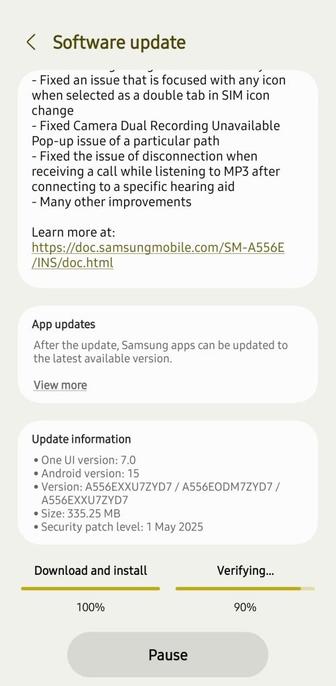
One UI 7 Beta 3 (with build ZYD7) has been released today for South Korea and for India that were eligible for this beta test. This means that everyone living in these countries can now try out the newer version of One UI 7 in its beta form!

Here are the official changelogs for this beta version of One UI 7 for the Galaxy A55:

  • Bugs that have been fixed
    • Fixed the ‘Lightning’ icon in the battery icon
    • Fixed an issue that is focused with any icon when selected as a double tab in SIM icon change
    • Fixed Camera Dual Recording Unavailable Pop-up issue of a particular path
    • Fixed the issue of disconnection when receiving a call while listening to MP3 after connecting to a specific hearing aid
  • Many other improvements

#Android #Android15 #AndroidV #GalaxyS24 #GalaxyS24Ultra #news #oneUi #OneUI7 #OneUI70 #OneUI71 #S24 #S24Ultra #Samsung #SamsungGalaxyS24 #SamsungGalaxyS24Ultra #smartphone #Tech #Technology #update

Tarun Vats (@tarunvats33) on X

Galaxy A55 One UI 7 beta 3 update is live in India. Build Version: A556EXXU7ZYD7/ A556EODM7ZYD7/A556EXXU7ZYD7

X (formerly Twitter)

One UI 7 Beta 2 is out for Galaxy A55 5G!

After much anticipation, One UI 7 Beta 2 (with build ZYD3) has been released today for South Korea and for India that were eligible for this beta test. This means that everyone living in these countries can now try out the newer version of One UI 7 in its beta form!

Here are the official changelogs for this beta version of One UI 7 for the Galaxy A55:

  • Bugs that have been fixed
    • Fix poor visibility issue when checking Now bar Google sports
    • Fix an issue that cannot be attached to MMS emoticon on a particular route
    • Fix top notification icon to SIM shape when eSIM Push notification is received
  • Many other improvements

#Android #Android15 #AndroidV #GalaxyS24 #GalaxyS24Ultra #news #oneUi #OneUI7 #OneUI70 #OneUI71 #S24 #S24Ultra #Samsung #SamsungGalaxyS24 #SamsungGalaxyS24Ultra #smartphone #Tech #Technology #update

One UI 7 Beta now released for Galaxy A55 series

Did you remember when an official Samsung Newsroom article had confirmed the Beta deployment month for the One UI 7 software based on the all-new Android 15 for the A55 series? Well, the time has finally come! Although the A55 beta program was overdue, One UI 7 Beta has been released for the following countries:

This means that everyone living in the above countries with their phones can now try out One UI 7 in its beta form! This is considered to be the last Beta program for the whole One UI 7 update.

To join the Beta program, open Samsung Members, find the One UI 7 banner similar to the one below, and click on the registration button.

Afterwards, follow the instructions on the screen. If everything is OK, go to Settings > Software update > Download and install. You’ll get the screen that looks similar to this:

Let it download, but it’s going to take a bit of time depending on your Internet connection. Afterwards, click on the Install button.

Remember: never interrupt the update process during the installation phase, and make sure that your phone is fully charged before proceeding. This is a precaution intended to avoid interruptions. For some markets, it’s advisable to put your device in a well-ventilated room to avoid green lines caused by heat up in some AMOLED panels.

Are you excited?

#Android #Android15 #AndroidV #GalaxyS24 #GalaxyS24Ultra #news #oneUi #OneUI7 #OneUI70 #OneUI71 #S24 #S24Ultra #Samsung #SamsungGalaxyS24 #SamsungGalaxyS24Ultra #smartphone #Tech #Technology #update

Keys Cafe and Pentastic from Good Lock series now support One UI 7

Fantastic! Samsung has now released a new version of Keys Cafe and Pentastic that are compatible with the seventh version of One UI. Keys Cafe allows you to customize your Samsung Keyboard’s key appearance, while Pentastic makes your S Pen more powerful. The version of Pentastic that is compatible with One UI 7 is 2.3.08, while Keys Cafe holds version 1.7.0.11.

Keys Cafe (left) and Pentastic (right)

This means that users who are already in the One UI 7 software are now able to try out the updated version of Keys Cafe and Pentastic!

After both modules get updated, you can check for updates using the Galaxy Store app, which should show the updated version of your modules. It may take some time to be rolled out to all users, though.

#Android #Android15 #AndroidV #GoodLock #news #oneUi #OneUI7 #OneUI70 #OneUI71 #Samsung #smartphone #Tech #Technology #update

One UI 7 Beta 2 (Galaxy Tab S10) Changelogs!

Here are the official changes of One UI 7 Beta 2 that is released right now.

If you can’t see the picture, or if you don’t have Smart Select, here’s the textual version:

  • New features
    • Screen ratio adjustment is officially applied through the Display > Screen ratio function.
  • Bug fixes
    • Home related error improvements
    • Improved Bluetooth related errors
  • Many other improvements

Surprisingly, the known issues list is empty. The version is ZYC5.

This means that everyone living in South Korea can now try out the newer version of One UI 7 in its beta form! This could possibly be the last beta version of One UI 7 for the Galaxy Tab S10 devices as we approach the end of March.

Are you excited?

#Android #Android15 #AndroidV #GalaxyS24 #GalaxyS24Ultra #news #oneUi #OneUI7 #OneUI70 #OneUI71 #S24 #S24Ultra #Samsung #SamsungGalaxyS24 #SamsungGalaxyS24Ultra #smartphone #Tech #Technology #update

탭S10시리즈(5G모델) OneUI7 베타 2차 나왔습니다.

>>업데이트 내용<< • 홈 관련 오류 개선 • Bluetooth 관련 오류 개선 • 그 외 개선사항 다수 * 기타사항 : 화면 비율 조정은 디스플레이 > 화면 비율 기능으로 정식 적용 • One UI 버전 : 7.0 • Android 버전 : 15 • 버전 : X926NKOU2ZYC5/X926NKOO2ZYC5/X926NKOU2BYC5 • 크기 : 1066.74MB • 보안 패치 레벨 : 2025년 3월 1일 어제 S23시리즈 2차 베타가 나왔었는데 오늘 탭S10 시리즈(5G모델)도 2차베타가 나왔네요

One UI 7 Beta 2 is out for Galaxy Tab S10!

After much anticipation, One UI 7 Beta 2 has been released today for South Korea that was eligible for this beta test. This could possibly be the last beta version of One UI 7 for the Galaxy Tab S10 devices as we approach the end of March.

This means that everyone living in South Korea can now try out the newer version of One UI 7 in its beta form!

Are you excited?

#Android #Android15 #AndroidV #GalaxyS24 #GalaxyS24Ultra #news #oneUi #OneUI7 #OneUI70 #OneUI71 #S24 #S24Ultra #Samsung #SamsungGalaxyS24 #SamsungGalaxyS24Ultra #smartphone #Tech #Technology #update

One UI 7 Beta 6 (Galaxy S24) Changelogs!

Here are the official changes of One UI 7 Beta 6 that is released right now.

If you can’t see the picture, or if you don’t have Smart Select, here’s the textual version:

  • New features
    • Press and hold the side button to launch the digital assistant
    • Call recording summary converted to text
    • Create your own stickers and images
    • Summarize the web page
    • Edit video sounds as you like
    • Natural language-based search within settings
  • Bug fixes
    • Improved battery animation at the top
    • Fix Ul errors in media controller real-time playback notification
    • Fix some widget overlap
    • Fix error that appear to be still running after the routine ends
  • Many other improvements

Surprisingly, the known issues list is empty. The version is ZYCE.

This means that everyone living in the above countries and have already registered in the Beta program can now try out the newer version of One UI 7 in its beta form! This could possibly be the last beta version of One UI 7 for the Galaxy S24 devices as we approach the end of March.

The beta program recruitment has ended according to Samsung, which means that newer users won’t be able to register for the beta program. Those who can’t enter the program must wait for the stable release of One UI 7.

Are you excited?

#Android #Android15 #AndroidV #GalaxyS24 #GalaxyS24Ultra #news #oneUi #OneUI7 #OneUI70 #OneUI71 #S24 #S24Ultra #Samsung #SamsungGalaxyS24 #SamsungGalaxyS24Ultra #smartphone #Tech #Technology #update

Samsung releases One UI 7 Beta 6 to Galaxy S24

Samsung has released the sixth beta version of Android 15-based One UI 7.0 to the Galaxy S24 series. It brings new features and bug fixes.

SamMobile

One UI 7 Beta 2 (Galaxy S23) Changelogs!

Here are the official changes of One UI 7 Beta 2 that is released right now.

If you can’t see the picture, or if you don’t have Smart Select, here’s the textual version:

  • New features
    • Press and hold the side button to launch the digital assistant
    • Call recording summary converted to text
    • Create your own stickers and images
    • Summarize the web page
  • Bug fixes
    • Fix widget letters and overlaps
    • Improve display during routine execution
    • Improve Music Control UI
    • Fix NFC tag not recognized with cover closed
  • Many other improvements

Surprisingly, the known issues list is empty. The version is ZYCE.

This means that everyone living in the above countries and have already registered in the Beta program can now try out the newer version of One UI 7 in its beta form! This could possibly be the last beta version of One UI 7 for the Galaxy S23 devices as we approach the end of March.

Are you excited?

#Android #Android15 #AndroidV #GalaxyS24 #GalaxyS24Ultra #news #oneUi #OneUI7 #OneUI70 #OneUI71 #S24 #S24Ultra #Samsung #SamsungGalaxyS24 #SamsungGalaxyS24Ultra #smartphone #Tech #Technology #update

Galaxy S23 series picks up second One UI 7 beta update

The Galaxy S23 series has taken a step closer to the official One UI 7 update with the release of a new One UI 7 beta update.

SamMobile

One UI 7 Beta 2 is out for Galaxy S23!

After much anticipation and a long wait, One UI 7 Beta 2 has been released today for all the countries that were eligible for this beta test. This could possibly be the last beta version of One UI 7 for the Galaxy S23 devices as we approach the end of March.

This means that everyone living in one of the eligible countries can now try out the newer version of One UI 7 in its beta form!

Are you excited?

#Android #Android15 #AndroidV #GalaxyS24 #GalaxyS24Ultra #news #oneUi #OneUI7 #OneUI70 #OneUI71 #S24 #S24Ultra #Samsung #SamsungGalaxyS24 #SamsungGalaxyS24Ultra #smartphone #Tech #Technology #update