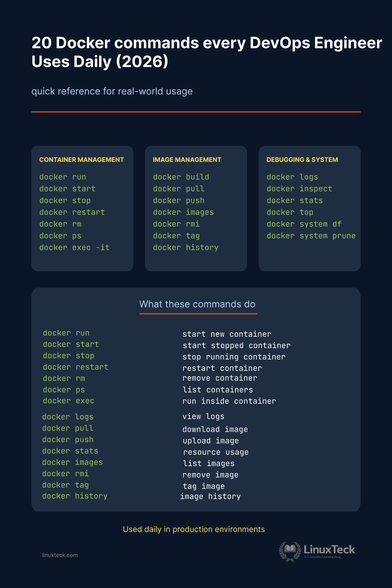
Most Docker users don’t need 100 commands

You use the same 15–20 daily:
run, logs, exec, prune

Made a cheat sheet with short explanations

What’s the one command you use the most?

https://www.linuxteck.com/docker-management-command-cheat-sheet/

#docker #devops #linux #sysadmin #cheatsheet #containers #kubernetes #linuxcommands #LinuxTeck
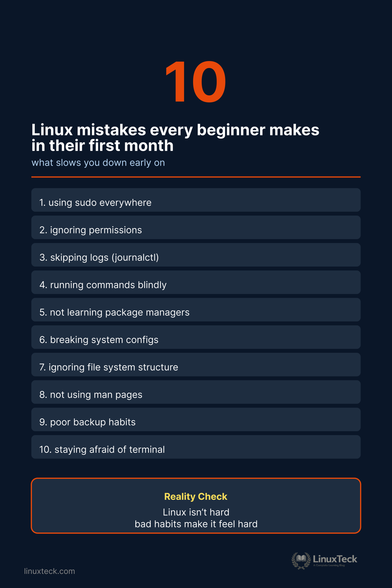
Most Linux beginners don’t fail because it’s hard

They fail because of habits:

sudo everywhere
no logs
copy-paste commands

Made a quick list of the most common ones I’ve seen

Which one did you run into first?

#linux #sysadmin #devops #linuxcommands #linuxbasics #cheatsheet #2026 #LinuxTeck

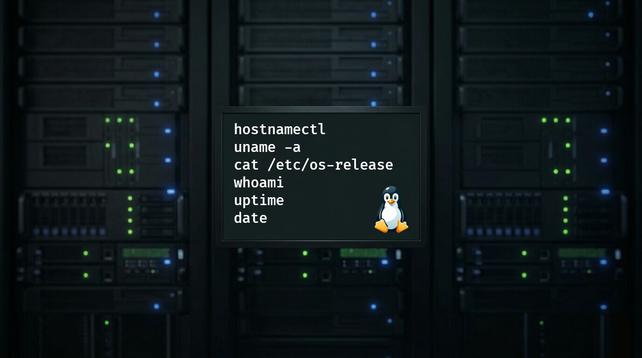
Before troubleshooting any Linux system, I run these commands. An 8-step Linux triage checklist with exact flags and what to do when you find a problem.

Read full guide here: https://ostechnix.com/linux-troubleshooting-commands-checklist/

#Linuxtroubleshooting #Linuxadmin #Linuxhowto #Linuxcommands

The Commands I Run Before Troubleshooting Any Linux System - OSTechNix

Most Linux problems aren't complex. They're poorly observed. These are the exact commands that I run before troubleshooting any Linux system.

OSTechNix

Want to improve your Linux skills?

Here are 50 top Linux commands every user should know.

From basic to advanced, all in one place.

Full guide: https://www.linuxteck.com/50-powerful-linux-commands/

#Linux #CLI #LinuxCommands #LinuxTips #LearnLinux #LinuxTeck

A quick-start guide to Unix commands - Negative PID

Unix is a powerful, multiuser operating system that serves as the foundation for Linux and MacOS. The Unix command-line interface (CLI) allows you to control

Negative PID

7 Linux Commands Every DevOps Engineer Must Master for Production Disasters

Learn how to debug servers, analyze logs, and recover outages using real-world Linux troubleshooting techniques. Essential for cloud DevOps, SRE, CI/CD pipelines, and automation workflows.

🔗 https://shorturl.at/2s2Oe

#DevOps #LinuxCommands #CloudDevOps #SRE #Infrastructure #Automation #Kubernetes

7 Linux Commands to Master for DevOps Disasters: Real-World Fixes

Struggling with Linux commands during DevOps disasters? Master 7 essential ones like ps aux for rogue processes and journalctl for crash…

Medium
A quick-start guide to Unix commands - Negative PID

Unix is a powerful, multiuser operating system that serves as the foundation for Linux and MacOS. The Unix command-line interface (CLI) allows you to control

Negative PID
A quick-start guide to Unix commands - Negative PID

Unix is a powerful, multiuser operating system that serves as the foundation for Linux and MacOS. The Unix command-line interface (CLI) allows you to control

Negative PID
A quick-start guide to Unix commands - Negative PID

Unix is a powerful, multiuser operating system that serves as the foundation for Linux and MacOS. The Unix command-line interface (CLI) allows you to control

Negative PID

Update: Die Lösung ist:
nano -- "-rw-r--r--"

Liebe mit-Linux-arbeitende. Ich habe auf meinem headless Raspberry Pi ausversehen eine Datei mit dem Namen "-rw-r--r--" (ohne Anführungszeichen) angelegt.
Ich würde gerne mal reinschauen, was drin ist. Jedoch gibt mir
nano -rw-r--r--
folgende Antwort aus:
Angeforderte Füllgröße „w-r--r--“ ist ungültig
Auch auf
nano "-rw-r--r--"
erhalte ich die gleiche Antwort.

Irgendeine Idee? Bitte teilen

#linux #linuxcommands #fedihelp